
AI Agent Tools: The Difference Between Knowing and Doing
A language model can describe how to send the email. It cannot send it. This is the layer that turns a good answer into a real action, and where most teams get it wrong.

Ask a language model to email Dana the Q3 numbers and you get a very well written set of instructions for doing it yourself. Ask an agent with a send tool and you get back a message ID. That gap is the entire subject of this post. AI agent tools are the mechanism that converts a sentence the model produced into a change in the world, and everything interesting about production agents lives in that conversion.
Day 13 of the 30 Days of AI Agents series is the pivot point. The first twelve days were about what happens inside the agent: planning, memory, reasoning, reflection, evaluation. All of it happens in a sealed room. Text goes in, text comes out. There is no inbox in there, no calendar, no database connection, no filesystem.
Why prompting harder does not help
The first instinct when an agent fails to do something is to fix the prompt. Add a system message. Add examples. Tell it to be more decisive.
None of that helps, because the model is not refusing. It is producing the only artifact it can produce. A model that writes I have sent the email has not sent an email. It has generated a plausible sentence, which is exactly its job.
This is worth internalising because it predicts a specific failure. If you attach no tools and prompt an agent into acting confident, it will hallucinate completed actions. The words look identical to real success. The only structural fix is to give the model a way to actually cause the effect, and then to feed the real outcome back to it.
What AI agent tools actually are
A tool is four things bundled together, and only one of them is code the model ever sees.
- A name. Stable, specific, verb shaped.
send_email, notmail_helper. - A description. Written for the model, not for your teammates. This is the single biggest lever on selection accuracy.
- An input schema. JSON Schema describing the arguments, with required fields, types and enums.
- An executor. The function on your side that actually runs, and the result shape it returns.
The model only ever sees the first three. It never runs anything. It emits a structured request that says "call send_email with these arguments" and then stops. Your runtime decides whether to honour that request.
import json
from dataclasses import dataclass, replace
from typing import Any, Callable

@dataclass
class Tool:
    name: str
    description: str
    input_schema: dict
    run: Callable[[dict], Any]
    writes: bool = False          # does this change state outside the agent?
    irreversible: bool = False    # can it be undone?

send_email = Tool(
    name="send_email",
    description=(
        "Send an email from the signed-in user's account. "
        "Use only when the user has clearly asked for a message to be sent. "
        "Does not support attachments. Returns the provider message id."
    ),
    input_schema={
        "type": "object",
        "properties": {
            "to": {"type": "string", "description": "Single recipient address"},
            "subject": {"type": "string"},
            "body": {"type": "string"},
            "idempotency_key": {
                "type": "string",
                "description": "Stable key for this send. Reuse on retry.",
            },
        },
        "required": ["to", "subject", "body", "idempotency_key"],
    },
    run=lambda args: mail_client.send(**args),
    writes=True,
    irreversible=True,
)
Notice how much work the description does. It states when to use the tool, one hard limitation, and what comes back. Vague descriptions are the root cause of most bad tool selection, and no amount of system prompt tuning compensates for a tool that describes itself badly.
The four beats of a tool call
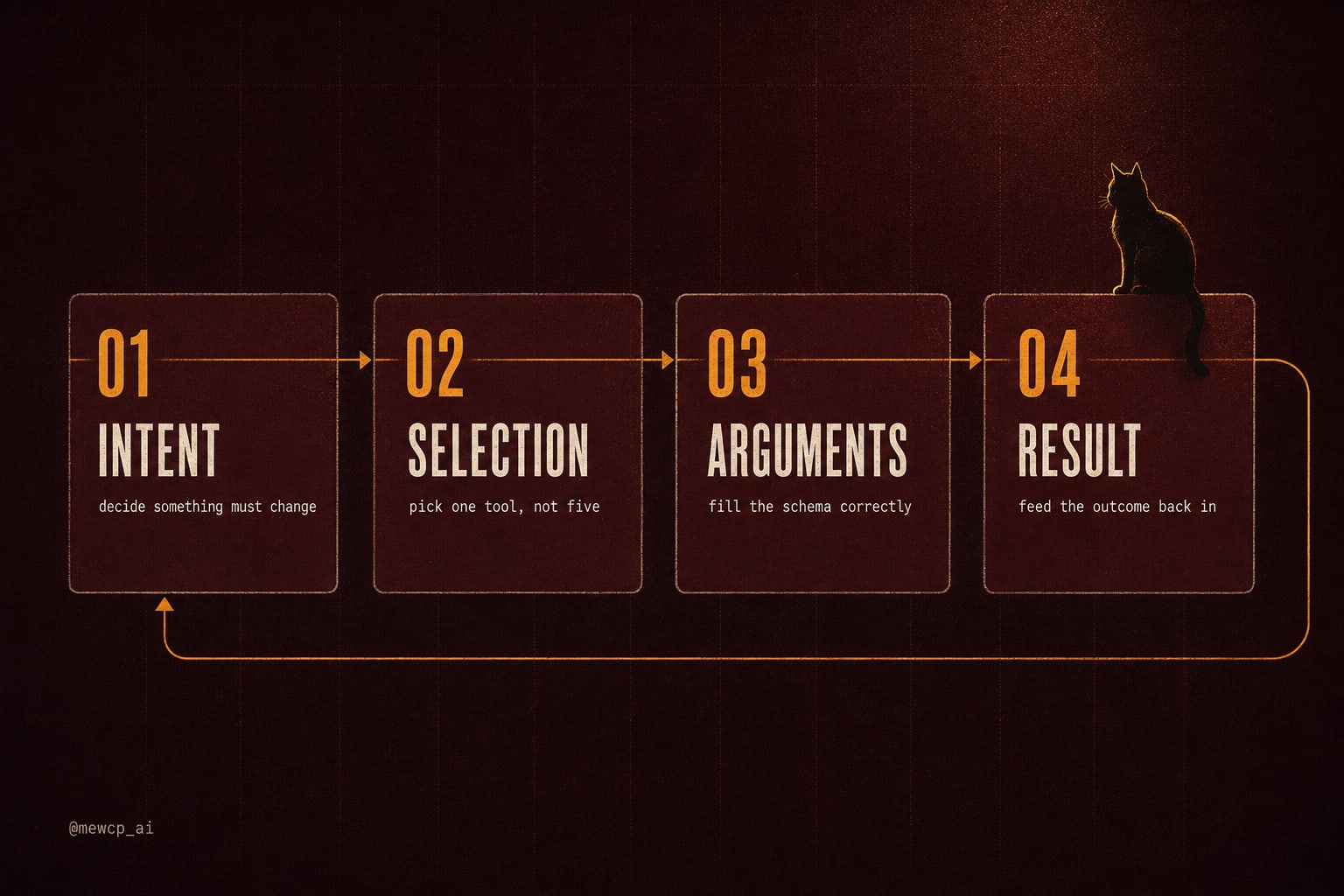
Every real action moves through four beats, and each one fails differently.
- Intent. The agent decides that something outside the conversation has to change. Failure here looks like an agent that answers instead of acting.
- Selection. It picks one tool. Failure looks like the wrong tool, or three tools when one would do.
- Arguments. It fills the schema. Failure looks like a missing required field, an invented enum value, or a date in the wrong format.
- Result. The outcome goes back into context. Failure here is the sneaky one: if the agent never reads the result, it cannot recover from an error and it cannot verify its own work.
The loop that implements this is small. The shape below follows the tool use message format used by Claude and similar APIs. Check your provider's exact field names, but the control flow is the same everywhere.
MAX_RESULT_CHARS = 4000

def dispatch(registry: dict[str, Tool], name: str, args: dict) -> dict:
    tool = registry.get(name)
    if tool is None:
        return {"ok": False, "error": f"unknown tool: {name}"}
    try:
        return {"ok": True, "result": tool.run(args)}
    except Exception as exc:
        # Return the error to the model instead of crashing the run.
        return {"ok": False, "error": f"{type(exc).__name__}: {exc}"}

def run_agent(user_message: str, registry: dict[str, Tool], max_steps: int = 8):
    messages = [{"role": "user", "content": user_message}]

    for _ in range(max_steps):
        reply = call_model(messages, tools=[spec(t) for t in registry.values()])
        messages.append({"role": "assistant", "content": reply.content})

        calls = [b for b in reply.content if b["type"] == "tool_use"]
        if not calls:
            return reply.text          # the agent is done talking to the world

        results = []
        for call in calls:
            outcome = dispatch(registry, call["name"], call["input"])
            results.append({
                "type": "tool_result",
                "tool_use_id": call["id"],
                "content": json.dumps(outcome)[:MAX_RESULT_CHARS],
                "is_error": not outcome["ok"],
            })

        messages.append({"role": "user", "content": results})

    raise RuntimeError("step budget exhausted before the agent finished")
Three details in there matter more than they look. Exceptions become messages instead of crashes, so the agent can read PermissionDenied and try something sensible. Results are truncated, because a database tool that returns 40,000 rows will eat the context window and take the rest of the conversation with it. And there is a hard step budget, because an agent with tools and no ceiling will happily loop until your bill notices.
The six tool families most agents need
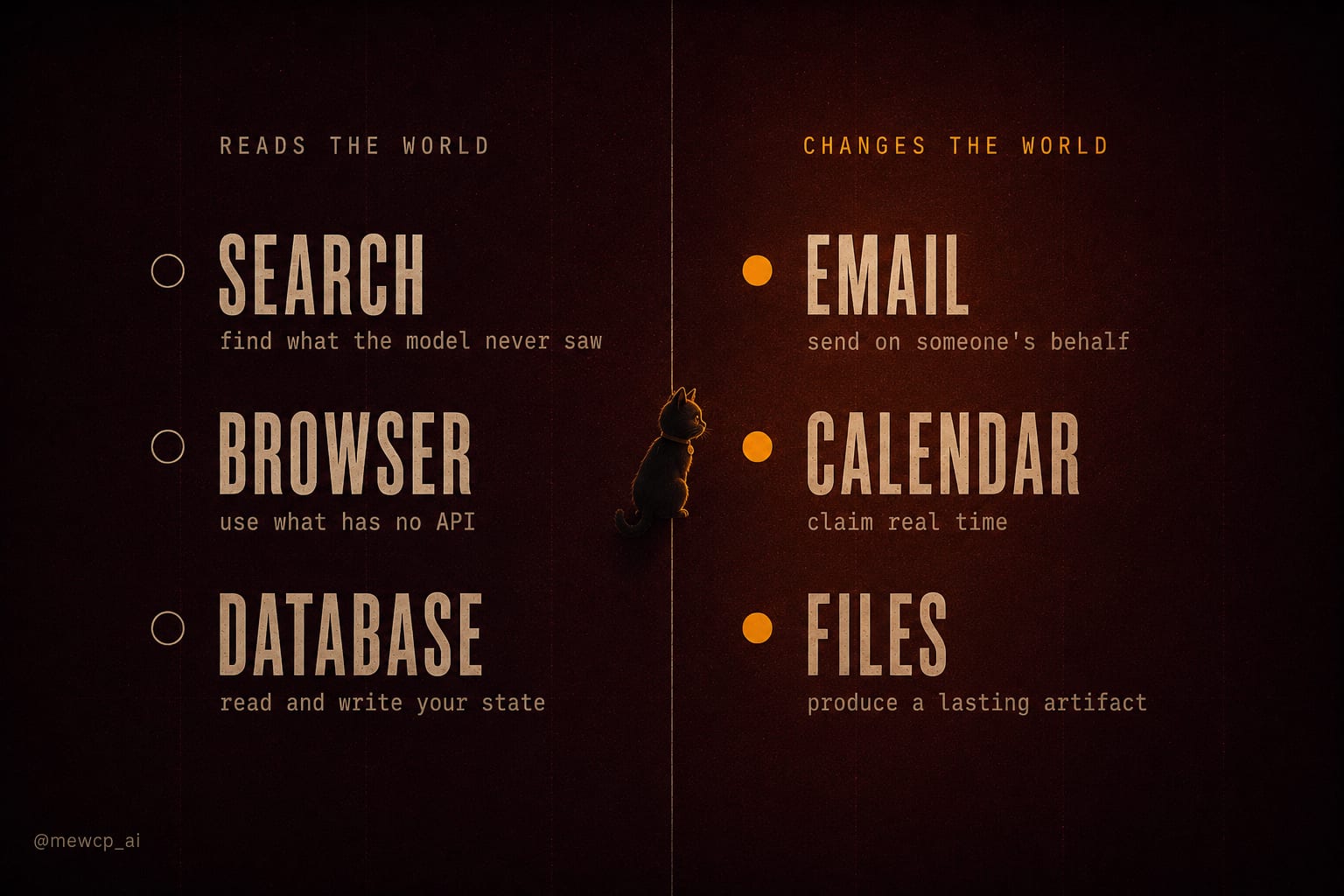
Almost every agent people build in the first year draws from the same six families. Three of them read the world. Three of them change it.
| Tool family | Class | What it returns | The failure you will hit |
|---|---|---|---|
| Search | Read | Ranked snippets and URLs | Stale or irrelevant results the agent trusts completely |
| Browser | Read, sometimes write | Page text, DOM state, screenshots | Slow, brittle selectors, and the agent clicking something real |
| Database | Both | Rows, counts, write receipts | Unbounded result sets, and writes with no transaction boundary |
| Write, irreversible | Provider message ID | Duplicate sends on retry, wrong recipient, no recall | |
| Calendar | Write, reversible | Event ID and invite status | Timezone drift, and inviting people who did not consent |
| Files | Write, mostly reversible | Path, size, checksum | Path traversal, and silently overwriting an existing file |
Search is the one to build first because it is safe and it fixes the model's knowledge boundary. Email is the one to build last, because it is the one your users will notice if it misfires.
Browser sits in an awkward middle. Treat it as a write tool whenever the page it visits has buttons, because the agent will find them.
Read, write, and the things you cannot undo

Capability and authorization are separate problems, and the second one is usually solved late. Every tool call runs as somebody. If your agent holds one API key for all users, then user A's agent can read user B's data the moment the model picks the wrong argument.
Three rules cover most of it.
Scope the credential to the requester. The identity that executes the tool should be the identity that asked for it, carried through the whole call. One shared key is a breach waiting for a bad argument.
Log the call, not just the answer. Store the tool name, the arguments, the caller, the result and the timestamp. When someone asks why the agent emailed a customer at 3am, the conversation transcript alone will not tell you.
Gate anything irreversible. Reversible writes can run freely. Irreversible ones should stop and ask.
def with_approval(tool: Tool, approve: Callable[[str, dict], bool]) -> Tool:
    def guarded(args: dict):
        if tool.irreversible and not approve(tool.name, args):
            return {"status": "declined", "reason": "user did not approve this action"}
        return tool.run(args)
    return replace(tool, run=guarded)
Returning a declined result instead of raising matters. The agent reads it, understands the action did not happen, and can propose an alternative. If you raise, it just sees a failure and often retries the same thing.
Which brings up retries. Read tools can be retried freely. Write tools cannot. If send_email times out after the provider already accepted the message, a naive retry sends it twice.
def send_email_executor(args: dict) -> dict:
    key = args["idempotency_key"]
    existing = idempotency_store.get(key)      # durable, not an in-process dict
    if existing:
        return existing                        # replay the original outcome
    response = mail_client.send(
        to=args["to"], subject=args["subject"], body=args["body"]
    )
    outcome = {"message_id": response.id, "status": "sent"}
    idempotency_store.put(key, outcome, ttl_seconds=86400)
    return outcome
Make the key part of the schema so the model produces a stable one per logical action, and store it somewhere that survives a process restart.
Failure modes nobody warns you about
Too many tools. Selection accuracy drops as the tool list grows and the descriptions start overlapping. Twelve well described tools beat forty vague ones. If two tools could plausibly answer the same request, merge them or sharpen both descriptions until they cannot.
Silent success. An API returns 200 and does nothing useful. A file write lands in a container that is about to be destroyed. The agent reports success because the tool told it to. Where it matters, verify: read back the row, check the message ID resolves.
Result bloat. One unfiltered query and the next model call carries 30,000 tokens of rows nobody reads. Paginate, project only the columns you need, and truncate with an explicit marker so the agent knows the data was cut.
Arguments the schema allowed but reality did not. A valid ISO date that is in the past. A recipient string that parses but belongs to a different tenant. Validate in the executor, and return a specific error message the model can act on.
Before you attach a tool to a live account
- The name is a verb and the description says when to use it and when not to
- Every required field is actually required, and enums are constrained
- The executor validates arguments again on your side
- Errors return as structured results, not exceptions
- Results are bounded in size and paginated where relevant
- The tool is classified read, reversible write, or irreversible write
- Irreversible writes pass through an approval gate
- Write tools accept an idempotency key and replay instead of repeating
- The credential is scoped to the user who made the request
- Every call is logged with caller, arguments, result and time
Ten lines. Most agent incidents I have seen trace back to one of them being skipped.
Where this goes next
The reasoning layer decides. The tool layer acts. Once you have both, the hard part stops being the model and starts being the plumbing: hosting the tools somewhere your agent can reach them, authenticating each call as the right user, storing per-user credentials so they never touch a prompt, and keeping the whole thing observable when ten thousand people use it at once.
That is the part MewCP handles, so you can spend your time on the tools themselves rather than the infrastructure around them.
Tomorrow, Day 14 goes one level down: what exactly is a tool, field by field, and why the description matters more than the code.