
AI Agent Architecture: The Six Components And How They Fit Together
Most agent tutorials teach one piece at a time and never show the whole board. Here is the full diagram, the contract between every component, and the control loop that ties them together.

You can learn planning, memory, tool calling and evaluation separately and still not be able to build a working agent. That gap is the whole problem with how AI agent architecture usually gets taught. Each piece makes sense on its own. What nobody draws is the wiring: which component produces what, who reads it next, and what happens to the result when it comes back.
This is the assembled version. Six components, one shared state object, one loop, and the code that runs it.
Why the single prompt approach breaks
The first agent almost everyone writes looks like this. One system prompt containing the goal, the rules, the tool list and the personality. One while loop. Send the messages, check for a tool call, run it, append the result, repeat until the model stops asking for tools.
That works, right up until it does not. Here is what actually goes wrong.
The model reconsiders its strategy on every single turn, because nothing outside the transcript is holding the plan. Turn six contradicts turn two. There is no place to store a fact that should outlive the conversation, so the agent re-fetches the same customer record four times. Nothing ever checks whether a tool result was any good, so a 200 response with an empty body counts as success. And when the whole thing eventually loops forever, you cannot say which part failed, because there are no parts. There is one blob.
Splitting that blob into named responsibilities is what architecture buys you. Not elegance. Debuggability.
The complete AI agent architecture
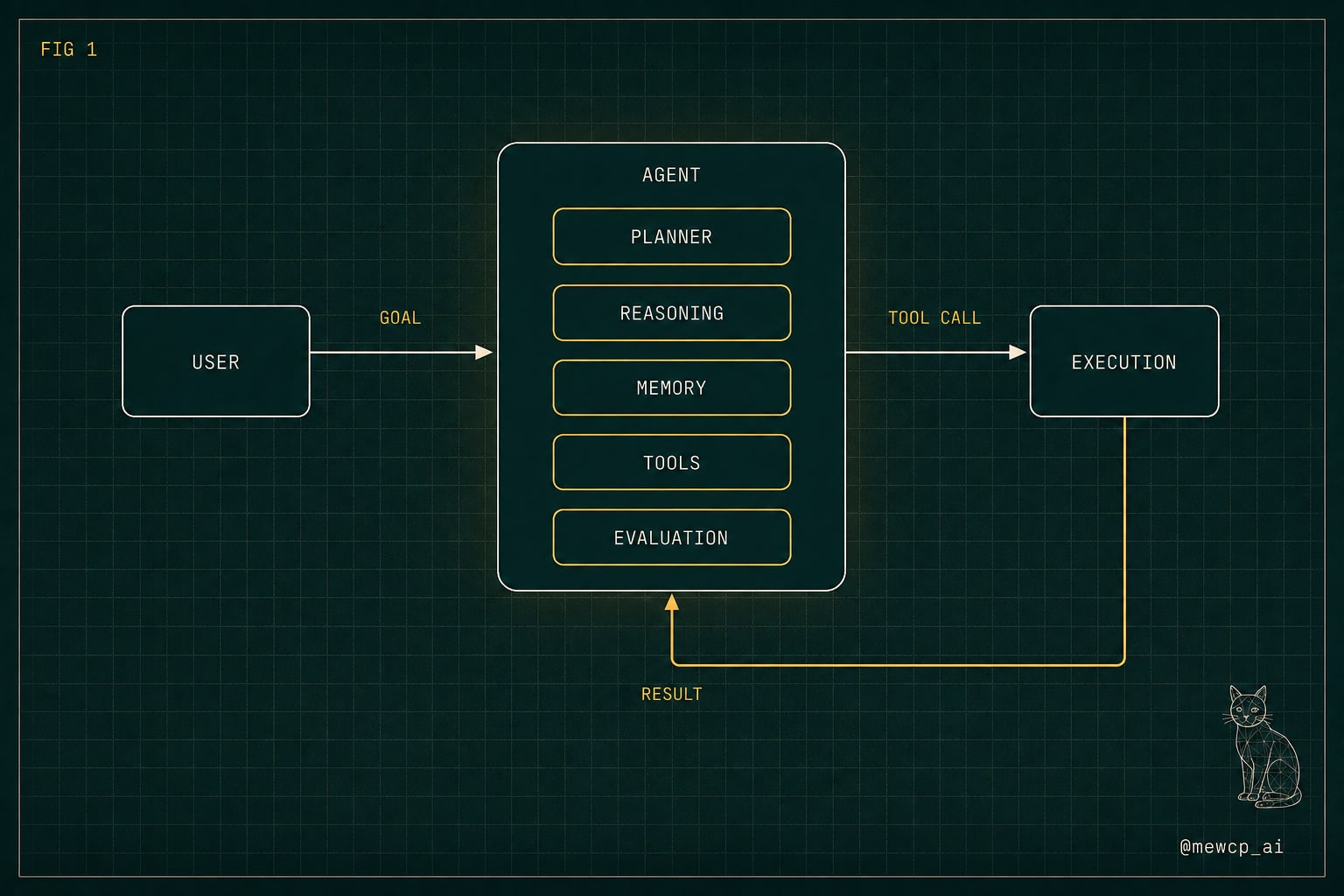
A user submits a goal. The goal enters the agent. Inside the agent, five components each own one job. Execution sits outside the agent, because it is the only part that changes something in the real world. Evaluation feeds the outcome back in, which is what makes this a loop rather than a pipeline.
Here is the contract for each component. Input, output, and the one question it answers.
Planner. Input: the goal plus any relevant durable facts. Output: an ordered list of steps. Question: what has to happen, and in what order? The planner does not choose tools and it does not touch the outside world. It produces sequence.
Reasoning. Input: the current step, working memory, and the available tool schemas. Output: one decision, either a tool call with concrete arguments, or a request to finish, or a request to replan. Question: what is the single next move? Notice that it decides one move, not the whole path. That is the planner's job.
Memory. Input: everything. Output: a filtered view for whoever asks. Question: what does this component need to know right now? Memory has at least two tiers in any real agent. Working memory holds the current run: the plan, results so far, the last error. Durable memory holds things that should survive the run: user preferences, resolved IDs, learned constraints. Keeping them separate matters, because working memory should be cheap to throw away and durable memory should not be.
Tools. Input: nothing at runtime. Output: the set of allowed verbs, each with a name, a description and a typed parameter schema. Question: what is this agent permitted to do at all? A tool layer is a permission boundary as much as a capability list. If a tool is not registered, the agent cannot do it, no matter how convincingly it argues.
Execution. Input: a tool name and validated arguments. Output: a result or a typed error. Question: what actually happened? This is the layer that owns timeouts, retries, rate limits and authentication. Keep it dumb and strict. It should never make decisions.
Evaluation. Input: the step, the decision and the result. Output: a verdict, one of continue, retry, replan or stop. Question: did that actually work? Evaluation is the component people skip, and it is the reason their agents cannot recover from anything.
One shared state object
The components do not call each other directly. They read from and write to a single state object. This one design choice removes most of the coupling.
from dataclasses import dataclass, field
from typing import Any, Callable, Literal

@dataclass
class AgentState:
    goal: str
    plan: list[str] = field(default_factory=list)
    step_index: int = 0

    # working memory, thrown away at the end of the run
    scratch: list[dict[str, Any]] = field(default_factory=list)
    last_error: str | None = None

    # durable memory, survives the run
    facts: dict[str, Any] = field(default_factory=dict)

    steps_used: int = 0
    done: bool = False
    answer: str | None = None

    @property
    def current_step(self) -> str | None:
        if self.step_index < len(self.plan):
            return self.plan[self.step_index]
        return None
Every component gets the state and returns a change to it. That means you can unit test the planner without a tool layer, and test evaluation by handing it a fake result. You cannot do either when everything lives inside one message array.
The tool layer
A tool is a function plus a schema plus a description the model can actually understand. The description is not documentation, it is part of the prompt, and it is the single biggest lever on tool selection accuracy.
import json

@dataclass
class Tool:
    name: str
    description: str
    parameters: dict[str, Any]
    fn: Callable[..., Any]

    def schema(self) -> dict[str, Any]:
        return {
            "type": "function",
            "function": {
                "name": self.name,
                "description": self.description,
                "parameters": self.parameters,
            },
        }

search_orders = Tool(
    name="search_orders",
    description=(
        "Find orders for one customer. Use when you have a customer email "
        "and need their order history. Returns at most 20 orders, newest first."
    ),
    parameters={
        "type": "object",
        "properties": {
            "email": {"type": "string", "description": "Customer email address"},
            "status": {
                "type": "string",
                "enum": ["open", "shipped", "cancelled"],
            },
        },
        "required": ["email"],
        "additionalProperties": False,
    },
    fn=lambda email, status=None: db.find_orders(email, status),
)

REGISTRY = {t.name: t for t in [search_orders]}
Two things worth copying. The description says when to use the tool and what comes back, not just what it does. And the parameters are constrained with enums and additionalProperties: false, so a wrong argument fails at validation instead of halfway through your database.
The control loop
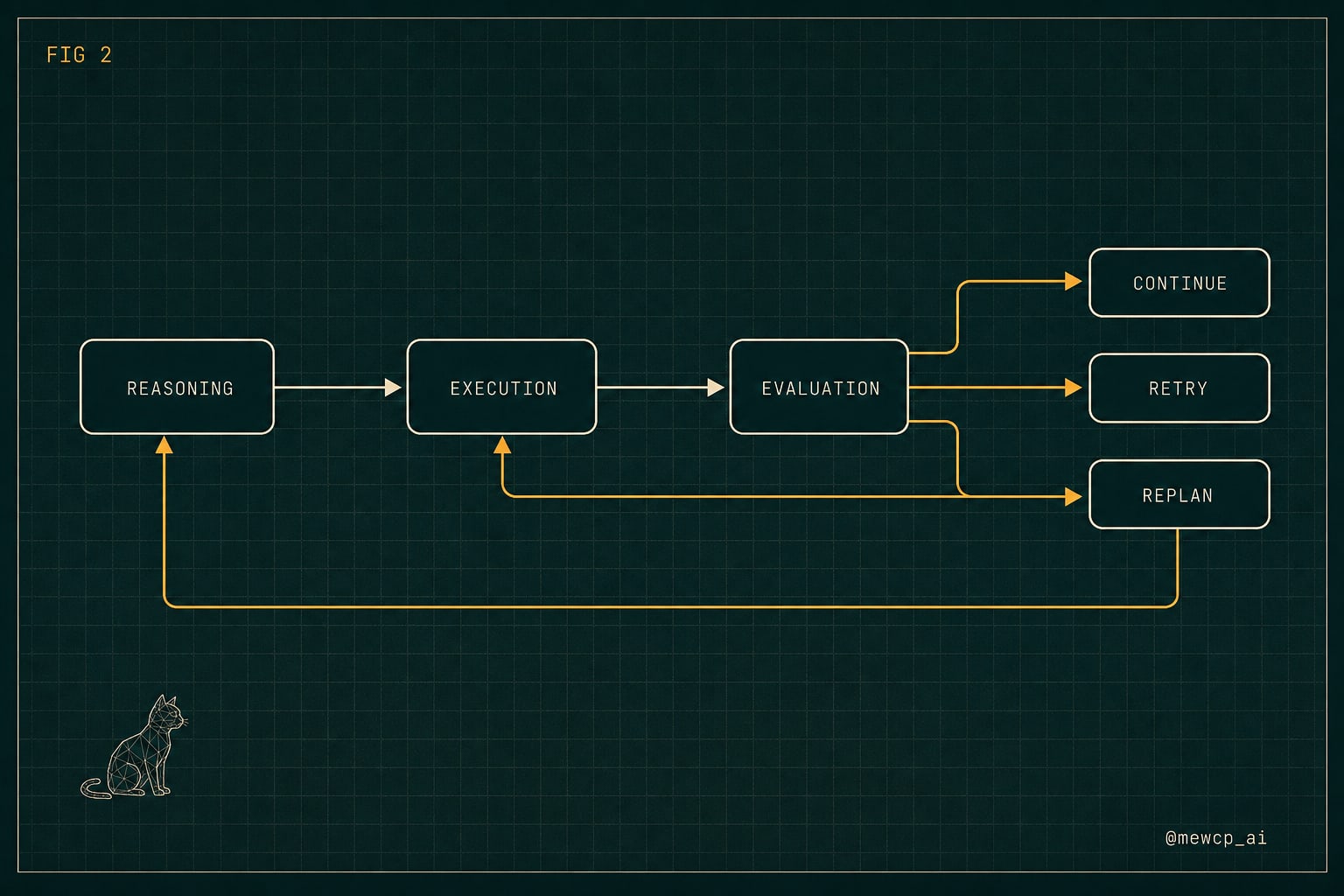
Now the part the carousel could not fit. This is one full turn, with the tool call round trip and the evaluation branch.
MAX_STEPS = 12
MAX_RETRIES_PER_STEP = 2

def run(state: AgentState, client, model: str) -> AgentState:
    state.plan = make_plan(state, client, model)
    retries = 0

    while not state.done and state.steps_used < MAX_STEPS:
        state.steps_used += 1

        decision = decide(state, client, model)

        if decision.finish:
            state.answer = decision.final_text
            state.done = True
            break

        result = execute(decision)
        state.scratch.append({"step": state.current_step, "result": result})

        verdict = evaluate(state, decision, result)

        if verdict == "continue":
            retries = 0
            state.step_index += 1
        elif verdict == "retry" and retries < MAX_RETRIES_PER_STEP:
            retries += 1
            state.last_error = str(result.get("error"))
        elif verdict == "replan":
            state.plan = make_plan(state, client, model)
            state.step_index = 0
            retries = 0
        else:
            state.done = True

    return state
The reasoning step and the round trip back into the model:
def decide(state: AgentState, client, model: str):
    messages = [
        {"role": "system", "content": REASONING_SYSTEM_PROMPT},
        {"role": "user", "content": render_context(state)},
    ]

    response = client.chat.completions.create(
        model=model,
        messages=messages,
        tools=[t.schema() for t in REGISTRY.values()],
        tool_choice="auto",
    )

    message = response.choices[0].message

    if not message.tool_calls:
        return Decision(finish=True, final_text=message.content)

    call = message.tool_calls[0]
    return Decision(
        finish=False,
        tool_name=call.function.name,
        arguments=json.loads(call.function.arguments),
        call_id=call.id,
    )


def execute(decision) -> dict[str, Any]:
    tool = REGISTRY.get(decision.tool_name)
    if tool is None:
        return {"ok": False, "error": f"unknown tool: {decision.tool_name}"}
    try:
        value = tool.fn(**decision.arguments)
        return {"ok": True, "value": value}
    except Exception as exc:
        return {"ok": False, "error": f"{type(exc).__name__}: {exc}"}
Two details people get wrong here.
render_context is memory doing its job. It does not dump the entire transcript. It renders the goal, the current step, the last two results and any relevant durable facts. Context is something you compose deliberately, not something that accumulates by default.
And execution never raises. It returns a typed result. An exception escaping the tool layer kills the loop and destroys any chance of recovery, which is exactly the situation evaluation exists to handle.
Evaluation itself can be far simpler than people expect:
def evaluate(state, decision, result) -> Literal["continue", "retry", "replan", "stop"]:
    if result["ok"] and is_useful(result["value"], state.current_step):
        return "continue"
    if not result["ok"] and is_transient(result["error"]):
        return "retry"
    if state.steps_used > len(state.plan) * 2:
        return "replan"
    return "stop"
Start with rules. Reach for a model based judge only when the check genuinely needs judgement, like whether a drafted email answers the customer's question. A rule beats a model call on latency, cost and determinism every time it is applicable.
Where each failure actually lives
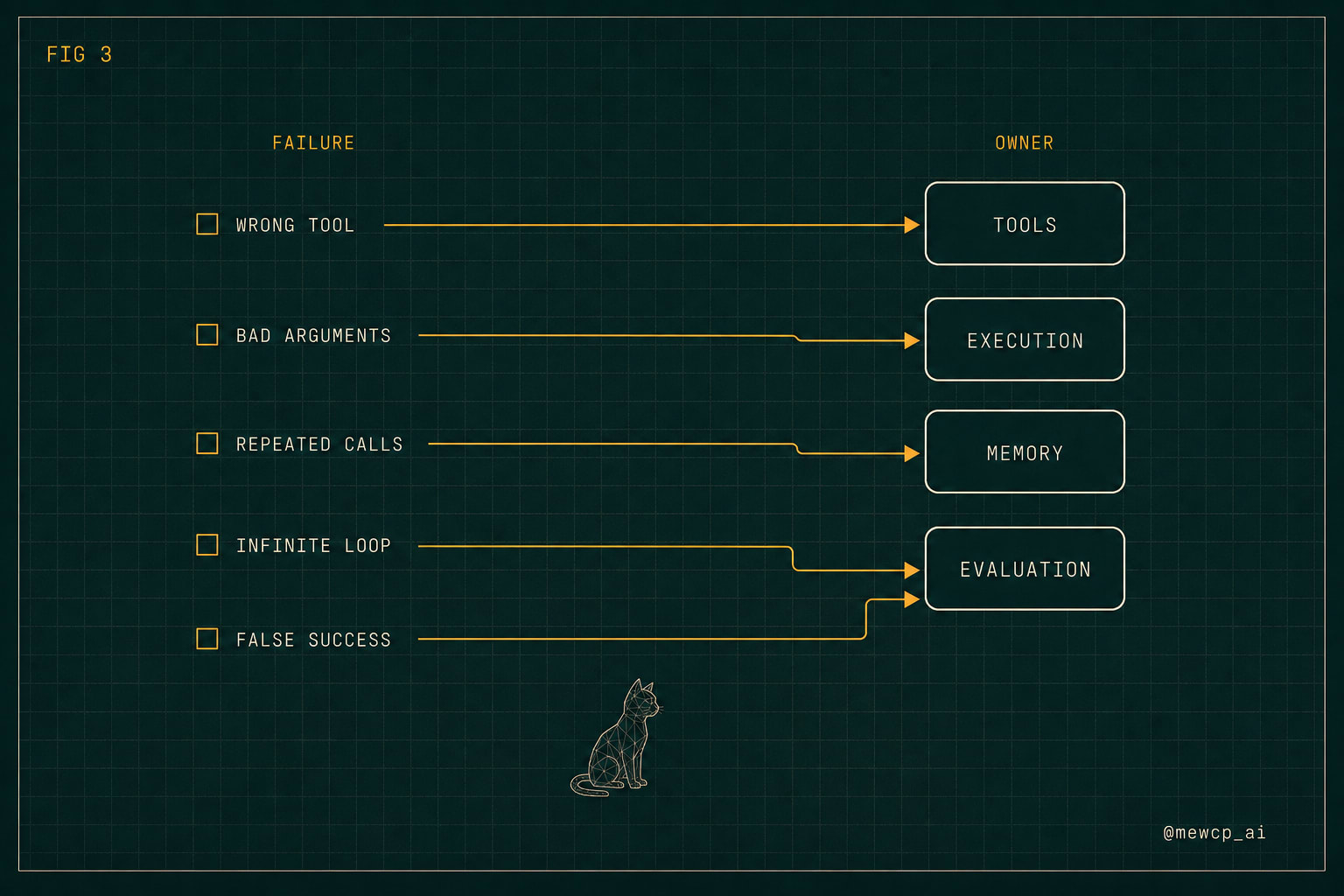
This is the practical value of naming components. When something breaks, the architecture tells you where to look.
| Symptom | Component that owns it | What to change |
|---|---|---|
| Picks the wrong tool | Tools | Rewrite the description to say when to use it, not what it does |
| Invents arguments | Tools and Execution | Tighten the JSON schema, validate before calling |
| Repeats a call it already made | Memory | Put completed steps and their results into rendered context |
| Loops forever | Evaluation and the loop | Add a step budget, a retry cap and a stop verdict |
| Drifts off the original goal | Planner | Keep the plan in state and render the current step every turn |
| Reports success on a bad result | Evaluation | Check the shape and usefulness of the result, not just the status code |
Notice that only one of these is fixed by a better model.
You probably do not need all six on day one
Nothing in this design requires six separate model calls. In a small agent, planning and reasoning can be a single call, and evaluation can be four lines of Python. What matters is that the responsibility exists somewhere and you know where it is.
A reasonable build order:
- Tools and execution first, with strict schemas. Everything else depends on these being trustworthy.
- A loop with a hard step budget. Runaway cost is the first real failure you will hit.
- Rule based evaluation. Even three checks will catch most silent failures.
- Working memory, once the transcript starts getting expensive or confusing.
- An explicit planner, once the agent starts changing its mind mid run.
- Durable memory, once the same facts get re-fetched across sessions.
Split a component out the moment it starts failing on its own. Not before.
A short checklist before you ship
- Every tool has a description that states when to use it and what it returns
- Every tool schema rejects unknown properties and constrains enums
- Execution returns typed errors and never raises into the loop
- There is a maximum step count and a maximum retry count per step
- Context is rendered, not accumulated
- Something checks the quality of a result, not just its status code
- You can log the full state object at any turn and understand what the agent was thinking
- Every state transition is reproducible from the logged state
That last one is the real test. If you can replay a bad run from your logs, you have an architecture. If you can only re-run the prompt and hope, you have a script.
Where the tool layer gets harder
Everything above assumes tools are local Python functions. Real agents call other people's systems, and that is where the tool layer stops being simple. Credentials per user, tokens that expire mid run, tenants that must never see each other's data, and versioned tool definitions that change under you.
That surface is what MewCP handles: hosted tool infrastructure, authentication and credential management, so the tool layer in your architecture stays a clean boundary instead of turning into the biggest file in your codebase. Worth knowing that layer exists as an infrastructure problem, not just a code problem, before you build all of it yourself.
Build the loop first though. The architecture is what makes the rest tractable.