
What an AI Agent Platform Actually Needs: The 10-Layer Stack
Your agent is the box you can see. Nine more boxes underneath it decide whether it survives its second user, and none of them are model problems.

For twenty-five days this series has been taking an AI agent apart one piece at a time. What an agent is, how its loop runs, how it plans, what memory actually means, how tool calling works, why MCP exists, how authentication and credentials change once the agent acts for someone else, how tenancy, state, reliability, observability and evaluation each become their own discipline.
Each of those posts made sense on its own. This one puts them back together, because the most useful thing you can do with twenty-five separate concepts is see that they form one structure, and that the structure is much larger than the part most people call "the agent."
Here is the structure, top to bottom:
- Agent - the loop that turns a goal into a sequence of decisions and actions
- Models - the LLMs that make those decisions
- Tools - the functions and MCP servers that let the agent act
- Memory - what carries context across turns, sessions and tasks
- Authentication - who is asking
- Credential management - which third-party token acts on their behalf
- Multi-tenancy - which customer's world this request is allowed to touch
- Execution - how a run is bounded, retried, resumed and stopped
- Observability - what actually happened, reconstructable after the fact
- Evaluation - whether it is still working, measured repeatably
The top four layers are what a demo is made of. The bottom six are what a product is made of. Every one of the bottom six is an ordinary application infrastructure concern that existed long before LLMs, and putting a model in the middle of your application removes exactly none of them. If anything the model makes each one harder, because the thing choosing which action to take next is probabilistic and reads text you did not write.
This post defines each layer properly: what it owns, the first failure it produces when it is missing, and how to tell whether you already have a problem there. Then it follows one real tool call through the whole stack in TypeScript, shows a minimal evaluation harness so layer ten is not left abstract, and ends with a build, buy or defer call for every layer and the full checklist.
The stack at a glance
| # | Layer | What it owns | First failure when it is missing |
|---|---|---|---|
| 01 | Agent | The decision loop, stop conditions, the plan | Loops that never terminate, or terminate early with a confident wrong answer |
| 02 | Models | Model choice, routing, prompts, structured output | One provider outage takes the whole product down |
| 03 | Tools | Tool definitions, schemas, discovery, MCP connections | The model calls the wrong tool, or the right tool with invented arguments |
| 04 | Memory | Conversation state, long-term recall, retrieval | The agent forgets a constraint from three turns ago, or recalls another user's |
| 05 | Authentication | Verified identity of the caller | Every request runs as "the developer" |
| 06 | Credentials | Per-user third-party tokens, refresh, revocation | One shared API key, used for everyone, stored in an env var |
| 07 | Multi-tenancy | Isolation of data, config, budgets and runs per customer | Customer A's data appears in customer B's answer |
| 08 | Execution | Timeouts, retries, idempotency, cancellation, long-running work | A hung tool call holds a worker for minutes, then retries a payment |
| 09 | Observability | Traces, logs, metrics, cost, execution history | "What did the agent do at 2:14am?" has no answer |
| 10 | Evaluation | Repeatable test suites, regression tracking, quality gates | A prompt change quietly breaks refunds and nobody notices for a week |
If you only keep one thing from this post, keep that table. The rest is the explanation behind each row.
The three layers everyone builds
Layers two, three and four get built first because they are where the interesting problems are and because a demo cannot exist without them.
Models
The model layer owns which model runs which step, how prompts are assembled, and how outputs are constrained. In a prototype this is a single hard-coded model string and a prompt in a template literal. In a platform it has three extra responsibilities.
Routing. Not every step needs your most capable model. Planning and ambiguous tool selection usually benefit from a stronger model. Classification, extraction and summarising a tool result often do not. A routing layer that picks per step is where most agent cost reduction actually happens, well before prompt trimming.
Structured output. Anything the rest of your system consumes should arrive as validated structure, not as prose that you regex. Use the provider's native tool-use or JSON schema mode, and validate the result again on your side, because a schema-conformant object can still contain a nonsensical value.
Provider failure. Model APIs have outages, rate limits and latency spikes like every other dependency. Whether you add a fallback provider is a genuine tradeoff, since prompts tuned for one model family rarely behave identically on another, but you should at least decide it on purpose rather than discover it during an incident.
You already have a problem here if the model name appears as a string literal in more than one file, or if nothing in your system would notice that the provider started returning 529s.
Tools
The tool layer owns what the agent can do. Days 13 through 18 covered this in depth: a tool is a name, a description and an input schema that the model reads, plus a handler that your code runs. MCP standardises that contract so a tool can be written once and used by any compliant client.
In a prototype the tool layer is a list of functions registered in one process. In a platform it grows to include discovery (which tools this user may see), versioning (what happens to in-flight runs when a schema changes), and connection management (which MCP servers are reachable, over which transport, with whose credentials).
The failure to watch for is tool surface growth. Every tool definition you expose costs context tokens and adds one more option the model can confuse with another. Past a few dozen tools, selection accuracy tends to degrade in ways that are hard to see without evaluation, which is one reason gateway patterns that expose a small search-then-call surface instead of every tool at once have become common.
You already have a problem here if your tool descriptions were written once and never measured, or if adding a new integration requires redeploying the agent.
Memory
The memory layer owns what the agent knows beyond the current message. Day 9 made the point that memory is not chat history: there is working memory (the current context window), session memory (this conversation or task), and long-term memory (facts, preferences and past outcomes retrieved when relevant).
The platform concern here is scope. Every memory write needs an owner, and every memory read needs to be filtered to that owner before the model sees it. Retrieved memory is one of the quietest ways tenant data leaks, because a similarity search does not know who is asking unless you make it know.
You already have a problem here if your vector store has one namespace, or if you cannot delete everything the agent remembers about one user on request.
Those three layers, plus the agent loop on top, are roughly what a working demo is. It is real engineering. It is also, in most products, less than half the work.
The six layers everyone skips
The bottom six are skipped for an understandable reason: in a demo, none of them has anything to do. There is one user (you), one set of credentials (yours), one tenant (your laptop), no concurrency, no history worth reading, and a test suite of whatever you typed into the chat box this morning. Every one of them switches on the day a second person uses the product.
Authentication
Authentication owns one question: who is making this request? Day 19 covered it. The output of this layer is a verified identity: a user id, a tenant id and a set of scopes, extracted from a signed token or session that your system can check without trusting anything the client says about itself.
The failure is subtle because nothing breaks. Without an authentication layer, every request simply runs as whoever owns the API keys in the environment, which is usually the developer. The agent works perfectly. It just works for the wrong person.
You already have a problem here if any tool handler can be reached without a verified identity in scope, or if "user id" arrives as a field in the request body.
Credential management
Credential management owns a different question from authentication, and conflating them is the most common structural mistake in agent products. Authentication asks who the user is. Credential management asks which third-party token should be used to act for that user, right now, against this specific provider.
Those tokens have their own lifecycle: they are issued through an OAuth flow, they expire, they are refreshed, they get revoked by the user in the provider's settings page, and they carry scopes that may be narrower than what your agent wants. Day 20 covered why this is hard. The short version is that the moment your agent calls anything on a user's behalf, you own a secrets problem with the blast radius of every account every user has connected.
You already have a problem here if a third-party token is ever read from process.env, held on a long-lived client object, or placed anywhere the model can see it.
Multi-tenancy
Multi-tenancy owns isolation between customers. Day 21's rule applies directly: the tenant boundary is a property of the authenticated request, re-derived on every tool call, and never a value the model is trusted to supply. Data, credentials, permissions, executions and configuration all need to be scoped per tenant, and caches, vector namespaces, background jobs and retrieved memory are where that scoping quietly fails.
You already have a problem here if tenant_id appears in any tool's input schema, or if a background job trusts the tenant id it was enqueued with without re-validating it.
Execution
The execution layer owns how a run behaves as a process: how long each step may take, what happens when a step fails, whether a retry is safe, how a long-running task survives a deploy, and how a user stops an agent that is doing the wrong thing. Day 22 (state) and Day 23 (reliability) both live here.
This is the layer where agents differ most from ordinary request handlers. A normal API call does one thing and returns. An agent run may make twenty tool calls over several minutes, some of which have side effects, and any of which can hang. Without explicit bounds, one slow upstream holds a worker indefinitely, and without idempotency, a retry after a timeout can send the same email or create the same invoice twice.
You already have a problem here if any tool call runs without a timeout, if a write tool has no idempotency key, or if there is no way to cancel a run in progress.
Observability
Observability owns the ability to answer questions about what happened without having predicted the question in advance. Day 24 covered the specifics: which tool the agent called, with which arguments, what came back, how long it took, where it failed and what it cost. Logs, traces, metrics and a per-run execution history are the raw material.
For agents this layer carries an extra burden, because the reasoning between tool calls is part of what you need to debug. A trace that shows three tool calls without the model turns between them tells you what happened but not why.
You already have a problem here if you cannot reconstruct one specific user's run from last Tuesday, step by step, including cost.
Evaluation
Evaluation owns whether the agent still works, measured in a way you can repeat. Day 25 made the case: a successful demo is one sample. Task success, tool selection accuracy, output quality, reliability, latency, cost and safety each need a measurement that runs the same way every time, so that a prompt change, a model upgrade or a new tool can be checked against a baseline instead of against someone's impression.
You already have a problem here if the answer to "did this prompt change make things better?" involves the phrase "it seemed fine."
One feature, five layers: following a tool call through the stack
The carousel used one product request to make this concrete: "let users connect their Gmail." It sounds like a tool integration, which is a layer three problem. Follow a single call through the stack and it touches five other layers before it touches the model.
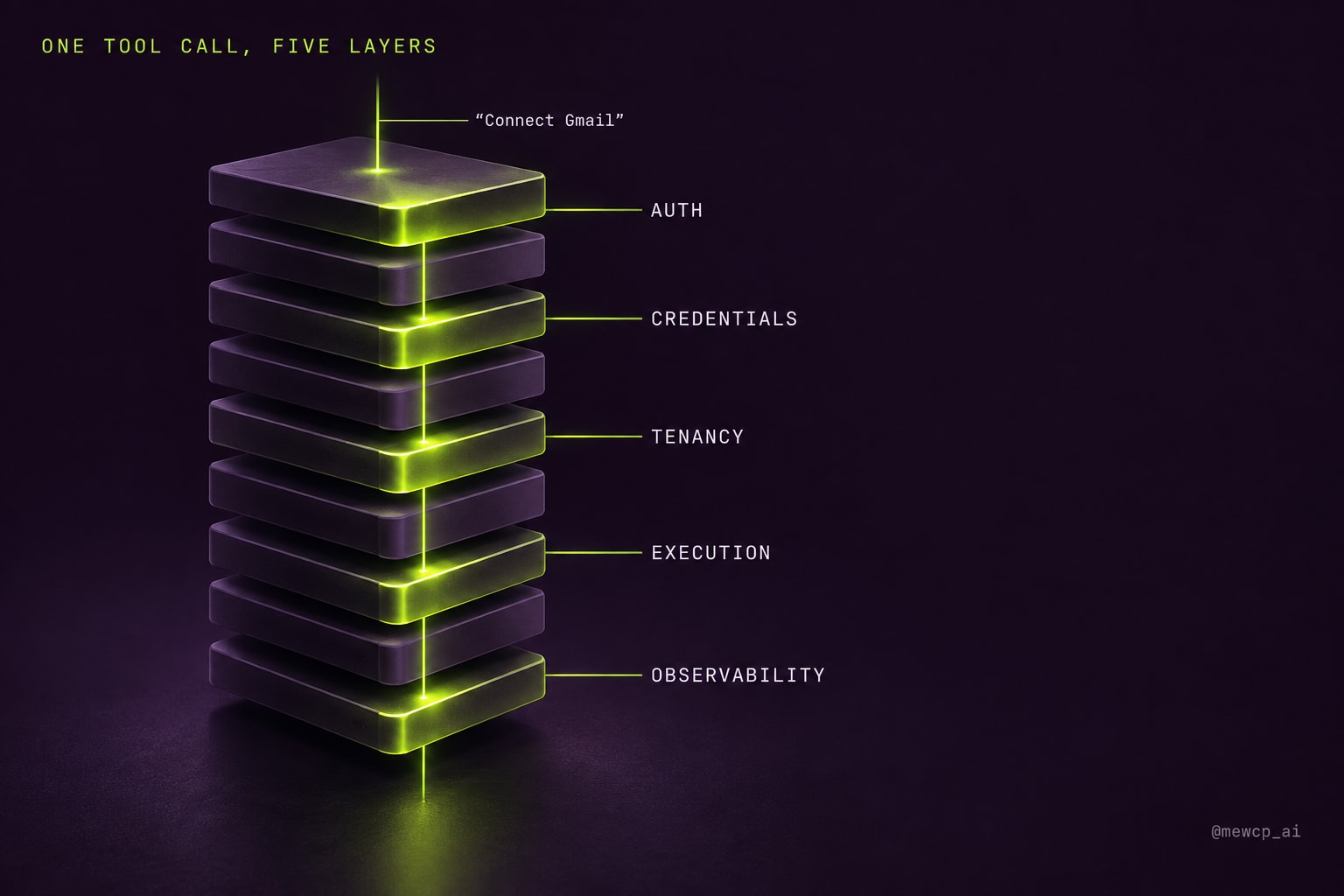
Here is that path as code. It is deliberately framework-free TypeScript so the layers are visible rather than hidden inside a library. The helpers it imports are small and shown later or are standard packages (jose for JWT verification, @opentelemetry/api for tracing).
import { createRemoteJWKSet, jwtVerify } from "jose";
import { trace, SpanStatusCode } from "@opentelemetry/api";

const tracer = trace.getTracer("agent-platform");
const jwks = createRemoteJWKSet(new URL(process.env.AUTH_JWKS_URL!));

// Layer 05: authentication. The only place a RequestContext is ever created.
export interface RequestContext {
  readonly tenantId: string;
  readonly userId: string;
  readonly runId: string;
  readonly scopes: ReadonlySet<string>;
}

export async function authenticate(bearer: string, runId: string): Promise<RequestContext> {
  const { payload } = await jwtVerify(bearer, jwks, {
    issuer: process.env.AUTH_ISSUER,
    audience: "agent-api",
  });
  return Object.freeze({
    tenantId: String(payload.tenant_id),
    userId: String(payload.sub),
    runId,
    scopes: new Set(String(payload.scope ?? "").split(" ").filter(Boolean)),
  });
}

// The tool call the model asked for. Note what is absent: no tenant, no user, no token.
export interface ToolCall {
  name: string;
  args: Record<string, unknown>;
  idempotencyKey: string; // derived from runId + step index, not chosen by the model
}

export async function executeToolCall(ctx: RequestContext, call: ToolCall) {
  // Layer 09: observability wraps everything, so failures below are recorded too.
  return tracer.startActiveSpan(`tool.${call.name}`, async (span) => {
    span.setAttributes({
      "tenant.id": ctx.tenantId,
      "run.id": ctx.runId,
      "tool.name": call.name,
    });
    const started = performance.now();

    try {
      // Layer 07: tenancy policy. Is this tool enabled for this tenant and user?
      const tool = await toolRegistry.resolveFor(ctx, call.name);
      if (!tool) throw new ToolNotAvailable(call.name);
      for (const scope of tool.requiredScopes) {
        if (!ctx.scopes.has(scope)) throw new MissingScope(scope);
      }

      // Layer 03: validate arguments against the schema before anything runs.
      const args = tool.validate(call.args);

      // Layer 06: credential resolution. Per call, per user, per provider.
      const credential = await credentials.resolve({
        tenantId: ctx.tenantId,
        userId: ctx.userId,
        provider: tool.provider,
      });

      // Layer 08: bounded execution. Timeout always; retry only when safe.
      const result = await runBounded(
        (signal) => tool.handler(args, { credential, signal, idempotencyKey: call.idempotencyKey }),
        { timeoutMs: tool.timeoutMs ?? 15_000, retries: tool.isIdempotent ? 2 : 0 },
      );

      span.setAttribute("tool.duration_ms", Math.round(performance.now() - started));
      span.setStatus({ code: SpanStatusCode.OK });
      return result;
    } catch (err) {
      span.recordException(err as Error);
      span.setStatus({ code: SpanStatusCode.ERROR, message: (err as Error).message });
      throw err;
    } finally {
      span.end();
    }
  });
}
Read it as a list of questions, one per layer, asked in a specific order:
- Observability opens first and closes last. If the span starts after the policy check, every rejected call is invisible, and rejected calls are exactly the ones you need to see when something is probing your tool surface.
- Tenancy decides whether the tool exists at all for this caller. The registry is resolved from the context, not from the model's request, so a tool that is disabled for a tenant is not merely refused, it is absent.
- Arguments are validated before credentials are touched. A malformed call should fail without ever decrypting a token.
- Credentials are resolved last and held only for the duration of the call. The token never enters the context object, never enters the model's context window, and never outlives the handler.
- Execution bounds are set by the tool definition, not by the model. The model does not get to decide that a call is safe to retry. That is a property of the tool.
None of those five steps involves the model. The model's entire contribution to this call was choosing name and args. Everything else is platform.
The bounded execution helper
runBounded is small, and it is where most of layer eight lives for a single call:
export async function runBounded<T>(
  fn: (signal: AbortSignal) => Promise<T>,
  opts: { timeoutMs: number; retries: number },
): Promise<T> {
  let lastError: unknown;
  for (let attempt = 0; attempt <= opts.retries; attempt++) {
    try {
      return await fn(AbortSignal.timeout(opts.timeoutMs));
    } catch (err) {
      lastError = err;
      if (!isRetryable(err) || attempt === opts.retries) break;
      const backoff = Math.min(8_000, 250 * 2 ** attempt) * (0.5 + Math.random());
      await new Promise((r) => setTimeout(r, backoff));
    }
  }
  throw lastError;
}

function isRetryable(err: unknown): boolean {
  if (err instanceof DOMException && err.name === "TimeoutError") return true;
  const status = (err as { status?: number }).status;
  return status === 429 || (status !== undefined && status >= 500);
}
Two decisions in there are worth defending. Retries are opt-in per tool (retries: tool.isIdempotent ? 2 : 0), because retrying a non-idempotent write after a timeout is how duplicate side effects happen: the timeout tells you that you stopped waiting, not that the upstream stopped working. And the handler receives the abort signal, so a timeout actually cancels the outbound request instead of leaving it running in the background while you retry.
Credentials: prototype versus platform
Layer six is where the gap between a demo and a product is widest, so it is worth seeing side by side.
The prototype version:
import { google } from "googleapis";

const auth = new google.auth.OAuth2();
auth.setCredentials({ access_token: process.env.GMAIL_TOKEN });
const gmail = google.gmail({ version: "v1", auth });

export async function listUnread() {
  return gmail.users.messages.list({ userId: "me", q: "is:unread" });
}
There is nothing wrong with this code for one person. It has four properties that become incidents the moment there are two:
- The token belongs to whoever set the environment variable, so every user reads the developer's inbox.
- The client is created at module load, so the credential outlives every request and cannot differ per user.
- When the access token expires, nothing refreshes it.
- If a user revokes access in their Google account, the system has no idea until a call fails.
The platform version:
export interface CredentialStore {
  resolve(key: { tenantId: string; userId: string; provider: string }): Promise<Credential>;
}

export interface Credential {
  accessToken: string;
  expiresAt: number;
}

export async function listUnread(args: { max: number }, deps: { credential: Credential; signal: AbortSignal }) {
  const res = await fetch(
    `https://gmail.googleapis.com/gmail/v1/users/me/messages?q=is:unread&maxResults=${args.max}`,
    { headers: { Authorization: `Bearer ${deps.credential.accessToken}` }, signal: deps.signal },
  );
  if (!res.ok) throw Object.assign(new Error(`gmail ${res.status}`), { status: res.status });
  return res.json();
}
The handler no longer knows where its credential came from. It receives one, per call, already resolved for the right tenant and user, and it uses it once. Everything interesting has moved into CredentialStore.resolve, which is where the real work lives:
- Look up the encrypted refresh and access tokens keyed by tenant, user and provider. The key must include all three.
- If the access token is within a safety margin of expiry, refresh it, using a per-key lock so that ten concurrent calls do not trigger ten refreshes that race to overwrite each other.
- If the refresh fails with
invalid_grant, mark the connection as revoked and surface a reconnect prompt to the user, instead of failing every future call with an opaque 401. - Decrypt only at the moment of use. Never log the token, never attach it to a span, never return it through anything the model reads.
That list is why credential management is a layer and not a helper function. It has its own storage, its own concurrency problem, its own failure states and its own user-facing flow.
A minimal repeatable evaluation harness
Layer ten is the one teams defer longest, usually because "evaluation" sounds like a research project. It does not have to be. The smallest useful version is a file of cases, a runner, and a number you compare against last time.
interface EvalCase {
  id: string;
  input: string;
  expectTools?: string[];          // tools that must be called, in any order
  forbidTools?: string[];          // tools that must not be called
  check?: (output: string) => boolean;
  maxCostUsd?: number;
}

interface EvalResult {
  id: string;
  passed: boolean;
  reasons: string[];
  latencyMs: number;
  costUsd: number;
}

export async function runSuite(cases: EvalCase[], agent: AgentRunner, runs = 3): Promise<EvalResult[]> {
  const results: EvalResult[] = [];
  for (const c of cases) {
    for (let i = 0; i < runs; i++) {
      const started = performance.now();
      const run = await agent.run(c.input, { evalMode: true });
      const called = new Set(run.toolCalls.map((t) => t.name));
      const reasons: string[] = [];

      for (const t of c.expectTools ?? []) if (!called.has(t)) reasons.push(`missing tool ${t}`);
      for (const t of c.forbidTools ?? []) if (called.has(t)) reasons.push(`forbidden tool ${t}`);
      if (c.check && !c.check(run.output)) reasons.push("output check failed");
      if (c.maxCostUsd !== undefined && run.costUsd > c.maxCostUsd) reasons.push("over cost budget");

      results.push({
        id: `${c.id}#${i}`,
        passed: reasons.length === 0,
        reasons,
        latencyMs: performance.now() - started,
        costUsd: run.costUsd,
      });
    }
  }
  return results;
}
A few design choices make this more useful than it looks:
- Every case runs more than once. Agents are nondeterministic. A case that passes two runs out of three is a different finding from one that passes three out of three, and a single run hides that entirely.
- Tool assertions come before output assertions. Checking which tools were called, and which were not, is cheap and deterministic, and it catches a large share of regressions before you need an LLM judge for output quality.
forbidToolsis how safety cases are written. "Summarise this customer's refund history" should never callissue_refund. That assertion is one line.evalModeroutes write tools to stubs. The suite must be safe to run on every pull request, which means it must never send a real email.
Run it in CI, store the pass rate per case, and fail the build when a case that used to pass three of three drops below that. That is a real evaluation layer. Everything Day 25 described (LLM judges, human review queues, production sampling) extends this; none of it replaces it.
The failure modes arrive in order
One useful property of the stack is that the bottom layers tend to fail in a predictable sequence as usage grows. If you know the order, you can build each layer just before you need it instead of during the incident.
- Second user. Authentication and credentials fail first, often on day one: the second user sees the first user's data, or nothing works because the only token is yours.
- Second customer. Multi-tenancy fails next, usually through a shared cache key or a single vector namespace rather than through the database, which most teams scope correctly.
- First slow upstream. Execution fails when one provider has a bad afternoon. Workers hang on calls with no timeout, then retries duplicate a write.
- First "why did it do that?" Observability fails the first time a customer asks what the agent did and the honest answer is that you do not know.
- First model or prompt change. Evaluation fails quietly. Nothing crashes. A case that used to work stops working, and you find out from a support ticket a week later.
- First enterprise conversation. All of the above get asked about at once, in a security questionnaire, with a deadline.
Notice that the model layer barely appears in that list. Model problems are real, but they are the problems you were already looking at.
Own, buy or defer: the call for each layer
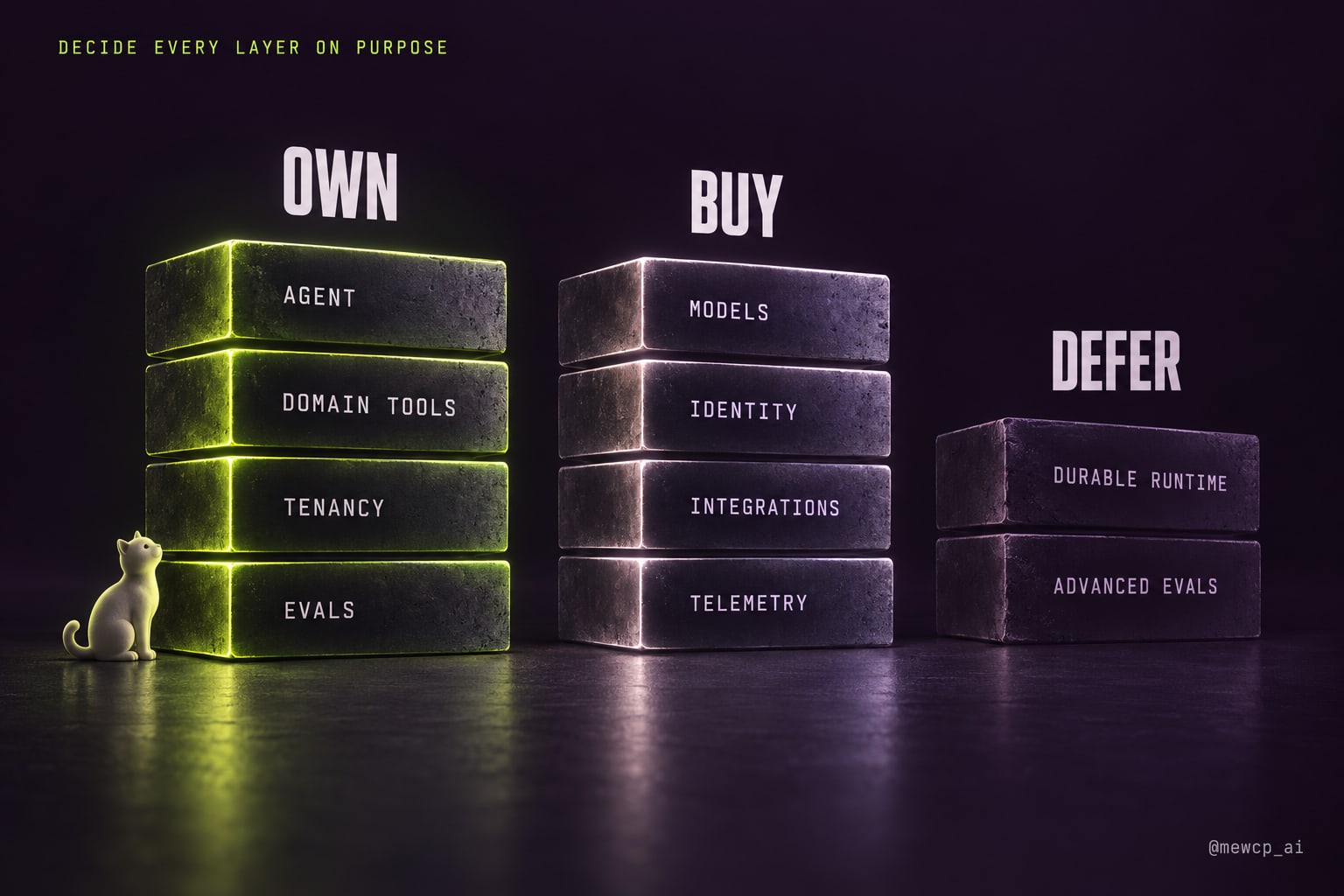
The takeaway slide said teams that reach production decided which layers they own, which they buy and which they can safely defer. Here is the call we would actually make for a small team shipping a multi-customer agent product. Your answers may differ; what matters is that you make them explicitly.
| Layer | Call | Reasoning |
|---|---|---|
| Agent | Own | This is your product. The loop, the plan and the stop conditions are where your differentiation lives. |
| Models | Buy | Use hosted model APIs. Own the routing logic and prompts; do not own inference. |
| Tools (your domain) | Own | Tools that touch your own data and business logic are part of your product. |
| Tools (third-party integrations) | Buy or adopt | Maintaining your own Gmail, Slack and GitHub integrations is undifferentiated work. Existing MCP servers or a hosted catalogue usually beat writing them. |
| Memory | Own the model, buy the storage | What to remember is product logic. Where to store vectors is a solved problem. |
| Authentication | Buy | Use an identity provider. Rolling your own auth is rarely the right call for an agent startup. |
| Credential management | Buy or build carefully | High blast radius, fiddly lifecycle. If you build it, give it its own service and its own review. |
| Multi-tenancy | Own | Isolation rules are tied to your data model. Vendors can help, but the boundary is yours to enforce. |
| Execution | Own the policy, buy the runtime | Decide timeouts and retry rules per tool; use a durable workflow or queue system rather than writing one. |
| Observability | Buy | Use OpenTelemetry-compatible tooling. Own the attributes you emit, not the backend. |
| Evaluation | Own | Your eval cases encode what "working" means for your product. No vendor can write them for you. |
What can you honestly defer? Less than people hope. For a single-customer pilot you can defer full multi-tenancy (but not authentication), defer a durable execution runtime (but not timeouts), and defer a sophisticated evaluation system (but not a basic suite). What you cannot defer, even for a pilot, is credential isolation. A leaked token is not a scaling problem; it is a day-one incident.
The AI Agent Infrastructure Checklist
This is the checklist the carousel promised. Each item is a question with a yes or no answer. Any "no" is either a deliberate deferral you can write down, or a gap.
Agent
- The loop has an explicit maximum step count and a maximum wall-clock time
- There is a defined stop condition other than "the model said it was done"
- Plans or intermediate steps are recorded somewhere a human can read them
Models
- Model identifiers live in configuration, not scattered string literals
- Outputs your code consumes are schema-validated on your side
- You know what happens when your primary provider returns rate limit or overload errors
- Model choice is made per step where it matters, not once for the whole product
Tools
- Every tool has a written description, an input schema, and a required-scope list
- Input schemas reject unknown properties
- Tools are classified as read or write, and write tools are labeled as idempotent or not
- The set of tools visible to a caller is resolved from their tenant and scopes
- Adding a third-party integration does not require redeploying the agent
Memory
- Every memory write has an owner (tenant, user, or both)
- Retrieval is filtered to the owner before results reach the model
- You can delete everything remembered about one user on request
Authentication
- No tool handler is reachable without a verified identity in scope
- User and tenant identity come from a signed token, never from the request body
- The authenticated context is immutable once created
Credential management
- Third-party tokens are stored encrypted, keyed by tenant, user and provider
- Tokens are resolved per call and never held on long-lived objects
- Refresh is handled with a lock so concurrent calls do not race
- Revocation is detected and surfaced to the user as a reconnect prompt
- Tokens never appear in logs, spans, prompts or tool results
Multi-tenancy
tenant_idnever appears in any tool input schema- Cache keys, vector namespaces and job payloads all include tenant identity
- Background jobs re-validate tenant and scopes on execution
- Per-tenant budgets stop one tenant's runaway loop from affecting others
Execution
- Every tool call has a timeout, and the timeout cancels the outbound request
- Only idempotent tools are retried automatically
- Write tools receive an idempotency key derived from run and step, not from the model
- Runs can be cancelled by a user or operator
- Long-running work survives a deploy or worker restart
- Consequential actions can require human approval before they execute
Observability
- Every run has an id that links every model turn and tool call
- Spans record tool name, duration, status, and tenant
- Cost is attributed per run and per tenant
- You can reconstruct one specific run from last week, step by step
- Raw payloads are redacted or kept in tenant-scoped storage
Evaluation
- A case suite exists and runs in CI
- Each case runs multiple times and records a pass rate
- Suites include forbidden-tool safety cases
- Write tools are stubbed in evaluation mode
- A regression in pass rate blocks a release
Where MewCP fits, honestly
We build MewCP, so it is fair to say plainly where it sits in this stack and where it does not.
MewCP works on layers three, five and six for third-party integrations, plus the gateway between your agent and those tools: a hosted catalogue of MCP servers reached through one gateway endpoint, credentials encrypted in a vault and injected into the upstream request only at call time so they never reach your agent or the model, OAuth token refresh handled for you, and per-end-user credential binding for teams building their own multi-customer products on top. The agent sees a small, stable tool surface (search, get schema, list accounts, call tool) no matter how many apps are connected.
It does not own your agent loop, your model choice, your memory, your own domain tools, your evaluation suite, or the tenancy rules of your own data. Those are yours, and the checklist above applies to them regardless of what you buy.
Where this leaves you
The stack is not an argument for building ten things before you ship. It is an argument for seeing all ten before you decide which ones to build. Most of the pain in productionising an agent comes from discovering a layer during an incident instead of during planning, and every layer on this list has been discovered that way by someone.
The demo runs on the model. Production runs on everything underneath it. The good news is that almost everything underneath it is ordinary infrastructure, with well-understood patterns, that you have probably built before for some other application. The agent does not change what those layers are. It changes how badly things go when they are missing.
Next in the series: building the agent and operating the platform it runs on turn out to be two different jobs, and the infrastructure layer between them is becoming its own category.