
The Infrastructure Layer Behind AI Agents: Building vs Operating
The agent code barely changes as you grow. Everything between the agent and its tools changes completely. Here is the reference architecture for that layer.

There is a moment in most agent projects when the work changes shape without anyone announcing it.
Before that moment, the questions are about the agent. Does the tool call work? Which prompt produces better plans? Did it answer correctly? You iterate on prompts, tool descriptions and model choice, and progress is visible in the chat window.
After that moment, the questions are about everything around the agent. Why did Acme's Slack token stop working at 3am? Why is every customer slow when one customer runs a batch job? Which upstream is rate-limiting us, and whose quota did we burn? What exactly did the agent do for this user last Tuesday, and can we prove it?
The first set of questions is building. The second set is operating. They are different jobs, they need different architecture, and teams that have only planned for the first one tend to discover the second in production.
Day 26 laid out the ten-layer stack an agent platform needs. This post zooms into one part of it: the layer that sits between the agent and its tools. It covers what that layer is responsible for, a reference architecture with clear component boundaries, the life of a single request through it, how authorization works for remote MCP servers, per-tenant rate limiting with code, what operating it looks like week to week, and a build-versus-adopt call for each component.
Two jobs, one codebase
The clearest sign of which job you are doing is where your time goes as usage grows.
As an agent goes from one user to a thousand, the agent code itself changes surprisingly little. The loop is the same loop. The planning prompt might get tuned. A few tools get added. Meanwhile, the work around the agent multiplies:
- Users multiply identities, sessions and permission checks.
- Tools multiply integrations, each with its own auth scheme, rate limits, error formats and deprecation schedule.
- Tokens multiply credentials: every user connects their own accounts, each token expires on its own schedule, and some get revoked without warning.
- Requests multiply load on every upstream, and upstreams enforce limits you do not control.
Almost none of that growth happens inside the agent. It happens in the space between the agent deciding "call send_message with these arguments" and a real HTTP request reaching Slack. That space is the infrastructure layer.
| Building asks | Operating asks |
|---|---|
| Does the tool call work? | Does it work for every tenant at 9am on a Monday? |
| Which prompt is best? | Whose token is this call using, and whose quota does it spend? |
| Did it answer correctly? | Can we prove what it did, and reconstruct it later? |
| Can the agent use Slack? | What happens to 400 in-flight runs when Slack returns 503 for ten minutes? |
| Does the new tool help? | Who is allowed to see the new tool, and what does it cost us per call? |
Neither column is more important. But they need different people thinking about them, and the right column needs infrastructure the left column never touches.
The layer's job in one sentence
The infrastructure layer decides who can call what, with whose credentials, how often, and records what happened.
Every component in the reference architecture exists to answer one of those five questions. Grouped by purpose, there are nine:
Access (who can reach which tool)
- MCP servers - where tools actually run: hosted, versioned and reachable
- Tool access - which tools each caller can see and invoke
- Authentication - a verified identity on every request
- Credentials - per-user third-party tokens, stored, refreshed and revoked
- Multi-tenancy - isolation per customer across all of the above
Control (keeping it running under load) 6. Gateway - one entry point where policy is enforced 7. Rate limiting - per tenant, per tool and per upstream 8. Execution - timeouts, retries, idempotency and cancellation 9. Observability - traces, cost and execution history for every call
The reference architecture
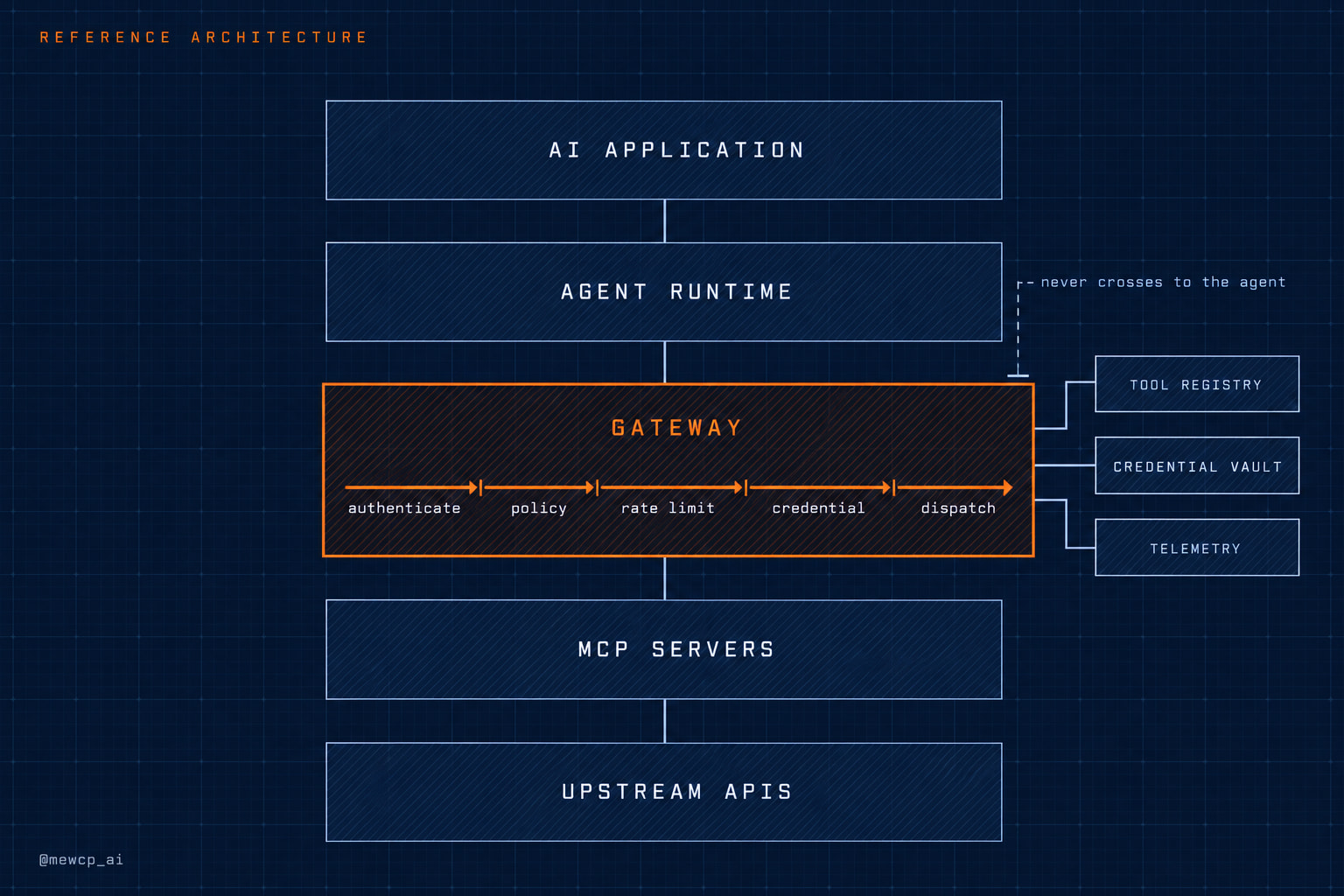
Here is the component map, top to bottom:
 ┌───────────────────────────────────────────────────────────┐
 │  AI APPLICATION  (your product UI, API, schedulers)        │
 └──────────────────────────┬────────────────────────────────┘
                            │  user session / API token
 ┌──────────────────────────▼────────────────────────────────┐
 │  AGENT RUNTIME  (loop, planning, memory, model calls)      │
 └──────────────────────────┬────────────────────────────────┘
                            │  MCP (Streamable HTTP) + request identity
 ╔══════════════════════════▼════════════════════════════════╗
 ║  GATEWAY                                                   ║
 ║   authenticate → resolve tenant → tool access policy →     ║
 ║   validate args → rate limit → resolve credential →        ║
 ║   dispatch with timeout → record trace                     ║
 ║                                                            ║
 ║   ├─ Tool registry     (what exists, who may see it)       ║
 ║   ├─ Credential vault  (encrypted tokens, refresh)         ║
 ║   ├─ Rate limiter      (tenant / tool / upstream buckets)  ║
 ║   └─ Telemetry export  (spans, metrics, cost)              ║
 ╚══════════════════════════╤════════════════════════════════╝
                            │  per-server connections
 ┌──────────────────────────▼────────────────────────────────┐
 │  MCP SERVERS  (hosted catalogue + your own domain servers) │
 └──────────────────────────┬────────────────────────────────┘
                            │  upstream credentials, injected
 ┌──────────────────────────▼────────────────────────────────┐
 │  UPSTREAM APIS  (Gmail, Slack, GitHub, your databases)     │
 └───────────────────────────────────────────────────────────┘
The double-bordered box is the infrastructure layer. Three boundaries in this diagram matter more than the boxes.
Boundary one: the agent never holds upstream credentials. The agent runtime authenticates to the gateway with an identity that says who the user and tenant are. It never sees a Gmail token or a Slack token. Those are resolved inside the gateway, injected at the last moment, and never travel back up. This is the single most important property of the layer, because the agent is the component that reads untrusted text.
Boundary two: every tool call passes through one policy point. There is no path from the agent to an upstream that skips the gateway. That is what makes access policy, rate limits and audit trails complete rather than best-effort. A second path, even one built "just for internal tools," becomes the place where the next incident happens.
Boundary three: MCP servers are replaceable. Whether a server is one you host, one a platform hosts for you, or one a vendor publishes, it sits behind the gateway and speaks MCP. Swapping it does not change the agent.
The life of one request
Walk one tool call through the layer. A user at Acme asks the agent to "post the release notes to #eng." The agent decides to call slack.send_message with a channel and text.
- The agent runtime sends an MCP
tools/callrequest to the gateway, over Streamable HTTP, carrying an access token that identifies the user and tenant. The tool arguments contain the channel and the text. They do not contain a tenant id, a user id or a Slack token. - Authenticate. The gateway validates the access token: signature, issuer, expiry, and audience. The audience check matters: the token must have been issued for this gateway, not for some other service.
- Resolve tenant. Tenant and user identity come from the validated token, never from the arguments.
- Tool access policy. Is
slack.send_messageenabled for Acme's plan? Does this user's role allow write tools? Has Acme connected Slack at all? If any answer is no, the call fails here with a clear, structured error. - Validate arguments against the tool's input schema. Unknown properties are rejected.
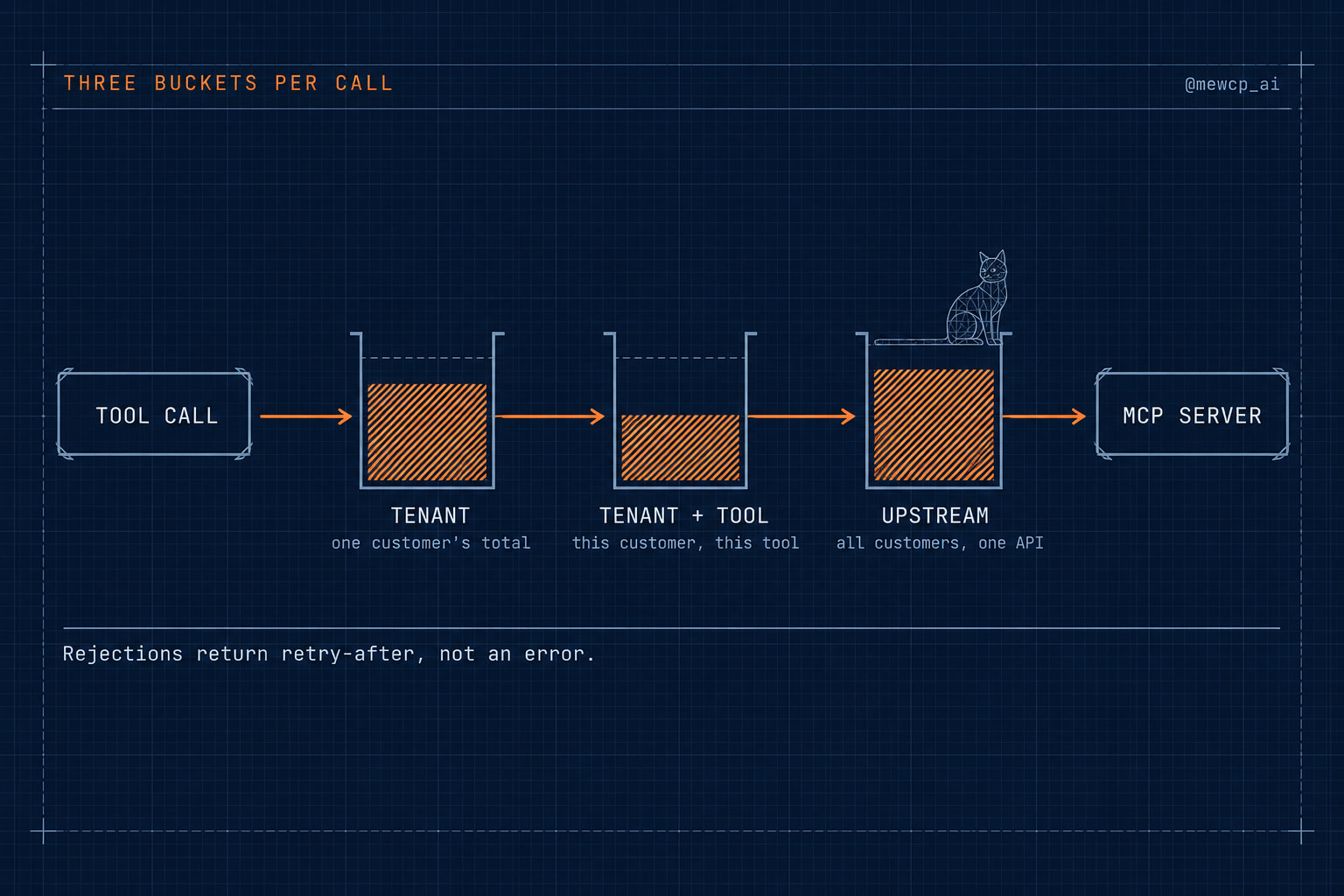
- Rate limit. Check three buckets: Acme's overall budget, Acme's budget for this tool, and the shared budget for Slack's API across all tenants. Any exhausted bucket returns a retry-after rather than a failure.
- Resolve credential. Look up the Slack token for (Acme, this user, Slack) in the vault, refresh it if it is close to expiry, decrypt it for the duration of this call only.
- Dispatch with a timeout to the Slack MCP server, attaching the credential in the way that server expects and an idempotency key derived from the run and step.
- Record the trace: tool name, tenant, duration, status, upstream status code, retry count and cost attribution. Not the token. Not, by default, the message text.
- Return a normalised result to the agent. Upstream-specific error formats are translated into a small set of categories the agent can reason about: retriable, needs user action, permission denied, invalid input.
Step 10 is underrated. An agent that receives raw upstream errors has to learn every API's error dialect. An agent that receives "needs user action: Slack connection revoked" can tell the user exactly what to do.
MCP servers: where tools actually run
MCP defines two standard transports. stdio runs the server as a local subprocess of the client, which is ideal on a developer's machine: no network, no hosting, credentials read from the local environment. Streamable HTTP runs the server as a network service that clients connect to remotely. It replaced the older HTTP plus Server-Sent Events transport in the 2025 revisions of the specification.
That distinction is the first infrastructure decision. stdio servers are per-process and per-machine. They do not serve many users, they cannot be shared across a fleet of agent workers, and their credentials are whoever launched them. The moment tools need to serve many users from shared infrastructure, they become remote servers, and a remote server is a service: it needs deployment, uptime, versioning, scaling, logging and authentication like any other.
Hosting one remote MCP server is a small project. Hosting twenty, each wrapping a different third-party API with its own OAuth app, scopes, token lifetime and rate limits, is an ongoing operational commitment. Day 28 covers the self-host versus hosted decision in detail; for this architecture the important point is that the gateway treats all servers the same way, so that decision can be made per server rather than once for everything.
Tool access and discovery at scale
In a prototype, the agent sees every tool that exists. In a platform, the tool list is a function of who is asking: tenant plan, user role, which accounts are connected, and which tools are enabled.
Two scaling problems appear together here.
Visibility. A tool that a tenant cannot use should not appear in that tenant's tool list at all. Refusing it at call time is necessary but not sufficient, because a model that can see a tool will sometimes try to use it, and each failed attempt costs a turn.
Volume. Every tool definition in the model's context costs tokens and adds one more option to confuse with another. Past a few dozen tools, exposing everything up front becomes expensive and hurts selection accuracy. The common response is a discovery pattern: the agent is given a small, fixed set of meta-tools (search for tools by intent, fetch a specific tool's schema, then call it) and loads only the definitions it needs for the current step. This moves tool discovery out of the prompt and into the infrastructure layer, where it can be filtered by policy before the model ever sees a result.
The gateway and the MCP authorization model
The gateway is the policy enforcement point, and for remote MCP it is also where the protocol's authorization model applies.
For HTTP-based transports, the MCP specification bases authorization on OAuth 2.1. In the current revisions of the spec:
- An MCP server acts as an OAuth resource server. It accepts access tokens issued by an authorization server and validates them.
- Servers advertise how to get a token by publishing OAuth Protected Resource Metadata (RFC 9728), which tells a client which authorization server to use.
- Tokens are audience-bound. Clients request tokens for a specific resource using Resource Indicators (RFC 8707), and servers must reject tokens that were not issued for them. This stops a token intended for one server being replayed against another.
- Token passthrough is forbidden. An MCP server must not take the token a client gave it and forward it to an upstream API. If the server needs to call Slack, it uses its own credentials for Slack, obtained through its own OAuth relationship.
That last rule is why the architecture has two distinct authorization hops, and why credential management is a separate component:
- Client to gateway (or MCP server): "Who is this user, and is this client allowed to act for them here?" Answered by the access token the agent runtime presents.
- Gateway (or MCP server) to upstream: "Which Slack token acts for this user?" Answered by the credential vault.
Conflating those two hops is the root cause of most agent credential bugs. The first token proves identity to your infrastructure. The second token is a secret your infrastructure holds on the user's behalf. They have different issuers, different lifetimes and different blast radii.
A gateway's policy pipeline, reduced to its shape, looks like this:
type Step = (ctx: CallContext) => Promise<void>;

interface CallContext {
  readonly identity: { tenantId: string; userId: string; scopes: ReadonlySet<string> };
  readonly tool: ToolDefinition;
  args: Record<string, unknown>;
  credential?: UpstreamCredential;
  readonly runId: string;
  readonly step: number;
}

const pipeline: Step[] = [
  enforceToolAccess,     // plan, role, connected accounts
  validateArguments,     // JSON Schema, additionalProperties: false
  enforceRateLimits,     // tenant, tenant+tool, upstream
  resolveCredential,     // vault lookup, refresh under lock, decrypt
];

export async function handleToolCall(ctx: CallContext) {
  for (const step of pipeline) await step(ctx);
  return dispatch(ctx, {
    timeoutMs: ctx.tool.timeoutMs ?? 15_000,
    idempotencyKey: `${ctx.runId}:${ctx.step}`,
  });
}
Authentication happens before a CallContext exists at all, which is why identity is readonly and not a pipeline step: nothing downstream should be able to construct or alter it. Tracing wraps handleToolCall from the outside, so rejected calls are recorded as well as successful ones.
Credentials: vault, injection, refresh, revocation
The credential component has four responsibilities.
Storage. Tokens are encrypted at rest, keyed by tenant, user and provider. All three are part of the key. A key that omits the user means two people at Acme share one Slack identity. A key that omits the tenant is a cross-customer leak waiting for a collision.
Injection at call time. Tokens are decrypted only when a call is dispatched, attached to that one upstream request, and discarded. They are never returned to the agent, never placed in a model's context, never written to a span or log.
Refresh. Access tokens expire, often within an hour. Refresh should happen shortly before expiry, under a per-key lock, so that twenty concurrent calls for the same user trigger one refresh instead of twenty racing ones. Some providers rotate refresh tokens on every use, which makes a race not just wasteful but destructive: the loser of the race may invalidate the winner's token.
Revocation. Users revoke access from the provider's side without telling you. The first sign is usually an invalid_grant on refresh. The right response is to mark the connection as revoked and surface a reconnect prompt, not to keep retrying and fail every future call with an opaque error.
Rate limiting: three buckets, not one
Rate limiting in an agent platform has two jobs that pull in different directions: protect each tenant from every other tenant, and protect every tenant from the upstream's limits.
That takes at least three buckets per call:
- Tenant bucket - how much this customer may do overall. Stops one tenant's runaway loop from consuming shared capacity.
- Tenant plus tool bucket - how often this customer may call this specific tool. Useful for expensive or dangerous tools.
- Upstream bucket - how fast the whole platform may call a given upstream API. Keeps you below the provider's limit so a single busy tenant does not get your OAuth app throttled for everyone.
A token bucket per key is the usual primitive. Here is a minimal in-process version that shows the logic:
interface BucketSpec {
  capacity: number;      // max burst
  refillPerSec: number;  // sustained rate
}

interface BucketState {
  tokens: number;
  updatedAt: number;
}

export class TokenBuckets {
  private state = new Map<string, BucketState>();

  // Returns 0 if allowed, otherwise milliseconds until a token is available.
  take(key: string, spec: BucketSpec, now = Date.now()): number {
    const s = this.state.get(key) ?? { tokens: spec.capacity, updatedAt: now };
    const elapsed = (now - s.updatedAt) / 1000;
    s.tokens = Math.min(spec.capacity, s.tokens + elapsed * spec.refillPerSec);
    s.updatedAt = now;

    if (s.tokens >= 1) {
      s.tokens -= 1;
      this.state.set(key, s);
      return 0;
    }
    this.state.set(key, s);
    return Math.ceil(((1 - s.tokens) / spec.refillPerSec) * 1000);
  }
}

const buckets = new TokenBuckets();

export async function enforceRateLimits(ctx: CallContext) {
  const { tenantId } = ctx.identity;
  const checks: Array<[string, BucketSpec]> = [
    [`tenant:${tenantId}`, planLimits(tenantId)],
    [`tenant:${tenantId}:tool:${ctx.tool.name}`, ctx.tool.perTenantLimit],
    [`upstream:${ctx.tool.provider}`, upstreamLimits(ctx.tool.provider)],
  ];
  for (const [key, spec] of checks) {
    const waitMs = buckets.take(key, spec);
    if (waitMs > 0) throw new RateLimited(key, waitMs);
  }
}
Two production caveats. First, an in-process map only works for a single gateway instance; with several instances, the buckets need to live in a shared store, typically Redis with an atomic script so that read, refill and decrement happen in one step. Second, the checks above consume from the tenant bucket even when a later bucket rejects the call. That is usually acceptable, but if it matters for your billing model, check all three before consuming from any.
The RateLimited error should carry the wait time back to the agent as a structured, retriable result. An agent that is told "retry after 1.2 seconds" can wait. An agent that is told "error" will often try a different, worse tool.
Execution: bounded, idempotent, cancellable
Days 22 and 23 covered state and reliability in depth. For the infrastructure layer, four rules carry most of the weight:
- Every dispatched call has a timeout, and the timeout cancels the outbound request rather than abandoning it.
- Retries are a property of the tool, not a decision the model makes. Read tools and tools that accept idempotency keys can be retried. Other write tools are not retried automatically, because a timeout means you stopped waiting, not that the upstream stopped working.
- Idempotency keys are derived from the run and step, so a retried agent step reuses the same key and the upstream can deduplicate.
- Runs can be cancelled. An operator or user who sees an agent doing the wrong thing needs a way to stop it that takes effect before the next tool call, which means cancellation is checked in the gateway, not only in the agent loop.
Observability: what the layer should record
Because every call passes through the gateway, the gateway is the natural place to produce the most complete record of what the agent did. For each call, record:
- Run id, step number, tenant, user
- Tool name, MCP server and version
- Policy decision (allowed, denied and why, rate-limited and which bucket)
- Duration, upstream status, retry count
- Cost attribution: which tenant, and any per-call upstream cost you track
Emit these as spans that share a trace with the agent runtime's model calls, so one run can be read end to end. OpenTelemetry has semantic conventions for generative AI spans that are useful here; check their current status before depending on specific attribute names, since that area of the conventions has been evolving.
Two things not to record by default: credentials, ever, and raw argument or result payloads in any store shared across tenants. Payloads are where the sensitive data is. Keep them in tenant-scoped storage or redact them before export.
What operating looks like week to week
Building is mostly done in bursts. Operating is a steady rhythm of small recurring work. For this layer, that rhythm looks like:
- Credential health. How many connections are expired, revoked or failing refresh, per provider? A sudden spike for one provider usually means they changed something.
- Upstream changes. Providers deprecate endpoints, change scopes, tighten rate limits and rotate OAuth requirements. Each one is a small migration in the MCP server that wraps them.
- Tool schema changes. Changing a tool's input schema affects runs in flight and evaluation cases written against the old shape. Version schemas, and roll out changes deliberately.
- Noisy tenants. Which tenants are hitting their buckets, and is that abuse, a runaway loop or a customer who needs a higher plan?
- Incident questions. When something goes wrong, the first three questions are always the same: what did the agent do, for whom, and with which credential. If answering them takes more than a few minutes, observability needs work.
- Access reviews. Which tools can write? Who can use them? Enterprise customers will ask, usually in a security questionnaire.
None of that is exotic. It is the ordinary work of running a platform. It is also work that never appears in an agent demo, which is why it catches teams by surprise.
Build versus adopt, per component
The takeaway slide put this layer in a lineage: databases, authentication and payments each started as something every team built and became infrastructure most teams adopt. Agent tool access is following the same path. That does not mean you should adopt everything. It means you should decide component by component.
| Component | Typical call | Why |
|---|---|---|
| MCP servers for your own domain | Build | They encode your business logic and data model. |
| MCP servers for common third-party APIs | Adopt | Wrapping Gmail, Slack or GitHub well is undifferentiated, ongoing maintenance. |
| Tool access policy | Build the rules, adopt the mechanism | Who may do what is product logic. Enforcing it consistently is plumbing. |
| Authentication | Adopt | Use an identity provider. |
| Credential vault and OAuth lifecycle | Adopt, or build as a dedicated service | High blast radius and fiddly edge cases. If you build it, give it its own review. |
| Multi-tenancy rules | Build | Isolation is tied to your data model. |
| Gateway | Adopt or build thin | The pipeline is simple; the completeness guarantee (no bypass path) is what matters. |
| Rate limiting | Adopt the primitive, build the policy | Buckets are solved; limits per plan and per tool are yours. |
| Execution runtime | Adopt for long-running work | Durable workflow engines exist; write your timeout and retry policy, not the engine. |
| Observability backend | Adopt | Use OpenTelemetry-compatible tooling; own the attributes. |
The pattern is consistent: own the rules, adopt the machinery. Your tenancy model, your tool access policy, your limits per plan and your domain tools are product. The vault, the OAuth dance, the gateway mechanics, the hosted integrations and the telemetry backend are infrastructure.
This is the category MewCP works in. It provides a hosted catalogue of MCP servers behind a single gateway endpoint, keeps upstream credentials encrypted in a vault and injects them only at call time so they never reach the agent or the model, refreshes OAuth tokens automatically, and exposes a small discovery-first tool surface (search, get schema, list accounts, call tool) so the agent's context does not grow with every app a user connects. It is one example of the category, not the only way to fill it, and it does not replace the parts of the table marked "build."
The infrastructure layer checklist
Access
- The agent runtime never holds, sees or logs an upstream credential
- There is no path from the agent to an upstream API that bypasses the gateway
- Access tokens presented to the gateway are validated for signature, expiry and audience
- Tenant and user identity come only from the validated token
- The tool list each caller sees is filtered by tenant plan, role and connected accounts
- Tools are discovered on demand rather than all loaded into the prompt, once the catalogue grows past a few dozen
- Upstream credentials are keyed by tenant, user and provider
- Refresh happens under a per-key lock; revocation surfaces as a reconnect prompt
Control
- Every call passes through one policy pipeline, in a fixed order
- Rate limits exist at tenant, tenant-plus-tool and upstream level
- Rate limit rejections return a structured retry-after, not a generic error
- Every call has a timeout that cancels the outbound request
- Only idempotent tools are retried automatically; idempotency keys derive from run and step
- Runs can be cancelled, and cancellation is checked before each dispatch
- Upstream errors are normalised into a small set of categories the agent can act on
Evidence
- Every call emits a span with run, tenant, tool, policy decision, duration and status
- Agent model calls and gateway tool calls share one trace per run
- Credentials never appear in telemetry; payloads are redacted or tenant-scoped
- You can answer "what did the agent do, for whom, with which credential" in minutes
Operations
- Credential health is monitored per provider
- Tool schemas are versioned and changes are rolled out deliberately
- Someone owns upstream API changes for each integration
- Build-versus-adopt has been decided per component, and written down
Where this leaves you
The agent is your product. The layer underneath it is infrastructure you still have to account for, whether you build it, adopt it or, most commonly, some of each. What does not work is pretending it is not there, because the moment real users arrive it starts doing its job whether or not you designed it, and an undesigned version of this layer is just a collection of incidents waiting for a timestamp.
Next in the series: the first component on the access list, MCP servers themselves, and an honest look at when self-hosting them makes sense and when hosted MCP infrastructure does.