
Hosted vs Self-Hosted MCP Servers: An Honest Architecture Guide
A hosted MCP server speaks exactly the same protocol as one you run yourself. What changes is who deploys it, holds its credentials and keeps it up. Here is how to decide, per integration.

The first MCP server most developers run is a subprocess. You add a few lines to a client config, the client launches the server on your machine, and your agent can suddenly read your GitHub issues. It feels like installing a plugin.
That feeling is accurate on a laptop and misleading everywhere else. The moment an agent serves other people, each MCP server it depends on stops being a plugin and becomes a service: something that has to be deployed, reached over a network, authenticated, updated, scaled and watched. And unlike most services, many MCP servers hold the most sensitive thing in your system: other people's OAuth tokens for other people's accounts.
That is the context for the hosted versus self-hosted question. This guide covers what each option actually involves, the authorization model that applies to remote MCP servers, an honest comparison, a per-integration decision matrix, and a hybrid architecture with code, which is where most teams end up. It closes with a due-diligence checklist for any hosted MCP provider, useful whichever way you decide.
Local versus remote: the transport decides the shape
MCP defines two standard transports, and they imply very different operating models.
stdio. The client launches the server as a child process and talks to it over standard input and output. There is no network, no port, no hosting. Credentials usually come from environment variables set by whoever launched the process. This is excellent for local development and single-user desktop tools, and it is the reason MCP feels so easy to start with.
Streamable HTTP. The server runs as an independent network service. Clients send JSON-RPC messages over HTTP POST, and the server can stream responses back when an operation produces multiple messages. It replaced the earlier HTTP plus Server-Sent Events transport in the 2025 revisions of the specification.
stdio servers are per-process and per-machine. They cannot be shared across a fleet of agent workers, they cannot serve many users, and their identity is whoever started them. So as soon as your agent runs on a server for many users, every MCP server it uses must become a remote one. The protocol is the same. The operational reality is not.
What self-hosting a remote MCP server actually involves
Here is the honest list for one integration, say a Slack MCP server that acts on behalf of each of your users.
Deployment and runtime
- A container or process, deployed somewhere with a stable HTTPS endpoint
- Health checks, restarts, and capacity for peak load
- A deployment pipeline, since upstream APIs change and you will ship updates
Authentication of callers
- Validating that each request comes from your agent platform and identifies a real user
- For MCP authorization over HTTP, acting as an OAuth resource server (more on this below)
Upstream credentials
- An OAuth app registered with Slack, with its client secret stored securely
- A connect flow for users, a callback endpoint, and consent screens
- Encrypted storage for every user's access and refresh tokens
- Token refresh before expiry, under a lock so concurrent calls do not race
- Handling revocation when a user disconnects Slack from their Slack settings
Upstream behaviour
- Respecting Slack's rate limits across all your users combined
- Translating Slack's error formats into something the agent can act on
- Tracking API deprecations and scope changes
Operations
- Logs and traces that do not leak tokens or message content
- Alerting when refresh failures spike
- Someone who owns it when it breaks at 3am
None of that is hard in isolation. Each item is a well-understood piece of work. The problem is the multiplier. An agent that is genuinely useful across a workday touches email, calendar, chat, documents, a code host, an issue tracker and perhaps a CRM. That is seven small services, seven OAuth apps, seven token lifecycles and seven sets of upstream changes to track, before you have written a line of your own product.
What hosted MCP infrastructure centralises
A hosted MCP server is a remote MCP server that someone else runs. Your agent connects to it over Streamable HTTP and uses it exactly as it would a server you host. What moves to the provider:
- Deployment, uptime and scaling of the server process
- The upstream OAuth app, connect flows and consent screens
- Credential storage, refresh and revocation handling
- Upstream maintenance: API changes, scope changes, error normalisation
- Consistency: one way to connect, one auth scheme and one error model across many integrations, instead of one per server
Providers that host many servers usually put them behind a gateway, so the agent connects to one endpoint rather than one per integration. That adds a second benefit: a single policy point for access, rate limits and audit, which Day 27 argued every platform needs anyway.
What does not move: your responsibility for which tools your agent may use, for whom, with what approval. Hosting changes who operates the server, not who is accountable for what the agent does with it.
The two authorization hops, and why token passthrough is forbidden
Remote MCP makes one architectural fact unavoidable: there are two separate authorization relationships in every tool call.
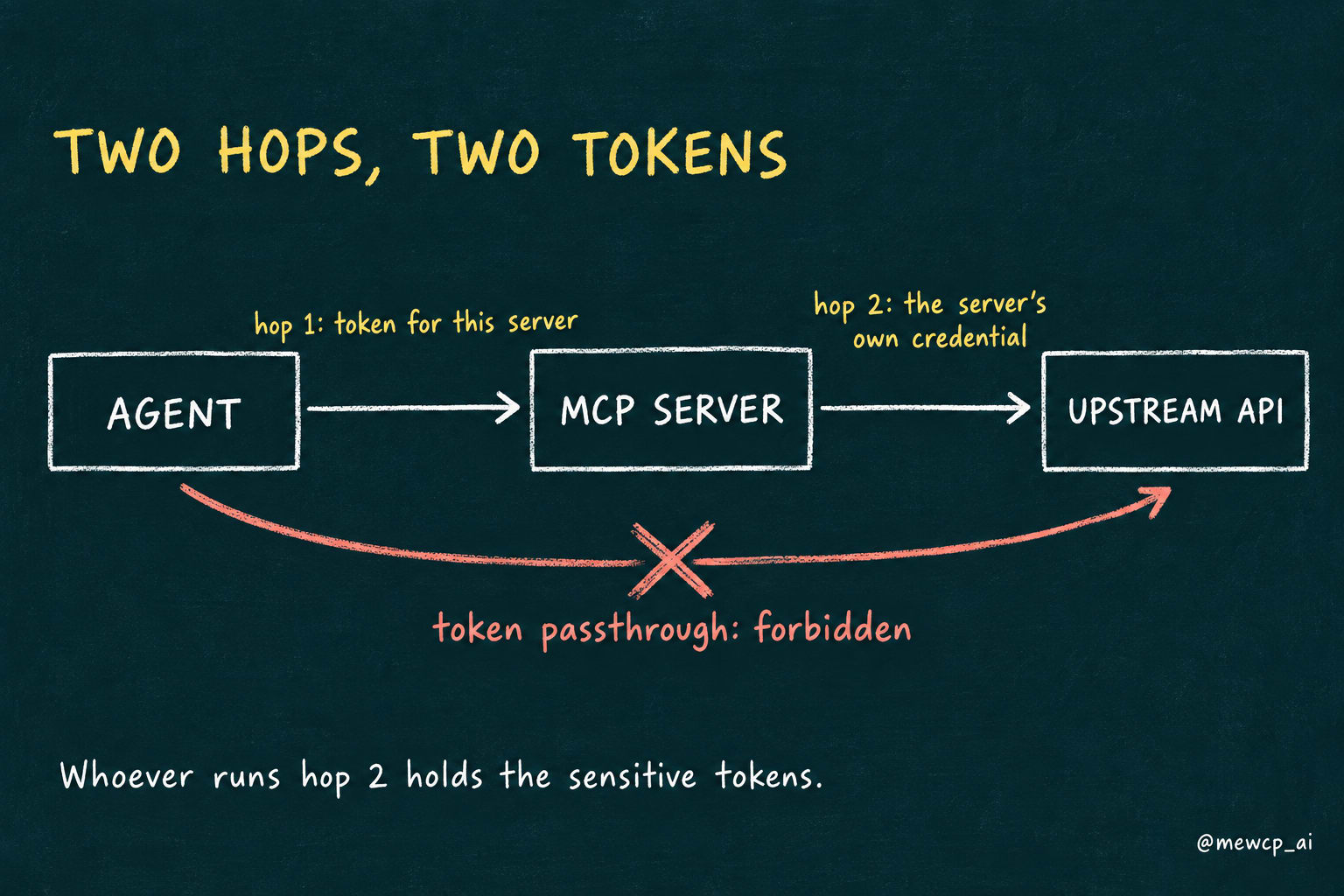
Hop one: client to MCP server. Is this caller allowed to use this server, and on whose behalf? For HTTP transports, the MCP specification bases this on OAuth 2.1. In current revisions of the spec, the MCP server acts as an OAuth resource server; it advertises its authorization server through OAuth Protected Resource Metadata (RFC 9728); clients request tokens bound to that specific server using Resource Indicators (RFC 8707); and the server must reject tokens that were not issued for it.
Hop two: MCP server to upstream API. Which Slack token acts for this user? This is answered by whatever credential the server holds for that user, obtained through the server's own OAuth relationship with Slack.
The specification is explicit that these two must not be merged. An MCP server must not accept a token and simply forward it to an upstream API. That practice, called token passthrough, is forbidden because it breaks audience validation (the upstream cannot tell which service is really calling), bypasses the server's own controls, and turns the MCP server into a confused deputy that can be tricked into using a token for something it was never meant for.
This matters for the hosted versus self-hosted decision because hop two is where the sensitive credentials live. Whoever operates hop two holds the refresh tokens for every connected account. If you self-host, that vault is yours to secure. If you use a hosted provider, their vault becomes part of your security posture, and you should evaluate it as seriously as you would your own.
Self-hosted versus hosted, honestly
| Self-hosted | Hosted | |
|---|---|---|
| Control | Full: code, versions, deployment, data paths | Limited to what the provider exposes |
| Data location | Stays in your network | Transits and, for credentials, rests with the provider |
| Custom tools | Anything you can write | Whatever the catalogue offers |
| Time to first integration | Days to weeks per integration | Minutes to hours |
| Credential lifecycle | You build and run it | Provider runs it |
| Upstream maintenance | Yours, forever | Provider's |
| Consistency across integrations | As consistent as your team makes it | One connection model for all |
| Scaling | Yours | Provider's |
Neither column wins outright. Self-hosting buys control and data locality with operational effort. Hosting buys speed and less operational load with trust and dependency. The right answer depends on the integration.
When self-hosting is the right call
There are cases where hosting is simply the wrong answer, and a guide that pretended otherwise would not be worth reading.
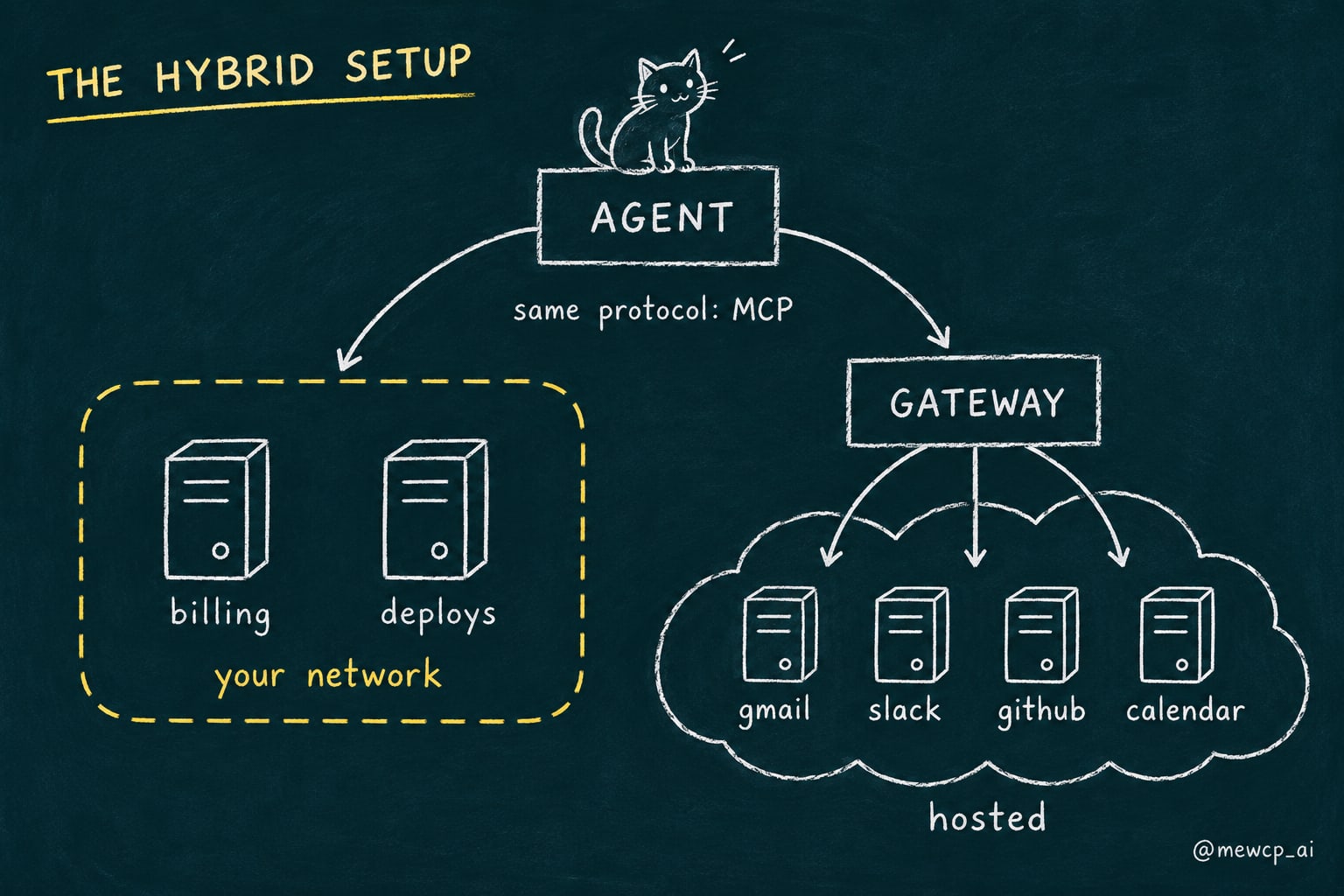
- Proprietary internal tools. An MCP server that queries your own billing database or triggers your own deployment pipeline encodes your business logic and touches your private systems. No catalogue will have it, and it should run next to the systems it wraps.
- Strict data residency or regulatory constraints. If data or credentials must never leave a particular jurisdiction or network, a hosted provider needs to meet that exactly, or it is out.
- Air-gapped or highly restricted networks. If the agent runs where outbound internet is not available, remote hosted servers are not an option.
- Custom behaviour on a common integration. If you need a Slack tool that enforces your own posting rules, you may wrap Slack yourself even though a hosted Slack server exists.
- You are the platform. If MCP integrations are your product, you host them by definition.
A decision matrix, per integration
Make the call per integration, not once for everything. For each MCP server your agent needs, answer five questions:
| Question | Points toward self-hosting | Points toward hosted |
|---|---|---|
| Does it wrap your own systems or a common third-party API? | Your own systems | Common third-party API |
| Is there a data residency or network constraint? | Yes | No |
| Does it need behaviour specific to your product? | Yes | No, standard operations are enough |
| How many of your users will connect their own accounts? | Few, or none | Many |
| Does your team want to own its OAuth lifecycle long term? | Yes, with capacity | No |
If most answers point one way, follow them. If they are mixed, the tie-breaker is usually ongoing maintenance: which option will still be healthy in a year when the upstream has changed twice and the engineer who wrote the integration has moved on?
The hybrid architecture: host the common, own the unique
Most teams land on a hybrid. Domain tools that encode business logic run in your infrastructure. Common third-party integrations come from a hosted provider. The agent connects to both over MCP and does not care which is which.
A self-hosted domain server with FastMCP
Here is a small internal MCP server in Python using FastMCP. It exposes read-only billing tools and runs over Streamable HTTP.
from fastmcp import FastMCP

mcp = FastMCP("billing-internal")


@mcp.tool
def get_invoice_status(invoice_id: str) -> dict:
    """Return the status, amount and due date of one invoice for the caller's account."""
    invoice = billing_db.fetch_invoice(invoice_id)  # your data access layer
    return {
        "invoice_id": invoice.id,
        "status": invoice.status,
Three production notes. First, the tools take no tenant or account argument, following Day 21's rule: identity must come from the authenticated request, never from the model. In a real deployment billing_db would scope every query to the caller resolved from the request, not shown here to keep the example short. Second, this server must validate who is calling. FastMCP ships token verification providers for this; check the FastMCP documentation for the exact class names in your version, since that API has evolved. Third, because this server wraps your own database and uses no third-party OAuth, there is no hop-two credential problem at all, which is part of why it is such a natural candidate for self-hosting.
Connecting the agent to both, in TypeScript
The official TypeScript SDK connects to any Streamable HTTP server the same way. Here the agent opens one connection to its internal server and one to a hosted gateway.
import { Client } from "@modelcontextprotocol/sdk/client/index.js";
import { StreamableHTTPClientTransport } from "@modelcontextprotocol/sdk/client/streamableHttp.js";

async function connect(name: string, url: string, headers: Record<string, string>) {
  const client =
From here, the agent loop merges both tool lists into what it gives the model, and routes each tool call back to the client that owns that tool. The agent does not need to know which server is self-hosted and which is hosted; it only needs to know which connection each tool name came from.
Discovery through a hosted gateway
A hosted gateway with a large catalogue creates a context problem if it exposes every tool up front. The MewCP gateway handles this by exposing four meta-tools to every client, however many apps are connected: search to find tools by keyword across connected apps, get_schema to fetch parameters for chosen tools, list_accounts to see which accounts are connected for an app, and call_tool to execute. A discovery-then-call sequence looks like this:
// 1. Find candidate tools by intent.
const found = await hosted.callTool({
  name: "search",
  arguments: { query: "send a slack message" },
});

// 2. Fetch the schema for the tool the agent picked from the search result.
const schema = await hosted.callTool({
  name: "get_schema",
  arguments: { tools: [{ server_maskedId: "slack", tool_name: pickedToolName }] },
pickedToolName comes from the search result rather than being hard-coded, deliberately: tool names and parameter shapes can change as integrations evolve, and fetching the schema at call time is good agent engineering whichever provider you use. In practice you give these meta-tools to the model and let it drive the sequence; the code above just makes the steps visible.
How MewCP approaches the hosted layer
We build MewCP, so here is what it does, limited to what its documentation states.
- One gateway endpoint. Every connected app is reached through the same MCP endpoint. Connecting a new app in the dashboard makes it available without a client config change or restart.
- Four tools, regardless of catalogue size.
search,get_schema,list_accountsandcall_tool, so the agent's context does not grow with each connected app. - Credentials held server-side. Per the docs, credentials are encrypted at rest in a vault, decrypted and injected into the upstream request only at the moment a tool is called, and never travel to your client, your agent or the model. Expired OAuth access tokens are refreshed automatically.
- Multiple accounts per app. When a user connects more than one account for the same app,
list_accountsshows them and the agent selects one by alias. - Per-end-user credentials for B2B products. For teams building their own multi-customer product, MewCP's Auth API ties every credential to an external user id you supply, so each of your users' connected accounts stays attached to that user.
It is a hosted option for the common integrations. It does not replace the domain servers you should own, the tenancy rules of your own data, or your responsibility for which actions your agent takes.
Due-diligence checklist for any hosted MCP provider
Whichever provider you consider, including us, ask these questions before you let it hold your users' credentials.
Credentials
- How are upstream tokens stored at rest, and how are encryption keys managed?
- When are tokens decrypted, and do they ever leave the provider's infrastructure other than in the upstream request itself?
- Do tokens ever reach the client, the agent or the model?
- How are refresh, rotation and revocation handled?
- Can a user or your platform revoke a connection immediately?
Isolation
- How are your users' credentials and calls isolated from other customers'?
- If you serve many end users, how is each end user's credential bound to that user?
Protocol and access
- Which MCP transports and spec revisions are supported?
- Does the provider follow the MCP authorization guidance, including audience-bound tokens and no token passthrough?
- Can you restrict which tools or apps are available, per user or per key?
Operations
- What are the rate limits, and how are upstream limits shared across customers?
- How are errors reported: structured, with retriable versus non-retriable categories?
- What audit and execution history do you get, and for how long?
- What is the provider's uptime history and incident communication process?
Exit
- If you leave, can users reconnect their accounts elsewhere without friction?
- Because the provider speaks MCP, how much of your agent code would change? (Ideally: only the connection configuration.)
That last question is MCP's quiet advantage. Because hosted and self-hosted servers speak the same protocol, the decision is reversible per integration. You can start hosted and bring an integration in-house later, or the reverse, without rewriting your agent.
Where this leaves you
Self-hosting is not the serious option and hosting is not the lazy one. They are two ways to operate the same protocol, with different costs in different places. Self-hosting costs operational effort and buys control. Hosting costs trust and buys time. For your own domain tools, the calculation almost always favours owning them. For the common integrations every agent needs, it usually favours not maintaining them yourself.
Host the common. Own the unique. And make that call integration by integration, knowing that MCP lets you change your mind later.
Next in the series: the whole production architecture on one page, from application to agent to gateway to servers to tools, and the cross-cutting concerns that tie it together.