
From Prompt to Production AI Agent: The Complete 30-Day Architecture & Builder Guide
Thirty lessons, one path. Everything this series taught about building AI agents, condensed into key rules, a reference architecture, a reference implementation, a builder roadmap and one production checklist.

Thirty days ago this series started with one question: what is an AI agent?
The common answer is "an LLM with a prompt." It is not wrong. It describes how almost every agent begins. But after thirty days of taking agents apart, the honest answer is longer: an AI agent is a system. It reasons and plans. It remembers. It acts through tools. It runs on infrastructure that knows who it is acting for, holds the right credentials, keeps customers apart, records what happened and checks that it still works.
This guide is the whole series in one place. It is written to be kept, not skimmed: a reference you can open when you are designing an agent, reviewing one, or deciding what to build next.
How to use this guide
- If you are starting out, read the journey in order. Each part builds on the one before it.
- If you have a working prototype, jump to the reference architecture and the builder roadmap, and find which stage you are at.
- If you are preparing to ship, go straight to the production readiness checklist and work through it honestly.
- If you are explaining agents to your team, the thirteen-station map and the one-sentence version are the two things to share.
The one-sentence version
If one sentence survives the whole series, make it this:
Building an AI agent is easy to demonstrate. Building one that reliably operates in the real world requires an infrastructure layer.
Everything below is the explanation of that sentence: the first half (what an agent is and how it works) and the second half (what it takes to operate one for real people).
The journey: thirteen stations, four parts
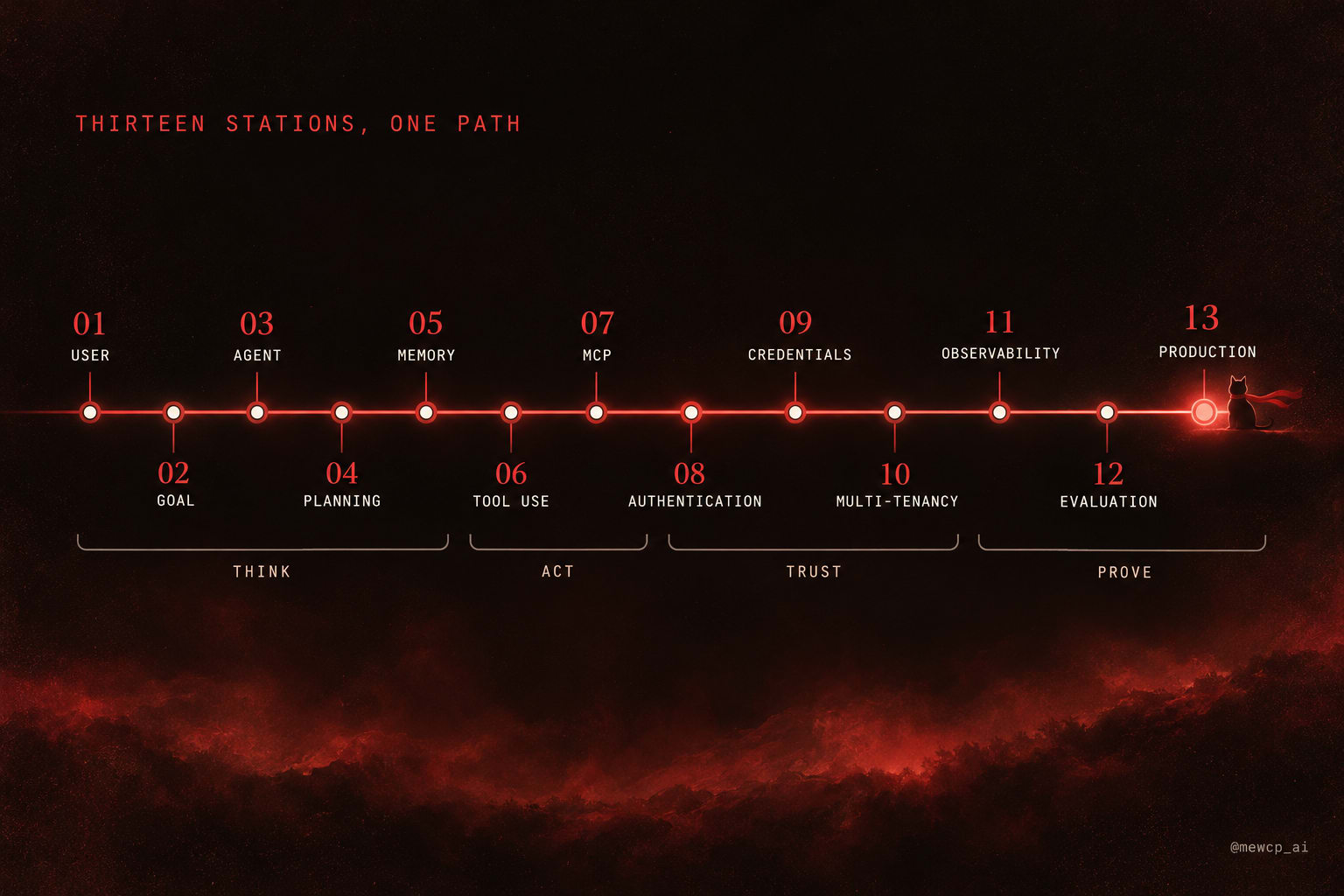
 THINK   01 USER ─ 02 GOAL ─ 03 AGENT ─ 04 PLANNING ─ 05 MEMORY
 ACT     06 TOOL USE ─ 07 MCP
 TRUST   08 AUTHENTICATION ─ 09 CREDENTIALS ─ 10 MULTI-TENANCY
 PROVE   11 OBSERVABILITY ─ 12 EVALUATION ─ 13 PRODUCTION
The first five stations are about the agent learning to think. The next two are about it learning to act. The next three are about it earning the right to act for real people. The last three are about proving it works, then shipping.
Notice where the model appears. It does most of its work at stations 03 to 06. The other nine stations are mostly not model problems at all. That is the shape of the whole series, and of every production agent.
Part one: it learns to think (Days 1 to 9)
Day 1. What is an AI agent?
An AI agent is a system that pursues a goal by deciding its own next steps, taking actions through tools, observing the results, and continuing until the goal is met or it should stop. The model provides the decisions. The system around it provides everything else.
Key rule: if nothing in your system decides the next step based on what just happened, it is not an agent. That is fine. Many problems do not need one.
Day 2. Chatbot vs AI agent
A chatbot responds. An agent acts. A chatbot's output is text for a human to read; an agent's output is often an action in another system, which is why everything about safety, identity and reliability gets harder.
Key rule: the moment your system's output changes something outside the conversation, you are building an agent, and the bar for correctness rises.
Day 3. The AI agent loop
Every agent runs a loop: observe the current state, think about what to do, act, observe the result, repeat. The loop is simple. Controlling it is not: it needs a step limit, a time limit, and a stop condition other than "the model said it was done."
Key rule: never ship a loop without a maximum number of steps and a maximum wall-clock time.
Day 4. What actually makes an agent autonomous?
Autonomy is not one property. It is a dial: how many decisions the agent makes without a human, how consequential they are, and how long it runs unattended. More autonomy is not automatically better; it is a cost you pay for convenience.
Key rule: set autonomy per action, not per agent. Reading can be autonomous while sending, paying and deleting require approval.
Day 5. AI agents don't just think
Reasoning is necessary but not sufficient. An agent's value is in what it does: the tools it calls and the state it changes. That shifts the engineering focus from prompts to actions, and from "is the answer good?" to "was the action right?"
Key rule: evaluate actions, not just answers.
Day 6. AI agent vs workflow
A workflow follows a path you designed in advance. An agent chooses its path at runtime. Workflows are cheaper, faster and more predictable; agents handle variety a fixed path cannot. Many good systems are workflows with one or two agentic steps inside them.
Key rule: use a workflow when you can draw the path. Use an agent only for the parts you cannot.
Day 7. Anatomy of an AI agent
An agent has recognisable parts: a model, instructions, tools, memory, a planning approach and a control loop, plus the guardrails around them. Naming the parts makes it possible to debug them one at a time.
Key rule: when an agent fails, find which part failed before you change the prompt.
Day 8. The planning layer
Planning turns a goal into steps. It can be implicit (the model decides one step at a time) or explicit (the model writes a plan first, then executes it). Explicit plans are easier to inspect, review and correct, especially for long or consequential tasks.
Key rule: for any task longer than a few steps, make the plan visible, so a human or a check can catch a bad plan before it runs.
Day 9. Memory is not just chat history
Memory comes in layers: the working context of the current call, the session state of the current task, and long-term memory retrieved when relevant. Stuffing everything into the context window is not memory; it is a growing bill and a dilution of attention.
Key rule: every memory write has an owner, and every memory read is filtered to that owner before the model sees it.
Part two: it learns to act (Days 10 to 18)
Day 10. How tool calling actually works
The model never runs a tool. It produces a structured request (a tool name and arguments that match a schema); your code validates it, runs it, and returns the result for the model to read. Tool calling is a contract between the model and your code.
Key rule: validate every tool call your code receives as if it came from an untrusted client, because in effect it did.
Day 11. Why AI agents fail
Agents fail in recognisable ways: wrong tool, right tool with wrong arguments, loops that do not terminate, confident answers built on failed tool calls, context that drifted, and actions taken on instructions injected through data. Most failures are not "the model is dumb"; they are missing guardrails.
Key rule: for every failure mode, there should be a mechanism outside the model that catches it.
Day 12. The complete AI agent architecture
Put together, an agent has a model layer, a planning layer, a memory layer, a tool layer and an execution layer, plus the guardrails and observability around them. Each layer has its own failure modes and its own tests.
Key rule: design the layers explicitly, even if each one is tiny at first.
Day 13. An agent is useless without the ability to act
Without tools, an agent can only talk. Tools are what connect reasoning to reality: reading data, writing records, sending messages, triggering systems. Choosing and designing the tool set is one of the highest-leverage decisions you make.
Key rule: give the agent the smallest set of tools that completes the job, not every tool you can.
Day 14. What exactly is an AI agent tool?
A tool is a name, a description, an input schema and a handler. The model only ever sees the first three, so the description and schema are effectively part of the prompt. Clear names, precise descriptions, tight schemas and helpful error messages measurably change how well an agent uses a tool.
Key rule: write tool descriptions for the model, not for humans, and reject unknown properties in every schema.
Day 15. The hidden problem with connecting agents to tools
Connecting one agent to one API is easy. Connecting many agents to many APIs, each with its own auth, schema style, errors and rate limits, becomes an N times M integration problem that grows faster than the product.
Key rule: standardise the interface between agents and tools before the integrations multiply.
Day 16. What is MCP?
The Model Context Protocol is an open standard for connecting AI applications to tools, data and prompts. An MCP server exposes capabilities; an MCP client inside the AI application discovers and uses them. One server works with any compliant client, which turns N times M integrations into N plus M.
Key rule: if you are writing a tool integration that more than one agent or client will use, write it as an MCP server.
Day 17. MCP vs APIs
MCP does not replace APIs. It sits on top of them. The API is how a service exposes its functionality to programs; MCP is how that functionality is described and offered to models, with discovery, schemas and a standard way to call it. Most MCP servers are thin, careful wrappers around existing APIs.
Key rule: put the MCP boundary where the model needs a tool, not where the API happens to have an endpoint. One good tool may combine several endpoints.
Day 18. Inside an MCP architecture
An MCP architecture has a host (the AI application), clients (one per server connection), and servers (which expose tools, resources and prompts). Servers can run locally over stdio or remotely over Streamable HTTP. Remote servers serve many users, which is where identity, credentials and isolation enter the picture.
Key rule: local servers are for one person's machine. Anything serving many users is a remote service and needs to be operated like one.
Part three: it earns trust (Days 19 to 22)
Day 19. AI agents need authentication too
The moment an agent acts on someone's behalf, it needs to know who that someone is. Identity must come from a verified token or session, never from anything the client or the model says. For remote MCP servers, the specification bases authorization on OAuth 2.1, with servers acting as OAuth resource servers that accept only tokens issued for them.
Key rule: identity is a property of the authenticated request, never a field the model can supply.
Day 20. Why AI agent credentials are hard
Authentication asks who the user is. Credential management asks which third-party token acts for them, right now, at this provider. Those tokens are issued through OAuth, expire, get refreshed, get revoked by users, and carry scopes. They are the most sensitive data your agent platform holds.
Key rule: resolve credentials per user, per provider, per call. Never put them in environment variables, long-lived objects, logs or the model's context.
Day 21. What is multi-tenancy in AI agents?
One platform, many customers, five things that must never touch: data, credentials, permissions, executions and configuration. In a classic SaaS app the tenant boundary is enforced once, in the query. In an agent the model chooses arguments at runtime, so tenancy must be re-derived from the request on every tool call. Caches, vector namespaces, background jobs, retrieved memory and reused tool sessions are where it leaks.
Key rule: tenant_id never appears in a tool schema. The server decides who is asking.
Day 22. Stateless vs stateful agent infrastructure
Stateful services hold session state in memory; stateless services get the context they need with each request or from explicit stores. Stateless tiers scale horizontally and deploy safely, which suits agent workers and gateways. Agents still have state; the point is to keep it in durable, explicit stores rather than in a process that can restart.
Key rule: bind identity and context to the request, keep run state in a durable store, and keep the compute tiers stateless where you can.
Part four: it proves itself (Days 23 to 25)
Day 23. What makes an AI agent reliable?
Reliability is not something the model provides. It comes from engineering: timeouts on every call, retries only where they are safe, validation of inputs and of tool results, fallbacks, clear error handling, idempotency for writes, and human approval for consequential actions.
Key rule: a timeout means you stopped waiting, not that the upstream stopped working. Only retry what is idempotent.
Day 24. You can't run production agents blind
Observability answers what the agent did, which tool it called, with what parameters, what came back, how long it took, where it failed and what it cost. Logs, traces, metrics and execution history are the raw material; one trace per run, linking model turns and tool calls, is the core.
Key rule: you should be able to reconstruct any single run from last week, step by step, including cost.
Day 25. How do you know if an agent actually works?
A successful demo is one sample. Evaluation measures task success, tool selection accuracy, output quality, reliability, latency, cost and safety in a repeatable way, so that a change can be compared against a baseline instead of an impression.
Key rule: run every evaluation case more than once, and block releases when the pass rate regresses.
The platform (Days 26 to 29)
Day 26. What an AI agent platform actually needs
The agent is one box in a ten-layer stack: agent, models, tools, memory, authentication, credentials, multi-tenancy, execution, observability and evaluation. The top four make a demo; the bottom six make a product. Each one should be owned, bought or deliberately deferred.
Day 27. The infrastructure layer behind agents
Building an agent and operating an agent platform are different jobs. Between the agent and its tools sits an infrastructure layer that decides who can call what, with whose credentials, how often, and records what happened: MCP servers, tool access, authentication, credentials, tenancy, a gateway, rate limiting, execution and observability.
Day 28. Why hosted MCP servers matter
Every remote MCP server you self-host is a service you run. Hosted MCP infrastructure moves deployment, credential storage and upstream maintenance to a provider, while the protocol stays identical. Self-host your domain tools and anything with strict data constraints; consider hosting for the common integrations. Host the common, own the unique.
Day 29. The production agent stack
Five layers on the request path (application, agent, MCP gateway, MCP servers, tools and services) and five concerns that cut across every layer (authentication, credentials, tenancy, observability, evaluation). The gateway is where the concerns meet for tool calls. The model chooses tools and arguments; the stack decides everything else.
The reference architecture
                    AUTH   CREDS   TENANCY   OBSERV.   EVALS
 ┌─────────────────────────────────────────────────────────────┐
 │ AI APPLICATION    users, sessions, runs, approvals UI       │
 ├─────────────────────────────────────────────────────────────┤
 │ AGENT             loop · planning · memory · model routing  │
 │                   step limits · stop conditions             │
 ├─────────────────────────────────────────────────────────────┤
 │ MCP GATEWAY       verify → scope → validate → limit →       │
 │                   inject credential → dispatch → trace      │
 ├─────────────────────────────────────────────────────────────┤
 │ MCP SERVERS       your domain servers │ hosted servers      │
 ├─────────────────────────────────────────────────────────────┤
 │ TOOLS & SERVICES  your systems │ third-party APIs           │
 └─────────────────────────────────────────────────────────────┘
   Durable run store · Credential vault · Rate-limit store
   Telemetry pipeline ──▶ Evaluation (CI suites + sampled runs)
Three properties make this architecture production-grade rather than just complete:
- The model never holds identity or credentials. Identity comes from the authenticated request; credentials are injected below the gateway, per call.
- Every tool call passes one policy point. No path from agent to upstream skips the gateway, so access rules, limits and traces are complete.
- Every run is reconstructable and every change is measurable. One trace per run feeds both debugging and evaluation.
A minimal reference implementation
Here is a compact agent loop in TypeScript that embodies the rules above. It uses the Anthropic TypeScript SDK for the model and the official MCP TypeScript SDK to reach tools through a gateway over Streamable HTTP. It has a step limit, a wall-clock limit, per-call timeouts, approval for anything not on a read-only allowlist, and tracing. It is deliberately small. Everything it leaves out (durable runs, evaluation, multi-tenant memory) is covered in the roadmap that follows.
import Anthropic from "@anthropic-ai/sdk";
import { Client } from "@modelcontextprotocol/sdk/client/index.js";
import { StreamableHTTPClientTransport } from "@modelcontextprotocol/sdk/client/streamableHttp.js";
import { trace, SpanStatusCode } from "@opentelemetry/api";

const anthropic = new Anthropic();
const tracer = trace.getTracer
What to notice:
- Identity travels in the access token, not in the conversation. The model never sees a user id, tenant id or upstream credential. The gateway derives all of them from
ctx.accessToken. - The loop cannot run forever. It stops at
MAX_STEPSorMAX_WALL_MS, whichever comes first, and says so. - Every tool call has a timeout. The MCP client's request options bound how long any single call can take.
- Approval is the default for anything not explicitly read-only. The allowlist is yours, not the server's, because server-provided tool annotations are hints and should not be trusted for safety decisions from servers you do not control.
- Errors go back to the model as tool results, flagged with
is_error, so it can reason about them instead of crashing the run. - Every model turn and tool call is traced under one run span.
The allowlist above names the four meta-tools of a discovery-style gateway such as MewCP's, where call_tool executes whichever underlying tool was chosen. With that surface, decide approval on the underlying tool inside call_tool's arguments rather than on the meta-tool name, so a read and a send are treated differently. With a gateway that exposes tools directly, list your read-only tool names instead.
The builder roadmap
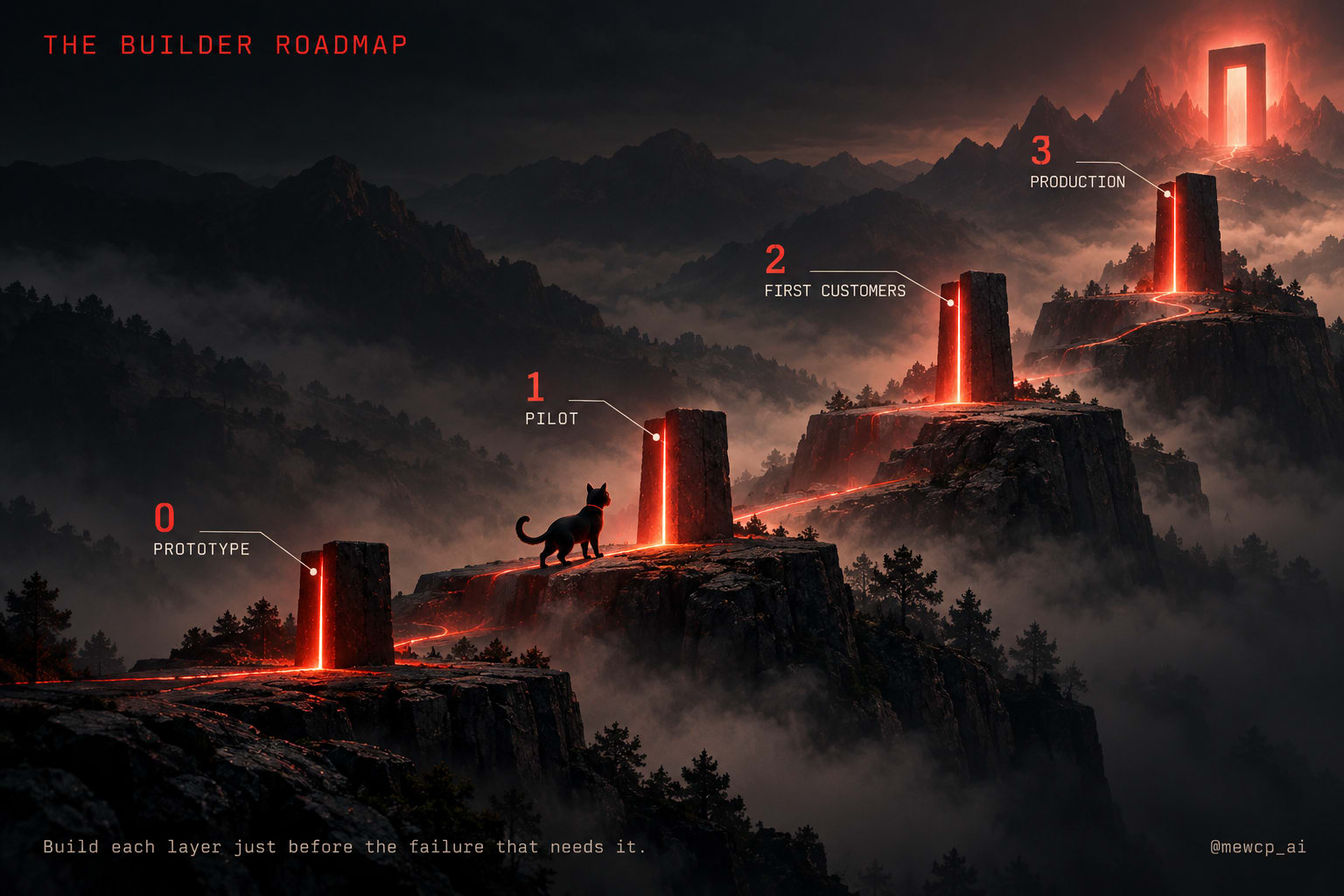
You do not build all of this at once. You build it in the order the failures arrive.
Stage 0: prototype (just you)
Goal: prove the agent can do the task at all.
- One model, a clear system prompt, a handful of tools
- Step limit and timeouts from the first day (they cost nothing)
- Write down 20 example tasks with expected outcomes; this becomes your first evaluation suite
- Tools connected over MCP, even locally, so nothing needs rewriting later
You are ready to move on when the agent completes most of your example tasks and you can explain its failures.
Stage 1: pilot (your team, internal)
Goal: let other people use it without it acting as you.
- Real login; identity from a verified token
- Per-user credentials, resolved per call; nothing in environment variables
- Remote MCP servers behind a thin gateway
- Approval for every write action
- One trace per run
- Evaluation suite in CI, each case run several times
You are ready to move on when you can answer "what did the agent do for this person on Tuesday?" in minutes, and a prompt change is checked by the suite before it ships.
Stage 2: first customers
Goal: serve more than one organisation without them ever touching.
- Tenant identity everywhere;
tenant_idabsent from every tool schema - Tenant-scoped memory, vector namespaces, caches and job payloads
- Rate limits per tenant, per tool and per upstream
- Structured, categorised errors the agent can act on
- Build-or-adopt decisions made per component, including which MCP servers to host yourself and which to use hosted
You are ready to move on when two tenants can run the same prompt at the same moment and the database query log proves each touched only its own rows.
Stage 3: multi-tenant production
Goal: operate reliably, at scale, with evidence.
- Durable run store and queued execution; runs survive deploys
- Idempotency keys on all writes; retries only where safe
- Circuit breakers per upstream; per-tenant budgets and cost attribution
- Redacted or tenant-scoped payload storage
- Sampled production runs flowing into evaluation; regression gates on release
- Every cell of the enforcement matrix (Day 29) has an owner
The production readiness checklist
This is the consolidated checklist for the whole series. Every item should be a yes, or a written, deliberate deferral.
Agent loop and planning
- Every run has a maximum step count and a maximum wall-clock time
- There is a stop condition other than the model saying it is done
- Plans for long tasks are visible and inspectable
- Autonomy is set per action: reads may be autonomous, consequential writes need approval
Models
- Model identifiers live in configuration
- Outputs consumed by code are schema-validated on your side
- You know what happens when the model provider is rate-limited or down
Memory
- Working, session and long-term memory are distinct
- Every memory write has an owner; every read is filtered by owner
- Everything remembered about one user can be deleted on request
Tools and MCP
- Every tool has a clear name, a model-facing description and a strict schema that rejects unknown properties
- The tool set is the smallest that completes the job
- Shared integrations are MCP servers, not one-off code
- Remote MCP servers are operated as services, or hosted by a provider you have vetted
- Large tool catalogues use discovery rather than loading every definition into context
Authentication
- Identity comes from a verified token, never from the request body or the model
- Tokens presented to the gateway or MCP servers are checked for audience
- No token passthrough from client to upstream
Credentials
- Upstream tokens are encrypted at rest, keyed by tenant, user and provider
- Credentials are resolved per call and injected below the agent
- Refresh happens under a lock; revocation produces a reconnect prompt
- Credentials never appear in logs, traces, prompts or tool results
Multi-tenancy
-
tenant_idnever appears in a tool schema - Caches, vector stores, queues and memory are all tenant-scoped
- Background jobs re-validate tenant and scopes when they run
- Per-tenant budgets protect every tenant from every other tenant
Execution and reliability
- Every tool call has a timeout that cancels the outbound request
- Only idempotent tools are retried automatically; writes carry idempotency keys
- Errors are categorised: retriable, needs user action, permission denied, invalid input
- Runs can be cancelled; long runs survive restarts
- Irreversible actions require human approval
Observability
- One trace per run links every model turn and tool call
- Spans record tool, duration, status, tenant and cost
- Any run from last week can be reconstructed step by step
- Payloads are redacted or kept in tenant-scoped storage
Evaluation
- A suite of cases runs in CI, each case several times
- Cases cover task success, tool selection, safety (forbidden tools), latency and cost
- Write tools are stubbed in evaluation runs
- Sampled production runs feed a review process
- A drop in pass rate blocks a release
Glossary
Agent - A system that pursues a goal by choosing its own next steps and acting through tools. Agent loop - The observe, think, act, observe cycle an agent repeats until it stops. Approval gate - A point where a human must confirm an action before it executes. Credential vault - Encrypted storage for upstream tokens, resolved and injected per call. Enforcement matrix - A grid of layers by concerns, showing where each concern is enforced. Evaluation suite - A repeatable set of cases that measures whether an agent still works. Gateway - The single entry point for tool calls, where policy is enforced. Hosted MCP server - A remote MCP server operated by a provider rather than by you. Idempotency key - An identifier that lets an upstream deduplicate a retried write. MCP (Model Context Protocol) - An open standard for connecting AI applications to tools, data and prompts. MCP client - The component inside an AI application that connects to one MCP server. MCP server - A program that exposes tools, resources and prompts over MCP. Multi-tenancy - Serving many customers from one platform while keeping them isolated. Planning - Turning a goal into steps before or during execution. Stateless service - A service that gets its context per request or from explicit stores, rather than holding it in memory. Streamable HTTP - The MCP transport for remote servers. stdio - The MCP transport for local servers launched as subprocesses. Token passthrough - Forwarding a client's token to an upstream API; forbidden by MCP's authorization guidance. Tool - A name, description, input schema and handler that lets an agent act. Trace - A linked record of every step in one run. Trust boundary - A line across which inputs must be treated as untrusted.
Where MewCP fits
We started this series to teach how agents actually work, not to sell anything, and most of this guide applies whatever tools you choose. It is still fair to say plainly what we build, because it sits on this map.
MewCP builds infrastructure for the MCP layer of the stack: a gateway in front of a catalogue of hosted MCP servers. Per its documentation, an agent connects to one endpoint and sees a small, fixed tool surface (search, get_schema, list_accounts, call_tool) however many apps are connected. Credentials are encrypted at rest in a vault, decrypted and injected into the upstream request only at the moment a tool is called, and never sent to the client, the agent or the model. OAuth tokens are refreshed automatically. For teams building their own multi-customer products, MewCP's Auth API ties each credential to an external user id they supply.
On the thirteen-station map, that covers part of stations 07 to 09 (MCP, authentication at the gateway, credentials) for third-party integrations. It is not your agent, your planning, your memory, your domain tools, your tenancy rules, your observability stack or your evaluation suite. Those stations are yours to walk.
Closing
Thirty days, thirteen stations, one path.
The first part of the path is the part everyone sees: an agent that thinks, plans and remembers. The second part is the part that makes it useful: tools, and a standard way to reach them. The last two parts are the ones that make it trustworthy: knowing who it acts for, holding their credentials safely, keeping customers apart, seeing what it did and proving it still works.
None of the last two parts makes a good demo. All of them make a good product. If you take one habit from this series, make it this: whenever an agent works in a demo, ask which of the thirteen stations it has actually reached. The answer is usually fewer than it looks, and the gap is exactly the work that turns a prompt into a production agent.
Thank you for walking it with us.