
AI Agent Failure Modes: Why Your Agent Breaks In Production
Four of the seven ways an agent breaks happen before the tool ever runs, and none of them throw an error. Here is what each one looks like in a real trace.

Your agent worked on Tuesday and produced confident nonsense on Wednesday, and the only thing that changed was the data. The instinct is to blame the model. Almost every time I have dug into one of these runs, the model was fine. AI agent failure modes are mostly boring engineering failures: a date filter that never parsed, two tool descriptions that overlap, an error string read as a fact, a loop with no budget attached to it.
Seven of them account for most of what you will see. Four happen before a tool executes. Three happen after. What makes the first four dangerous is that every one of them produces a tool call that looks completely valid from the outside.
The demo was not a test
The demo ran once. One goal, phrased the way you phrase it, against a database with rows in it, using a token you minted twenty minutes earlier. Production runs the same loop against a goal written by someone who does not know your tool names, on an account with no data yet, with a token issued last month, while the upstream API sheds load.
Here is the part people miss. In a normal service, an untested path throws. In an agent, an untested path gets summarised, reasoned about, and turned into a fluent English answer. The system converts broken states into plausible output. That is why agent bugs feel like witchcraft.
Mapping AI agent failure modes to the loop
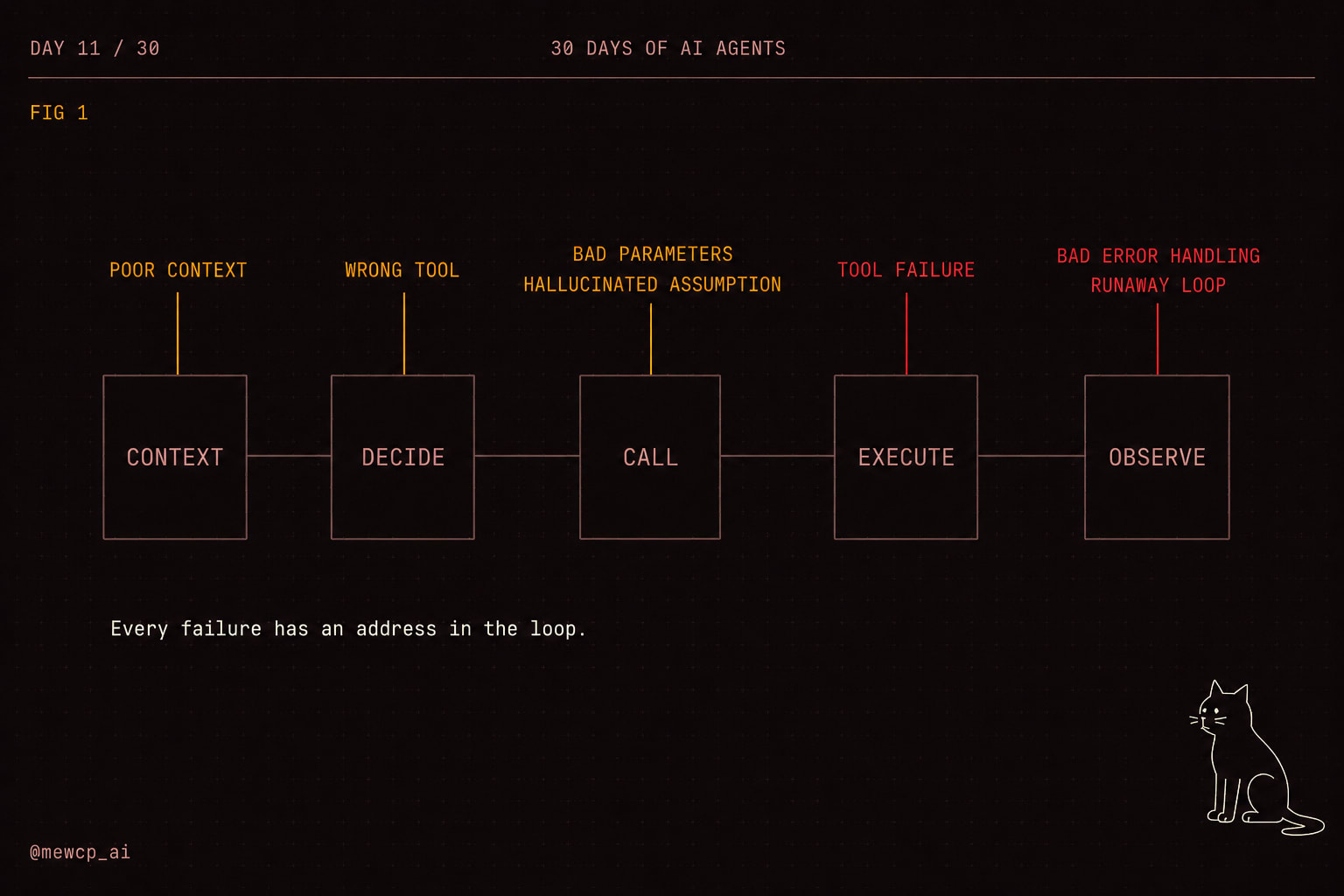
A single agent step moves through five points. Context gets assembled. The model decides. A call gets constructed. The call executes. The result is observed and folded back in.
Failures rarely happen inside those boxes. Models are decent at the thinking part. They happen at the seams, where one stage hands something to the next and nobody checks the handoff. So stop asking why the agent is dumb, and start asking which of five handoffs was wrong. That question has an answer, and it is in your logs if you wrote down the right fields.
Four failures before the tool runs
1. Poor context
The agent decides using facts it never actually had.
STEP 4
CONTEXT  goal + last_2_results + user_facts(0)
THINK    "The user is on the Pro plan, so the export limit is 10k rows."
CALL     export_rows(limit=10000)
Nothing in that context said Pro. Retrieval returned zero facts, the render function skipped the block, and the model filled the gap with the most statistically ordinary customer it could imagine.
Why it happens: a missing block and a block that legitimately has no content look identical from inside the prompt. There is no token that means absent, so the model treats absence as freedom.
How you detect it: log a context manifest per step, not the context itself. Block names, token counts, a hash. Then assert on it.
def render_context(blocks: list[ContextBlock]) -> tuple[str, list[dict]]:
    manifest, parts = [], []
    for b in blocks:
        tokens = len(b.text) // 4
        manifest.append({"block": b.name, "tokens": tokens})
        if b.required and tokens == 0:
            raise ContextError(f"required block '{b.name}' rendered empty")
        if tokens:
            parts.append(f"{b.name.upper()}\n{b.text}")
    return "\n\n".join(parts), manifest
Two runs of the same goal producing different manifests is the first thing to look at when behaviour changes and your code did not.
2. Wrong tool selection
Right intent, wrong instrument.
GOAL     "what did Priya order last month"
CALL     search_docs(query="Priya order last month")
RESULT   3 knowledge base articles about ordering
THINK    "Found the ordering policy."
The agent had search_orders. It picked search_docs because the word order appears in both descriptions.
Why it happens: selection is text matching with a thin layer of reasoning on top. A description like "Searches the documentation" says what a tool does, which is useless at selection time. The model needs when to use it and when not to.
# selection killer
{"name": "search_docs", "description": "Searches documentation."}

# selection helper
{"name": "search_docs",
 "description": ("Search internal help articles and policy pages. Use for "
                 "how-to and policy questions. Do NOT use for customer data, "
                 "orders or accounts, use search_orders for those.")}
How you detect it: offline, keep a selection eval of forty labelled goals, run only the decide step, and score the first tool chosen. Re-run it whenever you add a tool, because a new tool changes selection behaviour for every existing one. Online, watch for a result that gets fetched and then never referenced again. That is usually a selection miss.
3. Incorrect parameters
Right tool, wrong arguments.
CALL     search_users(range="last week", status="Active")
RESULT   []
Two bugs in one line. The range field expected an ISO date pair and got English. The status enum is lowercase in the database. Neither raised. The query built fine, matched nothing, returned an empty list.
Why it happens: loose schemas. A parameter typed string accepts every string in the universe, so the model writes the string a human would write.
How you detect it: validate before you execute, and count the failures.
SCHEMA = {
    "type": "object",
    "properties": {
        "start": {"type": "string", "format": "date"},
        "end": {"type": "string", "format": "date"},
        "status": {"type": "string", "enum": ["active", "churned", "trial"]},
    },
    "required": ["start", "end"],
    "additionalProperties": False,
}

errors = [f"{'.'.join(map(str, e.path)) or '<root>'}: {e.message}"
          for e in Draft202012Validator(SCHEMA).iter_errors(args)]

if errors:
    metrics.incr("tool.validation_failed", tags={"tool": name})
    observation = {"status": "invalid_arguments", "errors": errors,
                   "hint": "Fix the arguments and call the tool again."}
Do not raise into the loop. Hand the errors back as an observation the model can act on, and count the event. additionalProperties: False does more work than it looks: without it, a hallucinated customer_name field passes validation, gets dropped by your function signature, and you never learn the model thought that field existed. A tool failing validation on eight percent of calls has a schema problem, not a model problem.
4. Hallucinated assumptions
The agent invents an ID, a field, or a result that never appeared anywhere.
STEP 2
CALL     get_order(order_id="ORD-4417")
RESULT   {"error": "not found"}
Nothing in the goal or in any prior observation contained ORD-4417. The model needed an order ID to make progress, did not have one, and produced something order-ID shaped.
Why it happens: the loop rewards forward motion. Every prompt you write implicitly says keep going. Admitting a missing input is a lower probability continuation than filling in a plausible value, unless you make stopping a legal move.
How you detect it: provenance. Every identifier-shaped argument must have appeared earlier in the run.
ID_PATTERN = re.compile(r"\b[A-Z]{2,}-?\d{3,}\b|\b[0-9a-f]{8}-[0-9a-f]{4}\b")

def unprovenanced_ids(args: dict, transcript: str) -> list[str]:
    flat = " ".join(str(v) for v in args.values())
    return [m for m in ID_PATTERN.findall(flat) if m not in transcript]
Run it before execution and log every hit. In strict mode, block the call and return {"status": "needs_input", "missing": "order_id"}. Then give the model a request_missing_input tool, which removes most invented arguments because stopping becomes a legal move.
Three failures after the tool runs
5. Tool failure
Timeouts, rate limits, 5xx, expired auth, and the quiet one, empty results.
CALL     search_users(range="last week")
RESULT   []
THINK    "No signups last week."
CALL     send_email(body="0 new signups last week")
DONE     ok
Zero exceptions. Zero non-200 responses. A completed run and a false statement in someone's inbox.
[] carries no information about why it is empty. Genuinely no matches, and your filter was garbage so I ignored it, produce byte-identical output. The model picks an interpretation, and the confident one always outranks the cautious one. The fix is a return shape, not a prompt instruction.
def search_users(start: str, end: str, status: str = "active") -> dict:
    window = parse_window(start, end)          # raises on malformed input
    rows = db.query_users(window, status)
    return {
        "status": "ok",
        "matched": len(rows),
        "applied_filters": {"window": window.iso(), "status": status},
        "rows": rows[:50],
        "truncated": len(rows) > 50,
    }
That return value is impossible to misread. [] is a coin flip. And because parse_window raises instead of quietly falling back to a default range, mode three surfaces here as a loud error.
How you detect it: per tool, track a status distribution and an empty rate. An empty rate jumping from two percent to forty percent overnight is a parsing bug upstream, and you will find it in minutes if the number is on a dashboard.
6. Poor error handling
The agent treats an error string as a real answer.
CALL     get_invoice(id="INV-88")
RESULT   "error: 401 unauthorized"
THINK    "The invoice is not accessible, so it was likely voided."
CALL     send_email(body="That invoice was voided.")
That is not a hallucination. It is a reasonable inference over a bad input. You handed the model a sentence, and models turn sentences into meaning. An expired token became a business fact about an invoice.
Errors need to arrive as instructions. Four classes cover almost everything.
class Outcome(str, Enum):
    OK          = "ok"
    RETRYABLE   = "retryable"    # transient, try again
    TERMINAL    = "terminal"     # will never work, stop this branch
    NEEDS_INPUT = "needs_input"  # a human must supply something

def classify(exc: Exception | None, status: int | None) -> Outcome:
    if exc is None and status in (200, 201, 204):
        return Outcome.OK
    if isinstance(exc, (TimeoutError, ConnectionError)):
        return Outcome.RETRYABLE
    if status in {408, 429, 500, 502, 503, 504}:
        return Outcome.RETRYABLE
    if status in (401, 403):
        return Outcome.NEEDS_INPUT     # credentials, not the model's problem
    return Outcome.TERMINAL
Routing then belongs to your loop, not to the model. Retry the retryable, escalate on needs_input, block the tool on terminal.
One rule most retry code gets wrong: only auto-retry a call that is safe to run twice. Reads are safe. send_email, charge_card and create_ticket are not, unless the tool takes an idempotency key and the upstream honours it. A timeout does not mean the write did not happen. It means you did not hear back.
How you detect it: log the outcome class on every step, then look for a non-OK outcome followed by a step that produced user-facing output. That two-line sequence is the signature, and you can alert on it directly.
7. Infinite and unnecessary loops
Two shapes, and they need different detection. The hard loop repeats an identical call. The soft loop keeps moving and never converges: new calls each time, plan revised every second step, twenty six steps into a task that needed four. The soft one costs more, because nothing looks obviously wrong.
Why they happen: the exit condition lives in the model's judgement. Nothing in the code says when to stop, so stopping is a probabilistic event, and probabilistic events fail sometimes.
How you detect both: fingerprint the calls and budget the run.
class RunBudget:
    def __init__(self, max_steps=12, max_seconds=90,
                 max_cost_usd=0.50, max_repeats=2):
        self.limits = (max_steps, max_seconds, max_cost_usd, max_repeats)
        self.started, self.steps, self.cost = time.time(), 0, 0.0
        self.seen: dict[str, int] = {}

    def check(self, tool: str, args: dict) -> str | None:
        steps, seconds, cost, repeats = self.limits
        self.steps += 1
        if self.steps > steps:
            return "step_cap"
        if time.time() - self.started > seconds:
            return "wall_clock"
        if self.cost > cost:
            return "cost_cap"
        payload = json.dumps({"t": tool, "a": args}, sort_keys=True)
        fp = hashlib.sha1(payload.encode()).hexdigest()[:12]
        self.seen[fp] = self.seen.get(fp, 0) + 1
        return "repeat_call" if self.seen[fp] > repeats else None
The step cap catches the runaway. The repeat fingerprint catches the hard loop in three steps instead of twelve, and it tells you something the step cap cannot: the agent is stuck rather than slow. Log the reason, because repeat_call and step_cap need different fixes.
For soft loops, add a no-progress counter. Define progress as a step that produced a new observation the plan actually consumes, and stop after three consecutive steps without it.
Loud failures and silent failures
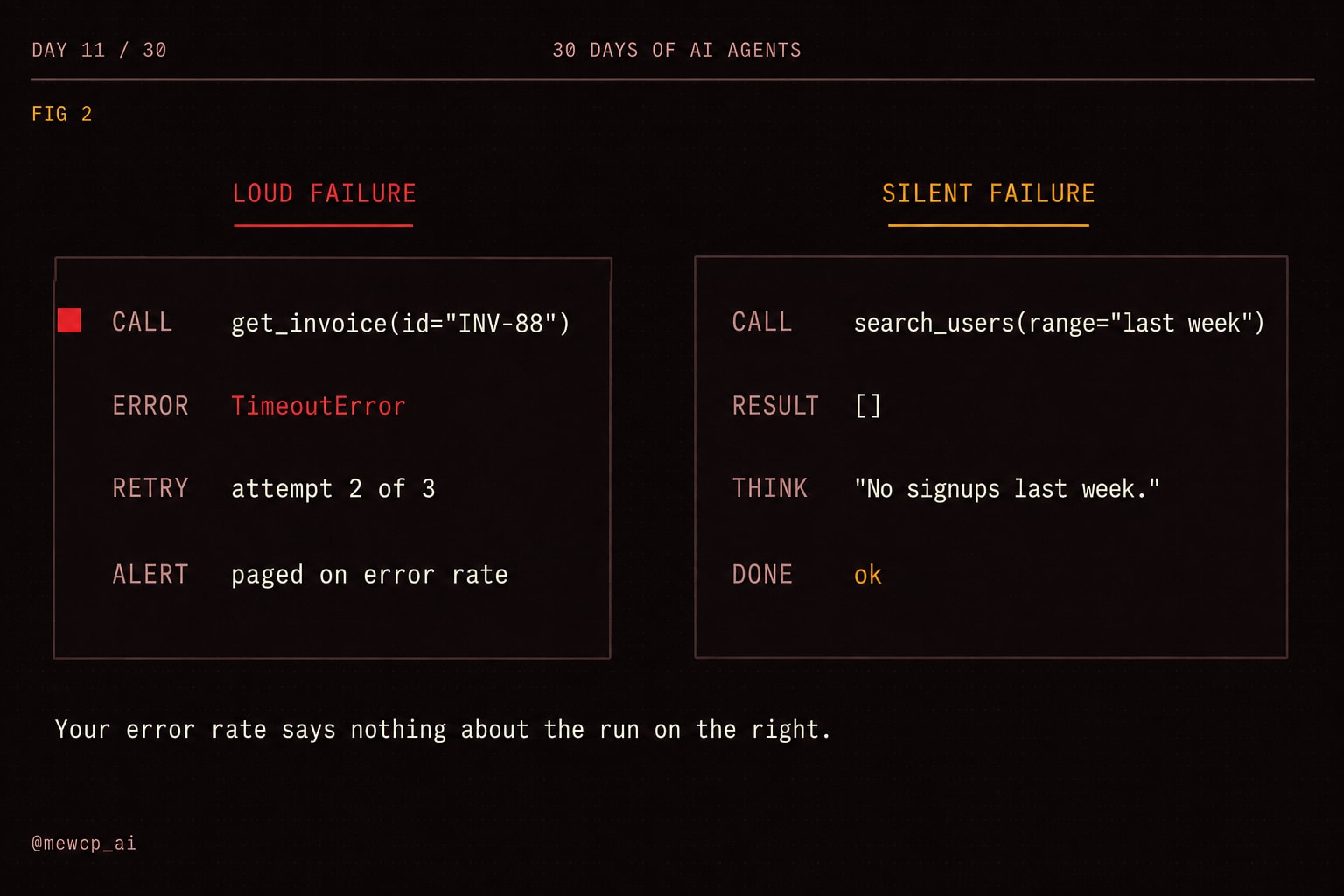
Sort the seven by whether they announce themselves, because that decides what you build first.
| Failure mode | Seam | What you see | Loud or silent |
|---|---|---|---|
| Poor context | Context | Confident claims with no source | Silent |
| Wrong tool selection | Decide | Result fetched then ignored | Silent |
| Incorrect parameters | Call | Empty or wrong result set | Silent |
| Hallucinated assumption | Call | Not found errors on invented IDs | Half loud |
| Tool failure | Execute | Exceptions, timeouts, empty results | Mixed |
| Poor error handling | Observe | Fluent answer built on an error string | Silent |
| Runaway loop | Observe | Cost spike, latency spike | Loud |
One of the seven is reliably loud, and it is the one your existing monitoring already catches. Your error rate can sit at zero while correctness is terrible, because the failure path and the success path both end in a well-formed English sentence. Agents need outcome instrumentation, not just error instrumentation.
What to log per step
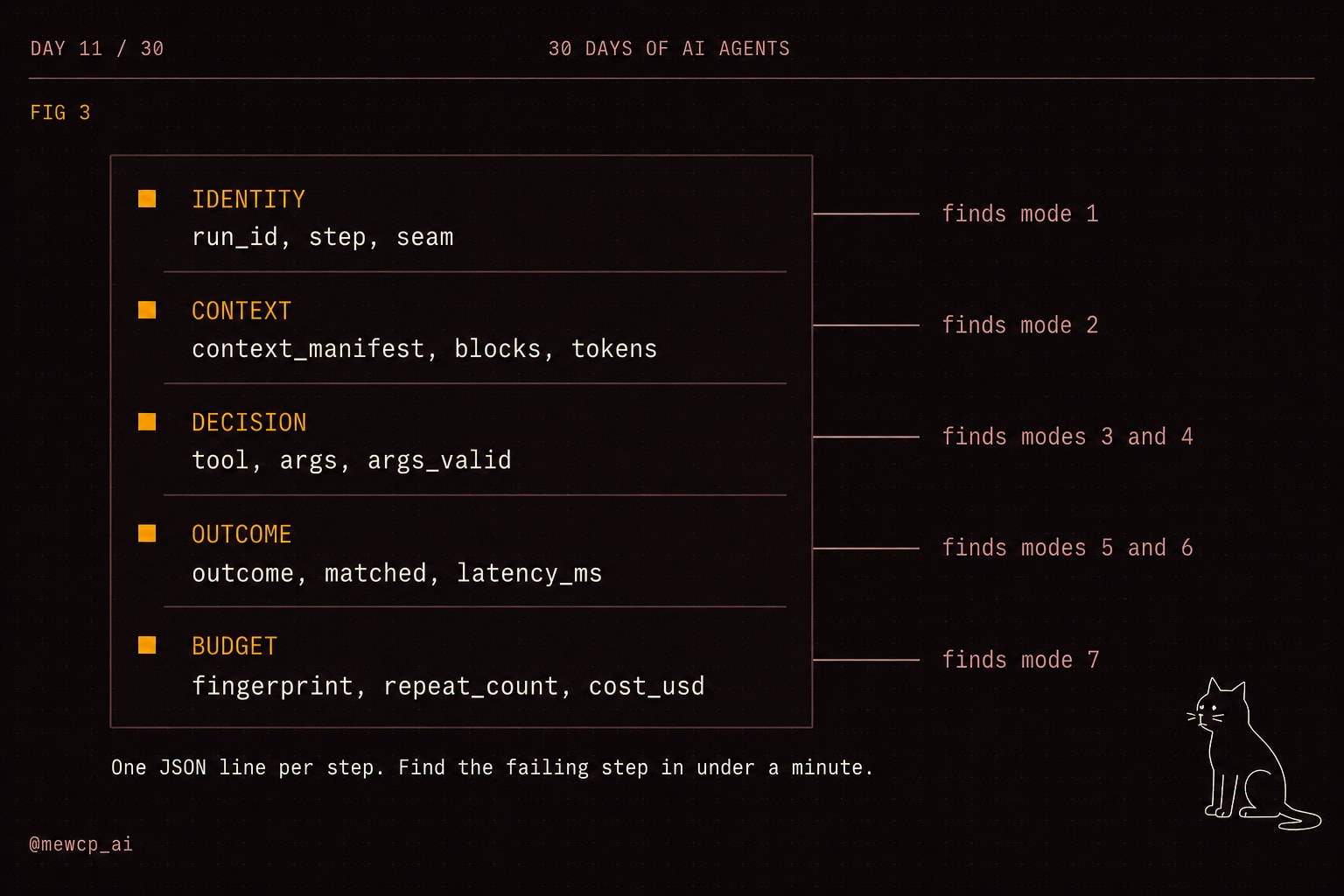
You do not need a tracing platform to start. You need five field groups per step, written as one JSON line.
@dataclass
class StepRecord:
    run_id: str
    step: int
    seam: str                       # context | decide | call | execute | observe
    context_manifest: list[dict]
    tool: str | None = None
    args: dict | None = None
    args_valid: bool | None = None
    outcome: str | None = None      # ok | retryable | terminal | needs_input
    matched: int | None = None      # rows returned, when applicable
    latency_ms: int | None = None
    fingerprint: str | None = None
    repeat_count: int = 0
    cost_usd: float = 0.0
Every field maps to a failure mode. context_manifest finds mode one. tool across many runs finds mode two. args_valid finds mode three. args plus provenance finds mode four. matched finds the empty-result half of mode five. outcome finds mode six. fingerprint and repeat_count find mode seven.
The bar to aim for: given a complaint about a bad run, you find the failing step in under a minute with one grep on run_id. If it takes longer, add fields until it does not.
Two habits pay off immediately. Log arguments before execution, so a call that never returns still leaves evidence. And log the raw tool response separately from what you rendered into context, because a surprising number of bugs live in the gap between those two.
The short version
- Every required context block fails loudly when it renders empty
- Every tool description says when to use it and when not to
- Every schema uses enums, formats,
required, andadditionalProperties: false - Arguments are validated before execution, and errors go back as observations
- Identifier arguments are checked against everything seen so far in the run
- Tools return status and match counts, never a bare
[],nullor"" - Errors arrive as a typed class, never as prose
- Auto-retry is restricted to idempotent calls
- Every run has a step cap, a wall clock cap and a cost cap
- Repeat calls are fingerprinted and counted
- One JSON line per step, carrying the five field groups above
- You have read ten real production traces this month
The last one is the item people skip and the one that finds bugs. Read the traces, not the summaries.
Where this goes next
Everything here is detection, and detection is deliberately most of the work. You cannot fix a failure you cannot name, and these seven are indistinguishable from each other in a bug report that says the agent gave a wrong answer.
The reliability layer comes later in this series: retry policies with backoff and jitter, evaluation that judges result quality instead of status codes, guardrails on side-effecting tools, approval gates on calls that spend money or send mail, and replayable traces.
One honest note on scope. Expired auth and per-user credentials are not model problems or even loop problems. They surface as a 401 at the worst moment because a token refresh failed three layers down. Hosted tool infrastructure with real credential management and tenant isolation takes that class out of your agent code, which is the part of this MewCP works on. The rest you own regardless of what you build on.
Start with the logging. Seven named failure modes and five logged field groups will tell you more about your agent next week than any model upgrade will.