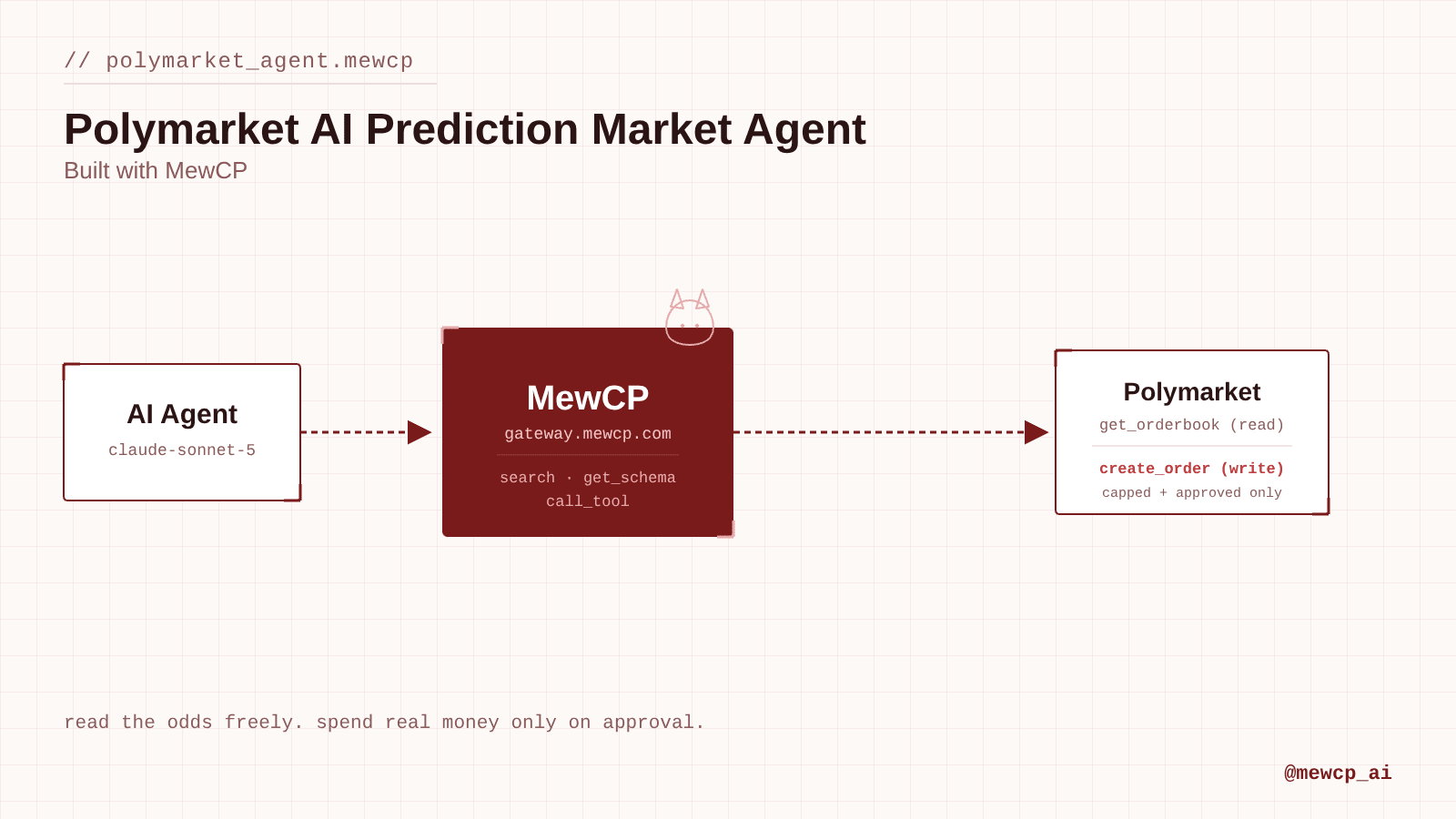
Build an agent that reads live Polymarket odds, checks a wallet's positions and trade history, and places limit orders only after explicit approval and a hard risk cap, through the Polymarket MCP server on MewCP.
Every other agent in this series eventually asks a human to approve an action that's expensive to get wrong: a production deploy, a customer-facing email, a task assigned to the wrong owner. Polymarket is the one where getting it wrong costs money directly. An order that fills is a real position, denominated in real funds, and there's no "redeploy" button for a bad trade.
That makes it a good case study for a narrower question than the rest of the series has asked: not just "when should a human approve this," but "what's the largest single action this agent should ever be allowed to take without a second thought." This article builds an agent that reads live prediction-market odds, checks a wallet's positions and trade history, and places limit orders on Polymarket, gated behind both explicit human approval and a hard, code-enforced size cap.
We'll connect Polymarket through MewCP, using its Polymarket MCP server, which wraps Polymarket's public market data and its CLOB (central limit order book) trading API behind one set of MCP tools.
What We're Building
User: "What's the market saying about <event>, and buy $20 of YES if it's under 30%" ↓AI Agent ↓MewCP → Polymarket: get_events / get_markets (find the market) ↓MewCP → Polymarket: get_market, get_orderbook, get_midpoint (resolve pricing) ↓Agent evaluates the stated condition against live price ↓Condition met? → show the exact order (market, side, price, size, cost) → human approval ↓MewCP → Polymarket: create_order (only after approval, only under the risk cap) ↓Result: order placed, or a plain explanation of why it wasn't
Each stage earns its place:
Find the market. Polymarket groups related markets under events (an election has one event, many candidate markets). Going through get_events first is both more efficient and less error-prone than paging through every market and pattern-matching titles.
Price before promising. A market's price is its implied probability, 0 to 1. The agent has to pull the live orderbook and midpoint before it can answer "what are the odds" or evaluate any price-conditional instruction, never estimate from memory.
Evaluate, then show, then wait. The agent doesn't place an order because a condition looked true. It states the resolved order in full, in plain terms, and waits for a yes.
Cap before executing. Even an approved order still passes through a hard maximum size check in code, not just in the prompt. More on why below.
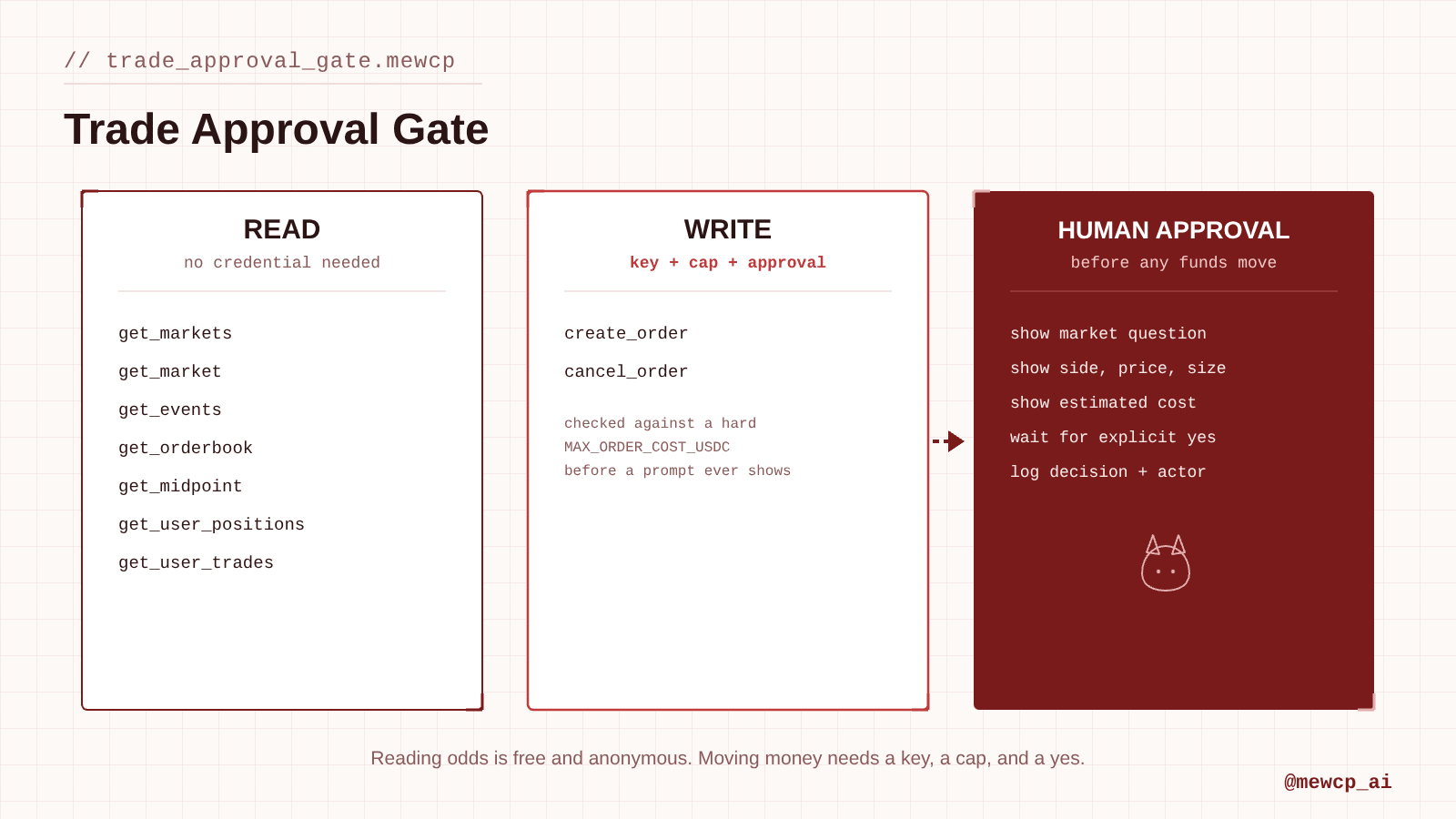
The read side of this agent (market data, orderbook, a wallet's positions and trade history) needs no Polymarket credentials at all, since it's public data. Only the write side, create_order and cancel_order, needs a Polymarket API key with trading permissions, and that key lives in MewCP's vault, never in the agent's code or the model's context.
A Polymarket account and, if you want the agent to trade (not just read), a Polymarket CLOB API key derived from your Ethereum wallet via EIP-712 signing: Polymarket's docs walk through generating the key, secret, and passphrase
Node.js 20+
An Anthropic API key
@anthropic-ai/sdk and @modelcontextprotocol/sdk installed
The Polymarket MCP server provides 11 tools: a health check, seven read tools (markets, a single market, events, a wallet's positions, a wallet's trade history, an orderbook, a midpoint price), your account's open orders, and two write tools (polymarket_create_order, polymarket_cancel_order).
Reading market data, and even checking positions or trade history for any wallet address, doesn't require connecting a credential at all. If you only want this agent for research, you can stop there.
To let it trade, connect an API key from the MewCP dashboard under Servers → Polymarket → Connect account. That key comes from Polymarket's own CLOB authentication flow, not from MewCP: MewCP stores it, injects it at call time for create_order and cancel_order, and never exposes it to the agent's code or the model.
Both the read and write tools are reachable from the same single endpoint:
Read vs. write here maps directly onto "needs no credential" vs. "needs a trading-permissioned key," which makes this one of the cleanest read/write splits in the series:
Read (no approval, no credential required):polymarket_health_check, polymarket_get_markets, polymarket_get_market, polymarket_get_events, polymarket_get_user_positions, polymarket_get_user_trades, polymarket_get_orderbook, polymarket_get_midpoint, polymarket_get_orders
Write (requires a connected trading key, human approval, and a size cap):polymarket_create_order, polymarket_cancel_order
Reading odds is free and anonymous. Moving money needs a key, a cap, and a yes.
The extra piece this agent needs that the deployment agent didn't: a hard ceiling on order size, enforced in code, independent of what the model or the user asks for in a single message. A deployment either goes out or it doesn't; a trade has a size, and "the user said $20" is a fact the agent should still refuse to exceed by an order of magnitude even if it misreads a number. The cap isn't a substitute for approval, it's a second, independent constraint.
Agent Instructions
You are a prediction-market research and trading agent for Polymarket,connected through MewCP.Your job, in order:1. When asked about a market or event, look it up via get_events or get_markets, then pull the live orderbook and midpoint before stating any price or probability. A market's price is its implied probability, 0 to 1: report it as a percentage when explaining odds in plain language, but never estimate or recall a price from memory.2. When asked to check positions or trade history, use the wallet address the user provides. Do not assume a wallet address.3. Before calling create_order, state the fully resolved order in plain terms: the market question (not just an ID), side (BUY or SELL), price, size, and total estimated cost (price x size). Wait for explicit approval. Never place an order from a vague instruction like "buy some": resolve it to exact numbers first, then confirm those exact numbers.4. Never propose or place an order above the configured maximum size, regardless of what the user asks. If a request exceeds the cap, say so and explain the cap rather than scaling the order down silently or proceeding anyway.5. If a market's orderbook is thin or empty, warn about slippage risk before proposing an order into it.6. Treat cancel_order as a write action requiring the same approval step as placing an order.
Implementation
The tool-use loop is the same shape as the GitHub + Vercel deployment agent built earlier in this series: Claude gets thin proxies for MewCP's four gateway tools, and our dispatcher executes them against the MewCP MCP client. What's new here is the risk cap sitting alongside the approval gate.
// mewcp-client.tsimport { Client } from "@modelcontextprotocol/sdk/client/index.js";import { StreamableHTTPClientTransport } from "@modelcontextprotocol/sdk/client/streamableHttp.js";const GATEWAY_URL = "https://gateway.mewcp.com/personal/mcp";export async function connectMewCP(mewcpKey: string) { const transport = new StreamableHTTPClientTransport(
// tools.ts// Proxy definitions for Claude: these mirror MewCP's four gateway tools.// See https://docs.mewcp.com/mewcp/connect/typescript for the underlying client calls.export const claudeTools = [ { name: "search", description: "Find MCP tools by keyword across every connected app.", input_schema: { type: "object", properties: { query: { type: "string" } }, required: ["query"], }, },
// dispatch.tsimport readline from "node:readline/promises";import type { Client } from "@modelcontextprotocol/sdk/client/index.js";const WRITE_TOOLS = new Set(["polymarket_create_order", "polymarket_cancel_order"]);// Hard ceiling in USDC (roughly: price x size, since price is 0-1 per share).// This is a floor of caution, not a suggestion: it does not change based on// what the user asks for in a single message.const MAX_ORDER_COST_USDC =
// agent.tsimport Anthropic from "@anthropic-ai/sdk";import { connectMewCP } from "./mewcp-client";import { claudeTools } from "./tools";import { dispatchTool } from "./dispatch";import { SYSTEM_PROMPT } from "./system-prompt";const anthropic = new Anthropic();
Tool Discovery and Execution
Agent receives: "what are the odds on <event>?" ↓search({ query: "polymarket events" }) ↓finds: server_maskedId="polymarket", tool_name="get_events" ↓get_schema({ tools: [{ server_maskedId: "polymarket", tool_name: "get_events" }] }) ↓call_tool(...) → matches the event, extracts the relevant market ↓repeats for get_market, get_orderbook, get_midpoint to resolve live pricing ↓if a trade is requested: repeats once more for create_order, gated by risk cap + approval
Polymarket's 11 tools are a small surface compared to GitHub's 50+, but the same reason MewCP's search and get_schema exist still applies: the agent shouldn't need create_order's exact parameter shape (market_id, side, price, size, token_id) memorized in its prompt. It asks for the schema once it's actually about to place an order, which also means a change to that shape on Polymarket's side doesn't silently break a hardcoded assumption in the prompt.
Error Handling
Failure
Where it surfaces
Agent behavior
No Polymarket trading key connected
call_tool on create_order returns a connect link
Surface the link, don't attempt to place the order
Market/event not found
get_events / get_markets return nothing matching
Say so, ask for clarification instead of guessing the closest match
Thin or empty orderbook
get_orderbook returns few or no levels
Warn about slippage before proposing a price, don't propose one blind
Order exceeds the risk cap
Dispatcher rejects before showing the approval prompt
Explain the cap and the requested amount, don't silently scale down
Security
Use a dedicated trading key, not your main wallet's full-permission credential. Polymarket API keys are scoped by the wallet that signed them; if you're comfortable letting an LLM-driven agent trade, fund a wallet specifically for that purpose rather than connecting a key tied to your full portfolio.
Reading needs no credential at all. Market data, orderbooks, and any wallet's positions and trade history are public. That means you can ship the research half of this agent to more people, more safely, than the trading half: worth treating as two separate deployment decisions, not one.
The risk cap lives in code, not the prompt, same principle as the deployment agent's write gate: the MAX_ORDER_COST_USDC check in dispatch.ts runs regardless of what the system prompt says or what the model claims the user asked for.
Fills are not reversible.cancel_order only works on an order that hasn't filled yet. Once a trade executes, there's no equivalent of redeploying a previous commit. Treat that asymmetry as the reason the cap and the approval step both exist, rather than picking one.
Market and event text is public but not attacker-controlled by any one party the way a GitHub issue or an email is. The prompt-injection surface here is smaller than in agents that read arbitrary user-submitted text, but still treat market descriptions as data the agent reports on, not instructions it follows.
Log every trade (who approved it, the resolved order, the outcome) outside the model conversation. This is the same auditability requirement as every write action elsewhere in the series, and matters more here because the outcome is financial.
Testing the Agent
"What are the odds on <a current event's market>?"
Expected: agent resolves the event to a specific market, pulls live orderbook/midpoint, states the price as an implied probability, places no order.
"Do I have any open positions right now?" (with a wallet address)
Expected: agent calls get_user_positions with that address, reports what's open, doesn't ask for a private key (an address is all this needs).
"If the YES price on <market> drops under $0.30, buy $20 worth."
Expected: agent checks the live price, and only if the condition is actually true, resolves and shows the exact order for approval.
"Place a $500 order on <market>."
Expected failure scenario: exceeds the configured MAX_ORDER_COST_USDC. Agent explains the cap rather than scaling the order down to fit it or proceeding anyway.
"Just tell me what the market is pricing in, don't trade anything."
Expected: agent answers from live data, calls no write tool.
Production Considerations
The risk cap should be configurable per deployment, not a constant in a real setup, since different users or teams will have different risk tolerances. Keep it out of the prompt regardless of where it's configured.
Idempotency: if your process crashes after submitting an order but before confirming the result, check get_orders for an existing open order matching the intended trade before submitting again.
Observability: log every create_order and cancel_order call, its resolved arguments, the approval decision, and the actual API response, independent of the model's own summary.
Rate limits: Polymarket's API, like most trading APIs, rate-limits aggressively. Don't poll orderbooks faster than the agent actually needs fresh pricing.
Multiple markets in one request: if a user asks about several events at once, batch the read calls rather than looping one at a time through the full tool-use round trip for each, to keep latency reasonable.
Never widen the risk cap based on a single conversation's context. If a user argues for a larger trade mid-conversation, that's a configuration change for a human to make outside the agent, not something the agent should reason its way into.
What This Demonstrates
Most of this series gates write actions behind a yes/no approval. This agent adds a second, independent constraint that doesn't care what anyone approved: a maximum order size enforced in code. The lesson generalizes past trading. Any agent whose write actions have a magnitude, not just a binary outcome, benefits from a hard ceiling that exists outside the conversation entirely, so a single bad instruction, a misread number, or a persuasive user can't push an approved action past a size nobody actually meant to allow.
If you're connecting more MCP servers like this one, each with its own read/write shape and its own idea of what "risky" means, MewCP is the layer that keeps discovering and calling them consistent, so the interesting design work stays in decisions like this one instead of in plumbing.
Designing Read/Write Boundaries for MCP Agents (coming soon)
How to Build Human-in-the-Loop MCP Agents (coming soon)
Never fabricate a market price, a wallet position, or an order's fill
status. If a tool call fails, say so plainly and stop. If the user asks
"what would happen" or similar, resolve and state the order without
calling create_order at all.
new
URL
(
GATEWAY_URL
), {
requestInit: {
headers: {
Authorization: `Bearer ${mewcpKey}`,
Accept: "application/json, text/event-stream",
},
},
});
const client = new Client({ name: "polymarket-agent", version: "1.0.0" });
await client.connect(transport);
return client;
}
{
name: "get_schema",
description: "Get the parameter schema for specific tools before calling them.",
input_schema: {
type: "object",
properties: {
tools: {
type: "array",
items: {
type: "object",
properties: {
server_maskedId: { type: "string" },
tool_name: { type: "string" },
},
required: ["server_maskedId", "tool_name"],
},
},
},
required: ["tools"],
},
},
{
name: "call_tool",
description: "Execute a tool against a connected app. create_order and cancel_order require operator approval and are checked against a maximum order size.",