
Build an AI Deployment Agent with GitHub and Vercel
A working walkthrough of an AI agent that finds the latest commit on GitHub, deploys it to Vercel through MewCP, polls until the build finishes, and explains failures from the logs.
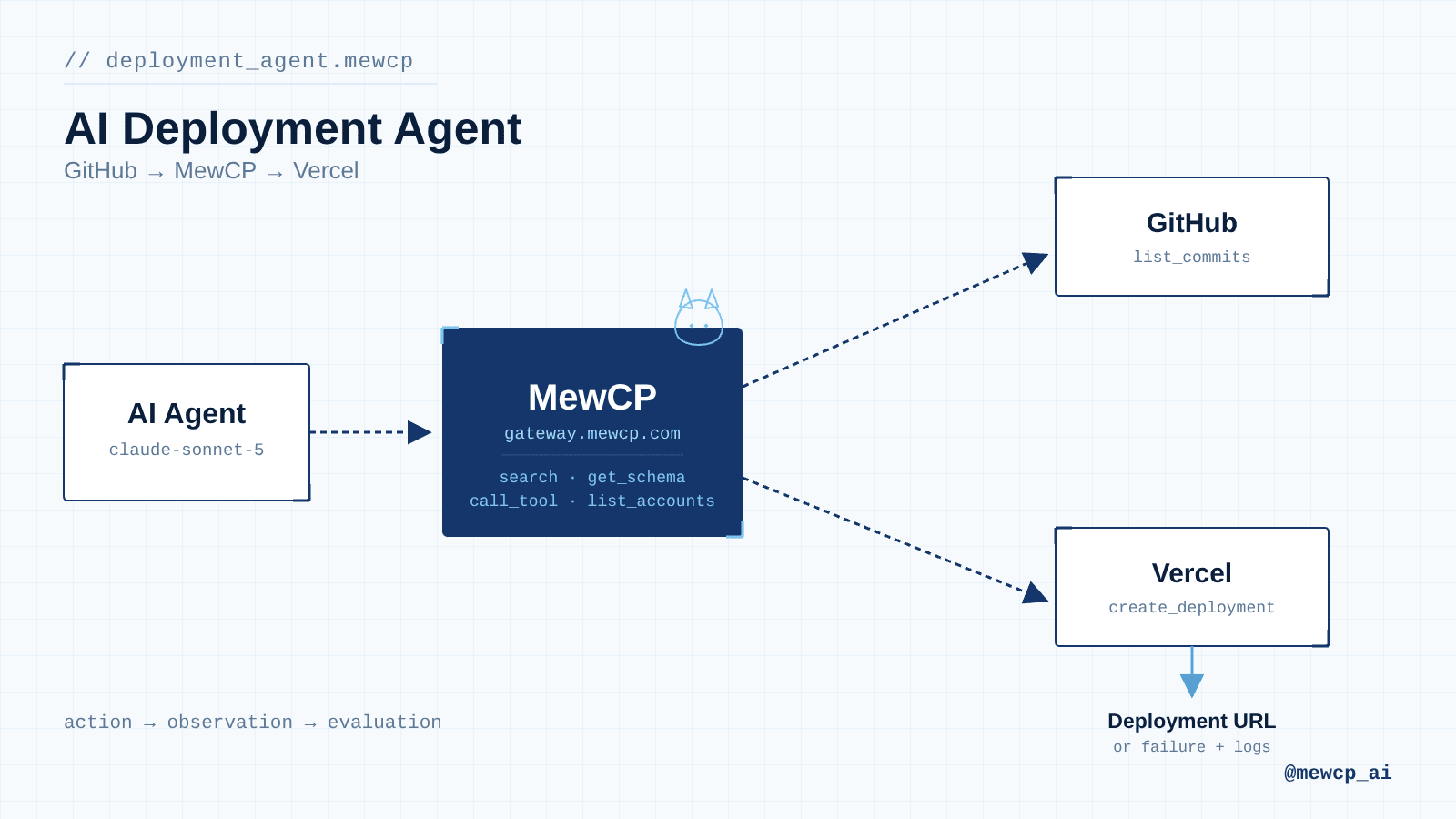
Most "AI deploys your app" demos stop at the interesting part. They show a model calling one API, printing a success message, and cutting to credits. They skip the part where the build actually fails, the part where the agent has to decide whether it's safe to proceed, and the part where someone has to explain to a human why the deployment broke.
This article builds the whole thing: an agent that reads the latest commit off a GitHub branch, kicks off a Vercel deployment, polls until the build resolves, and, if it fails, pulls the runtime logs and tells you what went wrong instead of just reporting "deployment failed."
The two systems involved, GitHub and Vercel, don't know about each other. The agent is the thing that understands both and moves state between them. That's the actual engineering problem: not "can an LLM call an API," but "how do you give an agent enough structure to act correctly across two independent systems it doesn't control."
We'll connect both services through MewCP, which handles credential storage and exposes both APIs as MCP tools behind one gateway endpoint, so the agent code isn't juggling a GitHub token and a Vercel token directly.
What We're Building
Developer
  ↓  "deploy main to production"
AI Agent (Claude)
  ↓
MewCP gateway
  ↓                    ↓
GitHub                 Vercel
list_commits            create_deployment
  ↓                    ↓
latest SHA          deployment id
                        ↓
                    poll get_deployment
                        ↓
              ┌─────────┴─────────┐
           READY                ERROR
              ↓                    ↓
      return live URL      pull runtime logs
                                    ↓
                          explain likely cause
Each stage matters:
- Find the commit. The agent doesn't take "main" at face value: it resolves it to a specific SHA before doing anything, so the thing it deploys is the thing it reports on.
- Deploy. A write operation, gated behind human approval before it touches production.
- Poll. Vercel builds are not instant. The agent has to wait without blocking forever or guessing.
- Evaluate. Build state maps to exactly two outcomes the agent has to branch on: ready or errored.
- Explain. On failure, the agent goes and gets the runtime logs itself rather than telling the developer to go look.
Architecture
flowchart LR
    Dev[Developer] --> Agent[AI Agent]
    Agent -->|search / get_schema / call_tool| Gateway[MewCP Gateway]
    Gateway --> GitHub[GitHub MCP server]
    Gateway --> Vercel[Vercel MCP server]
    Vercel --> Deployment[Vercel Deployment]
    Deployment -->|success| URL[Live URL]
    Deployment -->|failure| Logs[Runtime Logs]
    Logs --> Agent
The agent never talks to GitHub's or Vercel's APIs directly, and it never holds a GitHub token or a Vercel token. It authenticates once to the MewCP gateway with a single key, and the gateway resolves that call to whichever connected account it needs, injecting the real credential server-side at call time.
Prerequisites
- A MewCP account with GitHub and Vercel connected as MCP servers (servers catalogue)
- A GitHub repository you have push/read access to, already linked to a Vercel project
- A Vercel personal access token (used once, to connect the account inside MewCP, not stored in your code)
- Node.js 20+
- An Anthropic API key
@anthropic-ai/sdkand@modelcontextprotocol/sdkinstalled
npm install @anthropic-ai/sdk @modelcontextprotocol/sdkConnecting the MCP Servers
GitHub
The GitHub MCP server exposes 50+ tools covering repositories, commits, branches, pull requests, issues, and releases. The agent only needs a narrow slice of that surface: list_commits to resolve a branch to a SHA, and later, if you extend this agent, get_commit or list_issues for deeper investigation.
Connect it from the MewCP dashboard under Servers → GitHub → Connect account, which runs GitHub's OAuth flow and stores the resulting token in MewCP's vault. Nothing GitHub-specific goes into your agent's config.
Vercel
The Vercel MCP server covers project management, deployments, environment variables, domains, and runtime logs, with 19 dedicated tools plus a generic vercel_api_request fallback for anything not yet wrapped. Vercel connects via personal access token rather than OAuth: generate one in Vercel's account settings, then paste it into MewCP under Servers → Vercel → Connect account. From that point on, the gateway injects it per-request; your agent code never sees it.
Both servers are reachable from the same single endpoint once connected:
https://gateway.mewcp.com/personal/mcpSee Getting Started for the full connection walkthrough and MewCP Key authentication for how the gateway key works.
Agent Design
MewCP's gateway doesn't hand your client hundreds of raw tools from every connected app. It exposes four:
| Tool | What it does |
|---|---|
search | Find relevant tools by keyword across every connected app |
get_schema | Get the parameters for a specific tool before calling it |
list_accounts | List which accounts are connected for an app |
call_tool | Execute a tool against a server_maskedId |
This matters for agent design because it means tool discovery is a runtime step, not a config-time one. The agent doesn't need list_commits's exact parameter shape hardcoded into its prompt; it asks for the schema right before it needs it. That's also what keeps the design honest about read vs. write: every actual operation flows through the same call_tool chokepoint, which is exactly where we insert the approval gate below.
Read vs. write boundary for this agent:
- Read (no approval needed):
list_commits,get_commit,list_projects,get_deployment,get_runtime_logs_for_deployment - Write (requires human approval):
create_deployment,cancel_deployment
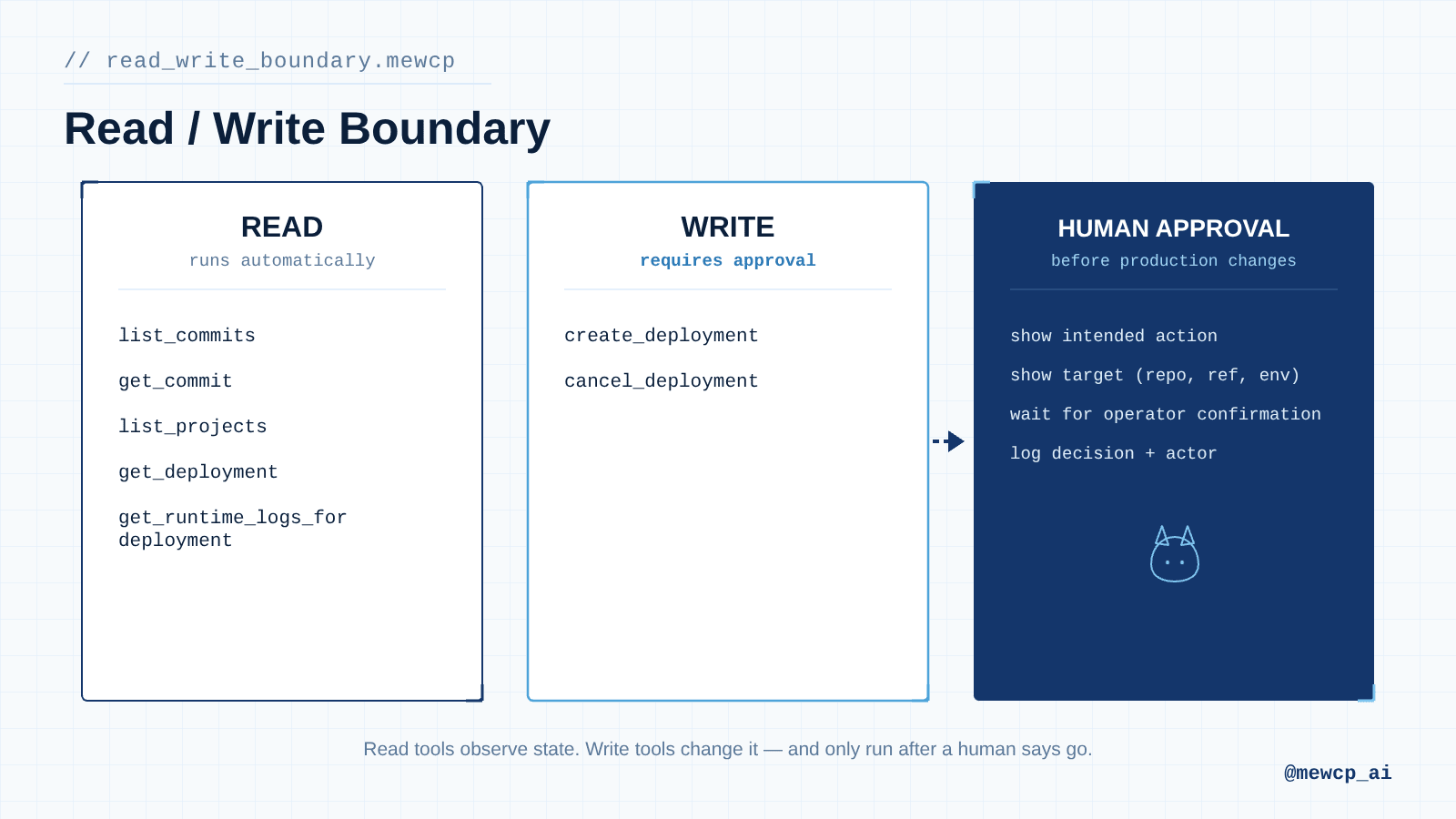
The agent can inspect freely. It can only ship after an operator says go.
Agent Instructions
You are a deployment agent. You help developers ship commits from GitHub
to Vercel and report honestly on what happened.

Your job, in order:
1. Resolve the requested branch to a specific commit SHA using GitHub tools.
   Never assume a branch name means a specific commit; always look it up.
2. Before calling create_deployment, state exactly what you are about to do:
   repository, branch, resolved SHA, and target Vercel project. Wait for
   explicit operator approval before proceeding. This is a production
   deployment. Do not skip this step, even if the user's request sounds
   like an instruction to deploy immediately.
3. Once approved, trigger the deployment and poll its status. Do not report
   success or failure until the deployment has reached a terminal state
   (READY or ERROR). Do not guess based on partial information.
4. If the deployment succeeds, return the live deployment URL.
5. If the deployment fails, retrieve the runtime logs for that deployment
   and identify the most likely cause before responding. Quote the specific
   log lines that support your explanation. Do not speculate without
   evidence from the logs.
6. If asked to cancel a deployment, treat that as a write action requiring
   the same approval step as deploying.

Never deploy without explicit approval. Never fabricate a deployment URL,
commit SHA, or log line. If a tool call fails, say so plainly and stop.
Do not retry silently more than once, and never paper over a failure with
a guess about what probably happened.

If the user says "just tell me what would happen" or similar, do not call
create_deployment or cancel_deployment at all. Walk through steps 1-2 only
and describe the intended action.
Implementation
The agent uses Claude's standard tool-use loop. Instead of giving Claude direct GitHub or Vercel tools, we give it thin proxies for MewCP's four gateway tools, and our code executes them against the MewCP MCP client. This is what gives us a place to insert the approval gate and the deployment poll: logic that belongs in code, not in the model.
// mewcp-client.ts
import { Client } from "@modelcontextprotocol/sdk/client/index.js";
import { StreamableHTTPClientTransport } from "@modelcontextprotocol/sdk/client/streamableHttp.js";

const GATEWAY_URL = "https://gateway.mewcp.com/personal/mcp";

export async function connectMewCP(mewcpKey: string) {
  const transport = new StreamableHTTPClientTransport(new URL(GATEWAY_URL), {
    requestInit: {
      headers: {
        Authorization: `Bearer ${mewcpKey}`,
        Accept: "application/json, text/event-stream",
      },
    },
  });

  const client = new Client({ name: "deployment-agent", version: "1.0.0" });
  await client.connect(transport);
  return client;
}
// tools.ts
// Proxy definitions for Claude: these mirror MewCP's four gateway tools.
// See https://docs.mewcp.com/mewcp/connect/typescript for the underlying client calls.
export const claudeTools = [
{
name: "search",
description: "Find MCP tools by keyword across every connected app (GitHub, Vercel).",
input_schema: {
type: "object",
properties: { query: { type: "string" } },
required: ["query"],
},
},
{
name: "get_schema",
description: "Get the parameter schema for specific tools before calling them.",
input_schema: {
type: "object",
properties: {
tools: {
type: "array",
items: {
type: "object",
properties: {
server_maskedId: { type: "string" },
tool_name: { type: "string" },
},
required: ["server_maskedId", "tool_name"],
},
},
},
required: ["tools"],
},
},
{
name: "call_tool",
description: "Execute a tool against a connected app. Write operations (create_deployment, cancel_deployment) require operator approval and may be rejected.",
input_schema: {
type: "object",
properties: {
server_maskedId: { type: "string", description: "e.g. 'github' or 'vercel'" },
tool_name: { type: "string" },
args: { type: "object" },
},
required: ["server_maskedId", "tool_name", "args"],
},
},
];The dispatcher is where the approval gate and the polling behavior live:
// dispatch.ts
import readline from "node:readline/promises";
import type { Client } from "@modelcontextprotocol/sdk/client/index.js";

const WRITE_TOOLS = new Set(["create_deployment", "cancel_deployment"]);
const IN_PROGRESS_STATES = new Set(["QUEUED", "BUILDING", "INITIALIZING"]);

async function confirmDestructiveAction(input: {
  server_maskedId: string;
  tool_name: string;
  args: Record<string, unknown>;
}): Promise<boolean> {
  console.log("\n--- APPROVAL REQUIRED ---");
  console.log(`About to call ${input.server_maskedId}.${input.tool_name}`);
  console.log(JSON.stringify(input.args, null, 2));

  const rl = readline.createInterface({ input: process.stdin, output: process.stdout });
  const answer = await rl.question("Proceed? (yes/no): ");
  rl.close();
  return answer.trim().toLowerCase() === "yes";
}

const sleep = (ms: number) => new Promise((resolve) => setTimeout(resolve, ms));

export async function dispatchTool(
  mewcp: Client,
  name: string,
  input: any
): Promise<unknown> {
  if (name === "call_tool" && WRITE_TOOLS.has(input.tool_name)) {
    const approved = await confirmDestructiveAction(input);
    if (!approved) {
      return { error: "rejected_by_operator", tool_name: input.tool_name };
    }
  }

  const result = await mewcp.callTool({ name, arguments: input });

  // Give the model a nudge to keep polling instead of hammering the API.
  if (name === "call_tool" && input.tool_name === "get_deployment") {
    const state = extractDeploymentState(result);
    if (state && IN_PROGRESS_STATES.has(state)) {
      await sleep(4000);
    }
  }

  return result;
}

function extractDeploymentState(result: any): string | null {
  try {
    const text = result.content?.[0]?.text;
    const parsed = JSON.parse(text);
    return parsed.readyState ?? parsed.state ?? null;
  } catch {
    return null;
  }
}
And the agent loop itself:
// agent.ts
import Anthropic from "@anthropic-ai/sdk";
import { connectMewCP } from "./mewcp-client";
import { claudeTools } from "./tools";
import { dispatchTool } from "./dispatch";
import { SYSTEM_PROMPT } from "./system-prompt";

const anthropic = new Anthropic();

export async function runDeploymentAgent(userMessage: string) {
  const mewcp = await connectMewCP(process.env.MEWCP_KEY!);

  const messages: Anthropic.MessageParam[] = [
    { role: "user", content: userMessage },
  ];

  while (true) {
    const response = await anthropic.messages.create({
      model: "claude-sonnet-5",
      max_tokens: 2048,
      system: SYSTEM_PROMPT,
      tools: claudeTools,
      messages,
    });

    messages.push({ role: "assistant", content: response.content });

    if (response.stop_reason !== "tool_use") {
      const finalText = response.content
        .filter((block): block is Anthropic.TextBlock => block.type === "text")
        .map((block) => block.text)
        .join("\n");
      return finalText;
    }

    const toolResults: Anthropic.ToolResultBlockParam[] = [];

    for (const block of response.content) {
      if (block.type !== "tool_use") continue;

      let output: unknown;
      try {
        output = await dispatchTool(mewcp, block.name, block.input);
      } catch (err) {
        output = { error: err instanceof Error ? err.message : String(err) };
      }

      toolResults.push({
        type: "tool_result",
        tool_use_id: block.id,
        content: JSON.stringify(output),
      });
    }

    messages.push({ role: "user", content: toolResults });
  }
}
// run.ts
import { runDeploymentAgent } from "./agent";
const result = await runDeploymentAgent("Deploy the latest commit on main to production.");
console.log(result);Tool Discovery and Execution
Agent receives: "deploy the latest commit on main"
        ↓
search({ query: "list commits github" })
        ↓
finds: server_maskedId="github", tool_name="list_commits"
        ↓
get_schema({ tools: [{ server_maskedId: "github", tool_name: "list_commits" }] })
        ↓
validates arguments against the returned schema
        ↓
call_tool({ server_maskedId: "github", tool_name: "list_commits", args: { owner, repo, sha: "main", per_page: 1 } })
        ↓
interprets result → resolved commit SHA
        ↓
repeats the cycle for Vercel: search → get_schema → call_tool("create_deployment")
        ↓
continues: poll get_deployment until terminal state
This is the same lifecycle MewCP's gateway is built around: search and get_schema exist precisely so the model isn't carrying every tool definition from every connected app in its context on every turn; it only pulls in the shape of the one or two tools it actually needs, right before it needs them. With GitHub alone contributing 50+ tools and Vercel another 19, that difference is the reason this agent stays accurate instead of picking the wrong tool out of a flooded list.
An example get_schema response for create_deployment looks roughly like this (always confirm the live shape with get_schema rather than hardcoding it, since Vercel's deployment parameters can change):
{
  "name": "vercel.create_deployment",
  "parameters": {
    "type": "object",
    "properties": {
      "name": { "type": "string", "description": "Project name" },
      "project": { "type": "string", "description": "Vercel project ID" },
      "target": { "type": "string", "enum": ["production", "preview"] },
      "gitSource": {
        "type": "object",
        "properties": {
          "type": { "type": "string", "enum": ["github"] },
          "ref": { "type": "string" }
        }
      }
    },
    "required": ["name", "project", "gitSource"]
  }
}
Error Handling
| Failure | Where it surfaces | Agent behavior |
|---|---|---|
| Vercel or GitHub not connected | call_tool returns a connect link instead of a result | Surface the link to the operator, stop |
| Wrong branch name | list_commits returns empty | Report that the branch wasn't found, ask for confirmation instead of guessing |
| Deployment errors during build | get_deployment returns readyState: "ERROR" | Fetch get_runtime_logs_for_deployment, quote the relevant lines, explain the likely cause |
| Poll never resolves | State stays BUILDING past a reasonable ceiling | Stop after a fixed number of polls (see Production Considerations) and report a timeout, not a guessed outcome |
| Rate limiting | call_tool returns a 429-shaped error | Back off once, retry once, then report the failure rather than looping silently |
| Model picks the wrong GitHub tool | e.g. calls search_commits instead of list_commits | get_schema on the wrong tool returns a schema that doesn't match the intended arguments, which is a natural signal to re-search rather than force-fit arguments |
| Operator rejects the deployment | confirmDestructiveAction returns false | Dispatcher returns rejected_by_operator; agent should acknowledge and stop, not retry the same call |
The one that matters most in practice is the "poll never resolves" case. An agent that polls forever isn't reliable, it's just quiet about being stuck. Put a hard ceiling on it.
Security
- Least privilege at the account level. Connect a Vercel token and GitHub account scoped to only what this agent needs, not a personal admin token you also use for everything else.
- Credentials never reach the model or your app code. MewCP decrypts and injects the GitHub and Vercel credentials server-side, at the moment
call_toolexecutes. Your agent process only ever holds a single MewCP key. - Read/write separation is enforced in your dispatcher, not just in the prompt. The system prompt tells Claude to ask before deploying, but the
WRITE_TOOLScheck indispatch.tsis what actually blocks the call if the model tries to skip that step. Treat the prompt as guidance and the code as the boundary. - Prompt injection surface. This agent reads GitHub commit metadata and Vercel logs, both of which can contain attacker-controlled text (a malicious commit message, a log line crafted to look like an instruction). Nothing in this design lets tool output add new tool calls to the conversation: the loop only executes
tool_useblocks the model itself produced in response to the system prompt, but it's still worth not trusting commit messages or log content as anything other than data when you extend this agent. - Auditability. Log every
call_toolinvocation forcreate_deploymentandcancel_deployment(who approved it, what SHA, what target) outside the model conversation. This is a production requirement, not a nice-to-have.
Testing the Agent
"Deploy the latest commit from main."Expected: agent resolves the SHA, states the intended action, waits for approval, deploys, polls, returns the URL.
"Deploy the latest commit and tell me if the deployment failed."Expected: same flow, but on ERROR state the agent pulls runtime logs and explains the cause instead of just saying "it failed."
"Do not deploy anything. Just tell me what would happen."Expected: agent resolves the commit, describes the intended create_deployment call, and stops: no approval prompt, no tool call to create_deployment at all.
"Deploy the feature/nonexistent-branch branch."Expected (failure scenario): list_commits returns nothing for that ref. The agent reports the branch wasn't found rather than deploying whatever main happens to resolve to.
Production Considerations
- Idempotency. If your process crashes mid-poll, don't blindly re-run
create_deploymenton restart; check Vercel for an existing deployment tied to the same commit SHA first, or you'll ship duplicate builds. - Poll ceiling and backoff. Cap total poll time (e.g., 10 minutes) and back off the interval as it goes, rather than polling every 4 seconds for the whole duration.
- Observability. Log every tool call, its arguments, and its result outside the conversation history; you'll want this independent of whatever the model decides to say in its final summary.
- Approval UX. A
readlineprompt is fine for a CLI tool. In a team setting, replaceconfirmDestructiveActionwith a Slack approval, a ticket, or a dashboard click; the dispatcher's job stays the same either way. - State across restarts. A long deployment poll can outlive a single process. If this agent runs as a service rather than a CLI, persist the deployment ID and resume polling instead of losing track of an in-flight build.
- Rate limits. Both GitHub and Vercel rate-limit aggressively under load. Don't poll faster than you need to, and treat a 429 as a normal, expected response to handle, not an error path you bolt on later.
- Cost. Each poll iteration is a full model turn if you're routing polling decisions through Claude. Moving the poll loop itself into
dispatch.ts(as shown above) rather than letting the model decide to callget_deploymentagain keeps token spend proportional to actual decisions, not to wall-clock wait time.
What This Demonstrates
The interesting part of this agent isn't that a model can call GitHub and then call Vercel. It's that the two systems have no relationship to each other at all: GitHub doesn't know a deployment happened, and Vercel doesn't know which commit message explains a code change. The agent is the thing that holds that relationship together across an operation that takes real wall-clock time to resolve.
That's also why the approval gate sits in code and not in the prompt, and why polling has a ceiling instead of running until someone notices it's stuck. An agent that can act on production infrastructure needs the same discipline you'd want from a human running a deploy script: know what you're about to do, say it out loud, wait for a state you can act on, and don't lie about outcomes you can't verify.
If you're connecting more than two services this way, the tool surface grows fast: GitHub alone is 50+ tools before you've added a third app. MewCP is built around that specific problem: a gateway that exposes discovery and schema retrieval as first-class steps instead of forcing every tool into a model's context up front.
Related MewCP Guides
- Ship Your Latest Commit to Vercel → the underlying use case this agent implements
- Debug Your Vercel App → extends this pattern with browser reproduction and a GitHub patch
- Daily GitHub Status Brief → a read-only agent built on the same GitHub server
- Build a Deploy → Verify Agent with GitHub + Vercel + Firecrawl (coming soon)
- How to Build Human-in-the-Loop MCP Agents (coming soon)