
What Exactly Is an AI Agent Tool?
Your agent never reads your code. It reads a name, a description and a schema, then guesses. Here is how to write tool definitions it can actually pick correctly.

Ask ten engineers what an AI agent tool is and nine will say "a function the model can call." That answer feels right and it will quietly cost you reliability, because an AI agent tool is not the function. The function is only the part that runs after the hard decision has already been made.
Here is the thing that reframes everything. Your model has never seen your code. It has never opened your repo. At the moment it decides which tool to call, it has access to three strings per tool: a name, a description, and a parameter schema. That is it. Your careful retry logic, your connection pooling, your typed return value, none of it is visible at selection time.
So when your agent calls search_web for a question about a specific customer's order history, the model did not malfunction. It read what you wrote and picked the closest match.
What an AI agent tool actually is
An AI agent tool is a contract with six parts, and the contract splits cleanly in half.
Written for the model, read at selection time:
- Name - the identifier the model emits when it wants to call the tool
- Description - natural language explaining what it does and when to use it
- Input schema - a JSON Schema object describing the parameters, their types, and which are required
Run by your code, invisible to the model until afterwards:
- Execution - the actual work: the HTTP request, the SQL query, the file read
- Result - whatever you send back, which re-enters the model's context as text
- Error - what the model sees when execution fails
Most teams spend ninety percent of their effort on parts four through six and write parts one through three in thirty seconds. That ratio is backwards. Parts one through three determine every selection decision your agent will ever make.
Here is a complete definition in the Anthropic Messages API shape:
{
  "name": "send_email",
  "description": "Send an email from the user's connected mailbox. Use this only when the user explicitly asks to send, reply to, or forward a message. Do not use it to draft text the user has not asked to send, and do not use it to read the inbox.",
  "input_schema": {
    "type": "object",
    "properties": {
      "to": {
        "type": "array",
        "items": { "type": "string" },
        "description": "Recipient email addresses. Must be full addresses, not display names."
      },
      "subject": {
        "type": "string",
        "description": "Subject line. Keep under 120 characters."
      },
      "body": {
        "type": "string",
        "description": "Plain text body of the email."
      },
      "importance": {
        "type": "string",
        "enum": ["normal", "high"],
        "description": "Defaults to normal. Use high only if the user says it is urgent."
      }
    },
    "required": ["to", "subject", "body"]
  }
}
OpenAI uses the same JSON Schema underneath but wraps it differently. In the Chat Completions API the shape is {"type": "function", "function": {"name", "description", "parameters"}}, and in the Responses API those fields are flattened to the top level. The key is called parameters rather than input_schema. Both providers support a strict mode that constrains generation to your schema, which is worth turning on. The schema itself, the part that matters, is portable.
Naming: the cheapest reliability win you have
Tool names are limited to letters, numbers, underscores and dashes, with a 64 character ceiling on OpenAI. Within that budget, use verb_object:
search_websend_emailcreate_eventquery_ordersopen_pageread_filecall_endpoint
Three rules that matter once you pass ten tools.
One verb per concept. If you have get_user and fetch_customer in the same list, you have created a coin flip. Pick get or fetch and use it everywhere.
Namespace by system, not by team. stripe_get_invoice and hubspot_get_contact beat billing_get_invoice and crm_get_contact, because the model can map the first pair to entities it already knows.
Never encode behaviour in the name that is not in the description. A tool called search_web_fast implies there is a slow one. If there is not, you have invented a distinction the model will try to reason about.
Descriptions: write the negative case
This is the highest-leverage text in your entire agent, and almost nobody writes it properly.
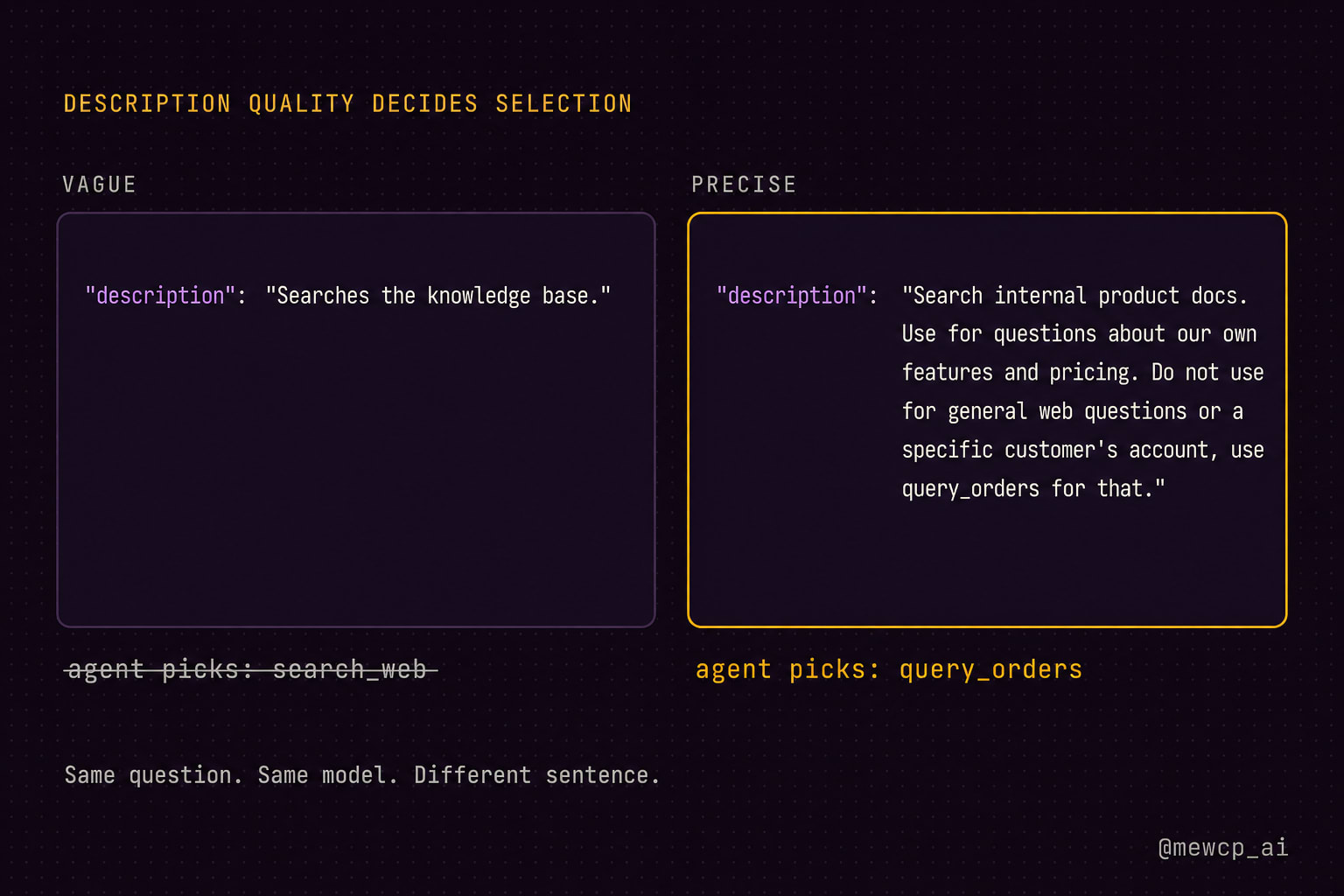
A weak description says what the tool does:
"Searches the knowledge base."A strong description says what it does, when to reach for it, when not to, and what it returns:
"Search internal product documentation. Use for questions about our own
features, pricing tiers, and API limits. Do not use for general web
questions, and do not use for anything about a specific customer's
account, use query_orders for that. Returns up to 5 excerpts with
source URLs."
The template underneath that:
- One sentence on what it does
- One sentence on when to use it
- One sentence on when not to use it, naming the tool that should be used instead
- One sentence on the shape of what comes back
The third line is the one people skip and the one that does the most work. You are not describing a tool in isolation. You are disambiguating it from the eleven others sitting next to it in the same list. Selection is a comparison, so write comparatively.
Parameter design
The schema is a prompt too. Every field description is read.
Use enums instead of free-text strings wherever the value set is closed. "status": {"enum": ["pending", "shipped", "delivered"]} eliminates a whole class of hallucinated values that a plain "type": "string" invites.
Keep it flat. Deeply nested objects raise the chance of malformed arguments. Three top-level fields beat one nested object with three fields inside it.
Minimise required. Every required field is something the model must invent if the user did not supply it. Make optional things optional and give them documented defaults.
Describe every field. A field without a description is a field the model will guess at. Say what format you expect: ISO 8601, full email address, integer count, lowercase slug.
Never accept raw code or raw SQL from the model as a parameter unless you have a sandbox and you have thought hard about it. query_orders(customer_id, limit) is a tool. run_sql(query) is an incident waiting to happen.
The result is also a prompt
This is the part that surprises people. Your tool result does not go into a variable. It goes back into the model's context window as text, and the model has to reason over it to decide what to do next.
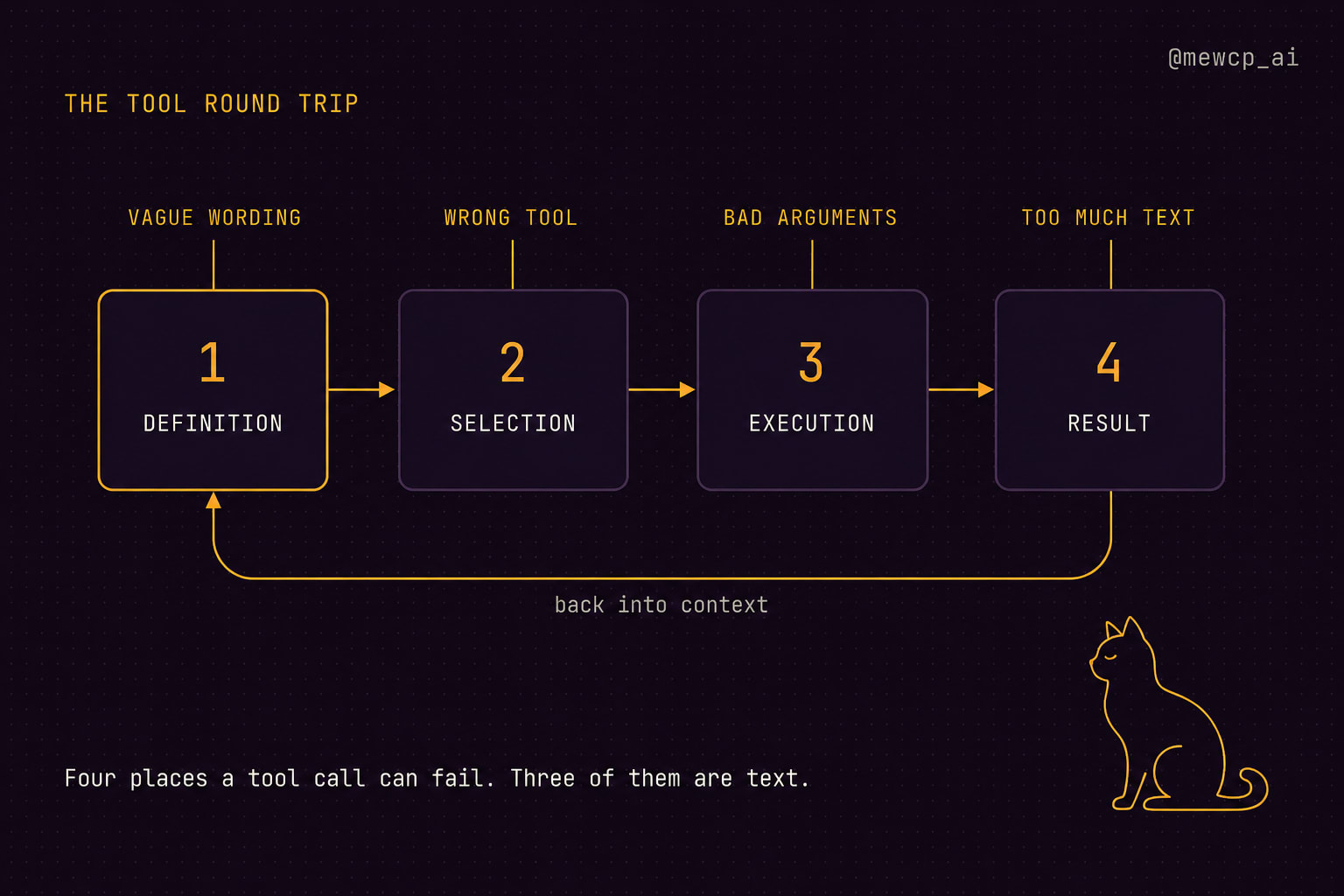
Which means a tool that dumps 4000 lines of raw JSON is sabotaging the next reasoning step just as effectively as a vague description sabotages the current one.
Good tool results are:
- Small. Return the fields the model needs, not everything the API gave you.
- Labelled.
Found 3 orders for customer C-8821:beats an unlabelled array. - Truncated with a signal. If you cut results off, say so:
Showing 5 of 47 results. Increase limit or add a filter to narrow. - Forward-looking when useful.
No orders found in the last 30 days. Try widening the date range.tells the model how to recover.
def execute_query_orders(customer_id: str, limit: int = 5) -> str:
    orders = db.fetch_orders(customer_id=customer_id, limit=limit + 1)

    if not orders:
        return (
            f"No orders found for customer {customer_id}. "
            "Verify the customer ID with get_customer before retrying."
        )

    truncated = len(orders) > limit
    orders = orders[:limit]

    lines = [f"Found {len(orders)} order(s) for customer {customer_id}:"]
    for o in orders:
        lines.append(
            f"- {o.id} | {o.placed_at:%Y-%m-%d} | {o.status} | ${o.total:.2f}"
        )

    if truncated:
        lines.append(
            f"More than {limit} orders exist. Increase limit to see the rest."
        )

    return "\n".join(lines)
Plain text like that costs a fraction of the tokens of the equivalent JSON and the model reads it more reliably.
Errors are instructions, not stack traces
When a tool fails, the model gets your error string and has to decide whether to retry, try a different tool, or ask the user. Give it enough to make that call. Three categories cover almost everything.
The model's fault. Bad arguments. Tell it exactly what to fix.
Invalid date format "next tuesday". Expected ISO 8601, for example 2026-08-18.
Transient. Timeouts, rate limits, 5xx. Tell it whether retrying is worth it.
Rate limited by the calendar API. Retry once after a short pause, then tell the user.
Permanent. Missing auth, revoked scope, deleted resource. Tell it to stop.
No calendar connected for this user. Do not retry. Ask the user to connect a calendar.
Never return a raw traceback. Never return a bare 500. Both produce the same behaviour: the model retries the identical call and burns your budget.
Side effects need a gate
Tools split into two risk classes and you should treat them differently.
Read tools are safe to retry. Write tools are not. A send_email that gets called twice sends two emails, and the model has no way to know the first one landed.
For anything with a side effect: make it idempotent where you can with a client-supplied key, log every invocation with the arguments, and put a human confirmation step in front of anything destructive or externally visible. The confirmation belongs in your execution layer, not in the description. Never rely on "Only use this after confirming with the user" as your safety mechanism, because that is a suggestion, not a control.
The seven categories in practice
| Category | Example tool | Typical return | Risk |
|---|---|---|---|
| Search | search_web | Ranked excerpts with URLs | Low, read only |
send_email | Confirmation with message ID | High, external side effect | |
| Calendar | create_event | Event ID and time | Medium, visible to others |
| Database | query_orders | Structured rows as text | Low to high, depends on write access |
| Browser | open_page | Extracted page text | Medium, slow and stateful |
| File system | read_file | File contents, truncated | Medium, path traversal risk |
| APIs | call_endpoint | Parsed response summary | Varies, scope it narrowly |
That last row is a trap worth naming. A generic call_endpoint(url, method, body) tool looks efficient because one definition covers everything. In practice the model has no idea which endpoint to hit or what body shape is valid, so selection accuracy collapses. Narrow tools with specific names outperform one general tool almost every time.
The checklist
Before you ship a tool, run it against this.
- Name follows
verb_objectand uses the same verbs as the rest of your tool set - Description states what it does, when to use it, when not to use it, and what it returns
- The "when not to use it" line names the correct alternative tool
- Every parameter has a type and a description with an explicit format
- Closed value sets are enums, not free-text strings
- The schema is flat, and
requiredcontains only what is genuinely required - No parameter accepts raw code, raw SQL, or an arbitrary URL
- Results are compact plain text, labelled, and truncated with an explicit signal
- Empty results explain how to widen the search
- Errors are sorted into fix-your-arguments, retry-later, and stop-and-ask
- Write tools are idempotent or gated behind a confirmation step in the execution layer
- Every invocation is logged with arguments and duration
- You have tested selection with a set of prompts where the wrong tool is plausibly attractive
That last one is the test almost nobody runs. Write fifteen realistic user messages, run them against your full tool list, and check which tool the model reaches for. You will find your description problems in about ten minutes.
Where this goes next
Everything above assumes one clean tool list, defined in one codebase, running in one process. That works beautifully until you have thirty tools spread across six services, each with its own auth, its own credential storage, and its own deployment. The definitions stay simple. The plumbing behind them does not.
That plumbing is what we work on at MewCP: hosting tool servers, handling per-user credentials and authentication, and putting a gateway in front so your agent sees one clean, well-described tool surface instead of six half-integrated ones. The design rules on this page do not change. They just stop being the hard part.
Write the contract first. The code is the easy half.