The AI Agent Architecture Breakdown: From Loop to Layers
by Rohit Gite, Co-Founder @MewCP··7 min read
A goal, a loop, and tools only gets you so far. Here's what actually sits underneath a production AI Agent.
If you've seen our carousel on what an AI Agent actually is, you already have the mental model: a goal, a loop, tools to act, memory to learn from. That's enough to tell an agent apart from a chatbot in conversation.
It is not enough to build one.
This guide picks up exactly where the mental model stops and walks through the actual architecture underneath: the layers, the tool-calling mechanics, the two kinds of memory, and the reasons most agent demos fall apart the moment real users touch them.
1. Recap: The Four-Part Mental Model
Before going deeper, here's the short version one more time, because everything below is just an expansion of it:
Goal: you tell the agent what, not how.
Loop: it observes, thinks, and acts, repeating until the goal is met.
Tools: the "hands" it uses to act on the world (search, code execution, APIs).
Memory: what lets step ten build on step one instead of repeating it.
Every architectural decision in a real agent system is really just an answer to one question: how do you implement these four things so they don't fall over under real usage?
2. The Four-Layer Agent Stack
In production, those four ideas map onto four engineering layers. They're usually built and reasoned about separately, even though they run together at runtime.
Planning Layer
Turns a goal into a sequence of steps. This is where techniques like Chain of Thought, ReAct, or Tree of Thoughts live, different strategies for deciding what to do next given the current state.
Memory Layer
Holds everything the agent needs to remember: the current conversation, prior tool results, and anything persisted across sessions. Covered in depth in Section 4.
Tool Layer
Defines what the agent is allowed to do and how it does it: the actual functions, APIs, and external systems it can call, plus the schemas that describe them.
The runtime that actually drives the loop. It calls the planning layer, dispatches tool calls, feeds results back into memory, and decides when the goal is done or when to stop trying.
Execution Layer
None of these layers is "the agent." The agent is what happens when all four run together, in a loop, until the goal is satisfied.
3. What "Tool Calling" Actually Looks Like
"The agent has tools" sounds abstract until you see the mechanics. Underneath, tool calling is a structured request-and-response exchange between the model and your code. The model never touches the outside world directly.
You describe each tool to the model: its name, purpose, and expected inputs, usually as a small schema.
The model decides a tool is needed, and returns a structured request instead of a plain-text reply.
Your code executes the real action (the actual API call, database query, or script). The model never does this part itself.
The result is handed back to the model as a new observation, and the loop continues.
A simplified version of step 2 and 3 looks like this:
// The model's response: a structured tool request, not a chat reply{ "tool_call": { "name": "get_weather", "arguments": { "city": "Lisbon" } }}
// Your code executes get_weather() and returns this to the model{ "tool_result": { "name": "get_weather", "output": { "temp_c": 24, "condition": "clear" } }}
That's the entire "hands" concept from the mental model, made concrete: the model requests, your infrastructure executes, and the result feeds the next iteration of the loop.
4. Memory, Two Ways: Short-Term vs Long-Term
"It remembers what it did" is doing a lot of work in the simple mental model. In practice, agent memory splits into two very different mechanisms.
Short-term memory (the context window)
Everything currently visible to the model in a single call: the conversation so far, recent tool results, the current plan. It's fast and always up to date, but it's also finite. Once a conversation runs long enough, older information has to be summarized or dropped to make room.
Long-term memory (persisted state)
Information saved outside the context window, in a database, a vector store, or a file, and retrieved only when relevant. This is what lets an agent "remember" a user's preferences across sessions, or recall a document it read a week ago, without carrying every past conversation in every request.
Most reliability issues that look like "the agent forgot" are actually a short-term/long-term mismatch. Something important aged out of the context window and was never written to persisted memory in the first place.
5. Why Most Agent Demos Break in Production
A demo only has to work once, on a happy path, in front of a friendly audience. Production has to work thousands of times, on inputs nobody planned for, unattended. That gap is where most agent projects stall. Four things close it:
Reliability: tool calls fail, APIs time out, models occasionally return malformed output. A production agent expects this and has a defined behavior for it, instead of crashing the loop.
Retries: not just "try again," but smart retries: knowing which failures are worth retrying, how many times, and when to give up and escalate instead of looping forever.
Guardrails: limits on what the agent is allowed to do without a human checking first. Sending an email might be fine to automate; deleting a production database usually shouldn't be.
Observability: logging every step of the loop (what it planned, which tools it called, what came back) so that when something goes wrong, you can see why, instead of re-running the demo and hoping.
None of these show up in a first prototype. All of them show up in the first week of real users.
6. A Real Reference Architecture Diagram
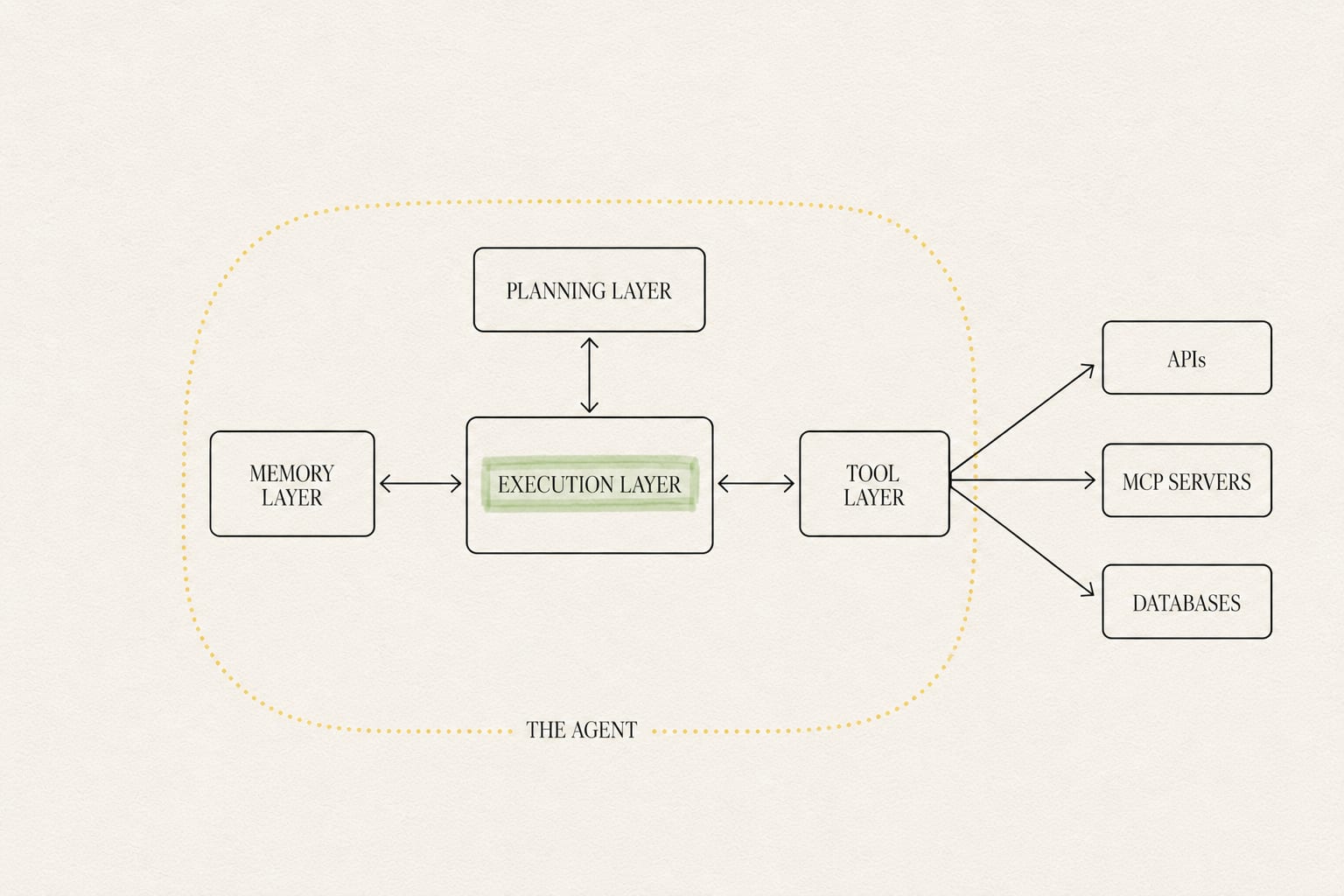
Put together, the four layers, the tool-calling mechanics, and the two memory types look like this in a real system:
Notice what the diagram makes explicit that the mental model doesn't: the Execution Layer sits in the middle, coordinating the other three. It's the actual implementation of "the loop." The Tool Layer is also where an agent stops being self-contained and starts touching the outside world, which is exactly why it's the layer most worth standardizing. That's what Section 7 is about.
7. Where MCP Fits In
Back in the mental model, "tools" were described simply as an agent's hands. In a real system, each tool your agent can call, a search API, an internal database, a third-party service, typically needs its own integration, its own auth, and its own way of describing itself to the model. Multiply that across a growing list of tools and several agents, and the tool layer becomes the messiest part of the stack.
The Model Context Protocol (MCP) exists to standardize exactly that layer. Instead of every agent implementing its own bespoke connection to every tool, MCP defines a common way for tools to describe themselves and be discovered, and a common way for agents to call them, regardless of which model or framework is driving the loop.
In practice, this is also where infrastructure concerns start to matter: who is authenticated to call which tool, how credentials are stored and rotated, and how the same tool server is shared safely across multiple agents or tenants. This is the part of the stack MewCP focuses on: hosted MCP servers, a gateway in front of them, and the authentication and multi-tenant plumbing that a growing tool layer eventually needs, so that the tool layer of your agent stack doesn't become the part you have to rebuild every time you add a new integration.
8. Glossary of Terms You'll See Next
A quick reference for terms that show up constantly once you're reading further into agent architecture:
Agent Loop: the repeating observe → think → act cycle that drives an agent toward its goal.
ReAct: a planning pattern where the model alternates between reasoning about what to do and acting on it, one step at a time.
Orchestration: the logic that decides which step, tool, or sub-agent runs next.
Autonomy: how much an agent can decide and execute without a human approving each step.
Tool Calling: the structured mechanism a model uses to request an action from your code.
Context Window: the finite amount of text a model can "see" in a single call; the basis of short-term memory.
Guardrails: explicit limits on what an agent is permitted to do unsupervised.
Retries: logic for re-attempting a failed step instead of stopping or crashing.
Observability: the logging and tracing that let you see what an agent actually did, step by step.
Multi-Tenancy: safely serving multiple users, teams, or customers from the same underlying agent or tool infrastructure.
Gateway: a single entry point that routes, authenticates, and manages access to a set of tools or MCP servers.
OAuth: a standard way for an agent to be granted limited, revocable access to a tool or service on a user's behalf.
That's the full path from the four-part mental model to a real, production-shaped architecture. The next useful step is usually the smallest possible version: one goal, one tool, one loop, built, not just diagrammed.