
Chatbot vs Workflow vs Agent: Which Should You Build?
Three architectures, one decision. A one-page matrix, a decision tree, twelve real scenarios classified, and the honest cost of picking wrong in either direction.

Chatbot vs Workflow vs Agent
Companion resource for Day 02 of 30 Days of AI Agents.
The carousel showed the structural difference between a chatbot and an agent. This post covers the part that actually costs money to get wrong, which is deciding which of the three you should build.
Most comparisons only offer two options and imply the agent is the advanced, correct choice. That framing has caused a lot of over-engineering. There are three options, and the middle one wins more often than either of its neighbours.
If you haven't read Day 01's companion, The AI Agent Mental Model, it covers the loop itself: the four moves, the five parts, the four stop conditions, and a working implementation. Same AGENT keyword. This post assumes you know roughly what a loop is, but it doesn't assume you've read that one.
Section 1: The One-Page Matrix
This is the centrepiece. Print it, pin it, paste it into the design doc.
| Chatbot | Workflow | Agent | |
|---|---|---|---|
| Who chooses the next step | Nobody, there's one step | You, at build time | The model, at run time |
| Who closes the loop | The user | Your code | The agent |
| Can it act on the world | No | Yes | Yes |
| Does it see its own results | No | Yes, at fixed points | Yes, every iteration |
| Path decided at | n/a | Build time | Run time |
| Same input, same path? | Yes | Yes | Not guaranteed |
| Relative latency | Lowest | Low and predictable | Highest and variable |
| Relative cost per task | 1 model call | N model calls, N known | N model calls, N unknown |
| How you test it | Evaluate responses | Test each step, like normal software | Evaluate trajectories |
| How you debug it | Read the response | Find the failing step | Read the trace, replay it |
| Primary failure mode | Confidently wrong | Brittle to input drift | Loops, or stops too early |
| What good looks like | Accurate, well-scoped answers | Reliable, boring, observable | Completes tasks you couldn't script |
| Best fit | Questions with answers in context | Known path, repeatable | Path genuinely unknowable upfront |
These are three tools rather than three tiers. A team shipping a well-built workflow hasn't settled for less than a team shipping an agent. Quite often they've made the better call.
Section 2: The Three, Defined Precisely
Chatbot
One model call. The user asks, the model answers, the interaction ends, and nothing outside the conversation changes.
Chatbots are good at answering from context you supply, whether that's docs, a knowledge base or a transcript, and at transforming text: summarising, classifying, rewriting, extracting, translating. They stop being enough when the answer depends on information the model can't see, or when somebody has to take the output and go do something with it by hand.
The tell is easy to spot. If your users are copy-pasting the response into another system, that step is a workflow you haven't built yet.
Workflow
Fixed steps, in an order you chose, with the model doing the parts that need language. A workflow acts. It observes. It's genuinely useful software. But the path was decided at build time by a human.
Workflows are good at anything with a knowable sequence: fetch, transform, classify, route, send. They're especially good for high-volume repeatable work where predictability matters more than flexibility. They stop being enough when the number of branches explodes, or when step three genuinely can't be chosen until step two returns.
This is where most production "AI features" actually land, and it's chronically missing from chatbot-versus-agent comparisons. Which is exactly why teams skip straight past it to something harder.
Agent
The model chooses each next step based on what it just observed, and decides for itself when the goal is met. Day 01's companion covers the full mechanics.
Agents are good at tasks where the path depends on what you find, like investigation, triage, or reconciliation, and at work with a wide space of possible sequences and no sensible way to enumerate them. They stop being enough when you need a guarantee about how the work gets done rather than just that it does.
Section 3: The Decision Tree
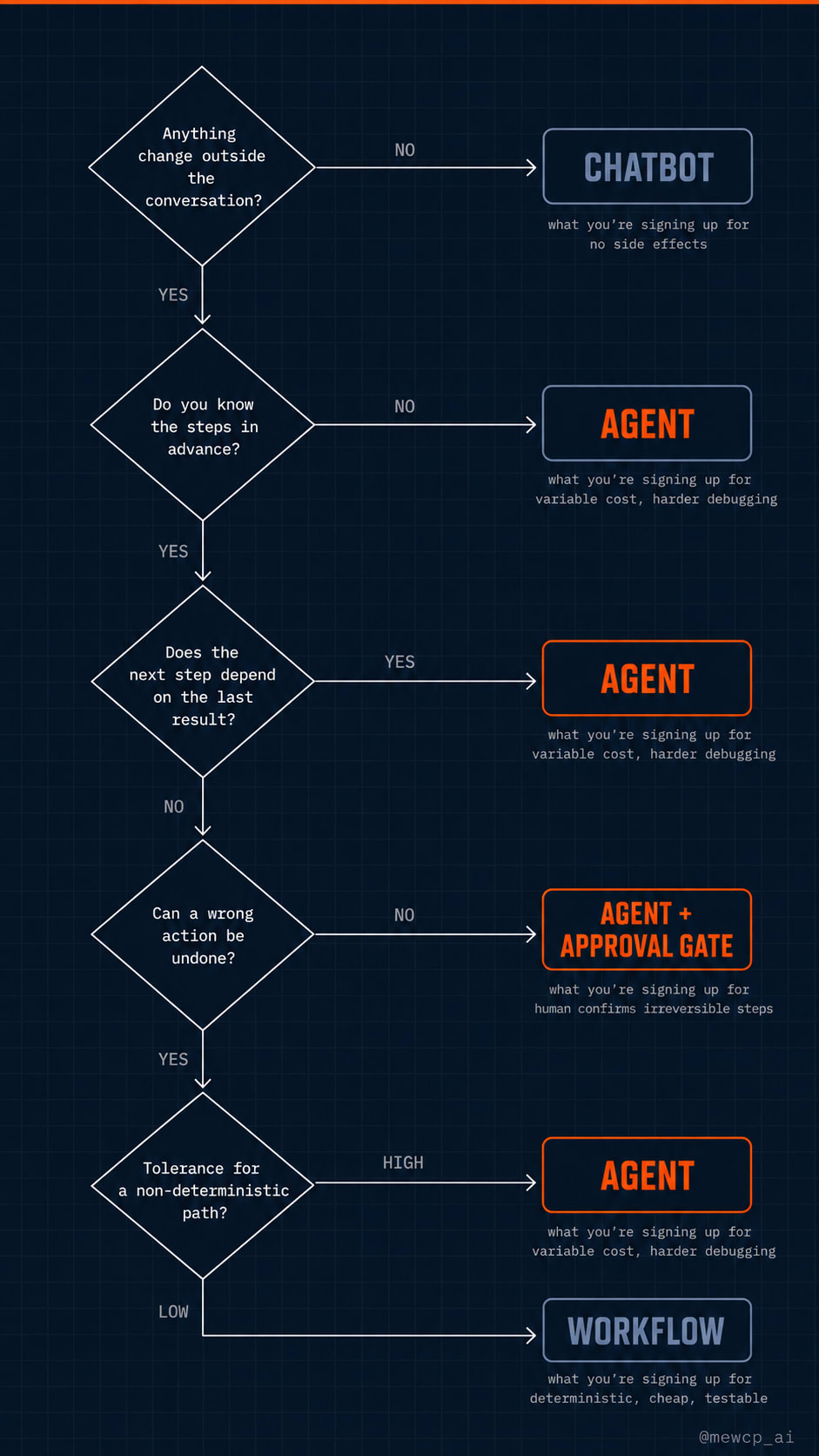
Five questions, answered in order.
1. Does anything need to change outside the conversation? If no, build a chatbot. You're signing up for no side effects, no state, and the lowest cost of the three.
2. Do you know the steps in advance? If no, you're heading for an agent, so jump to question 4.
3. Does the next step depend on what the previous one returned? If no, build a workflow. You're signing up for deterministic, testable, cheap behaviour, plus some maintenance when your inputs drift. If yes but in ways you can enumerate, build a workflow with branches. If yes in ways you can't enumerate, you need an agent.
4. Can a wrong action be undone? If no, build an agent with an approval gate so a human confirms the irreversible actions.
5. What's your tolerance for a non-deterministic path? If it's low, go back and reconsider the workflow, and think about constraining the problem instead. If you're fine with it, build the agent. You're signing up for variable cost, trajectory-based evaluation, and harder debugging.
Question 3 is where most projects are actually decided, and it's the one people skip. "The next step depends on the previous one" feels like it always applies, but the real question is whether it depends in ways you can enumerate. If there are four possible outcomes and you know all four, that's a switch statement rather than an agent.
Section 4: What Each One Actually Costs
Putting numbers here would be dishonest, because the real figures depend entirely on your model, prompt size, tool latency and task. What's stable is the shape of the cost, so learn the formula and then measure your own.
Model calls
A chatbot makes one. A workflow makes as many as it has model-using steps, and you know that number at build time. An agent makes one per iteration, and you don't know how many iterations until the run finishes.
That last point is the whole cost story. An agent averaging six iterations costs roughly six model calls plus six tool round-trips per task, but the variance matters far more than the average. A task that usually takes four iterations and occasionally takes thirty will destroy a budget built on the mean.
Context growth
A chatbot sends one prompt. A workflow sends a bounded prompt per step. An agent resends its accumulated history on every iteration, so the cost per iteration climbs as the run continues unless you actively manage it.
This is the line item that surprises teams shipping their first agent: the last iteration is more expensive than the first.
Engineering time
Chatbots absorb time in prompt iteration and response evaluation. Workflows absorb it in step implementation and the error handling between steps. Agents absorb it in tool design, stop conditions, trace tooling and building an evaluation harness.
Agents front-load work with no equivalent in the other two. You need the ability to see what happened before you can improve anything, and that tooling doesn't come free.
Debugging
With a chatbot you read the response. With a workflow you find the failing step, using ordinary software debugging. With an agent you read the trace, and since the same input may not reproduce the same path, "run it again" isn't a reliable reproduction strategy.
Operational surface
Agents introduce concerns the other two don't have at all: iteration caps, cost ceilings, no-progress detection, approval gates for irreversible actions, and somewhere to store a trace per run.
Measure rather than estimate. Run twenty representative tasks, log iterations and tokens per task, and look at the distribution rather than the mean. The 95th percentile is what your budget has to survive.
Section 5: Twelve Scenarios, Classified
Verdicts with reasoning. Three of these are deliberately borderline.
1. Customer support Q&A over a documentation set: chatbot. The answer is in the context you supply and nothing changes outside the conversation. Retrieval plus one good call.
2. Nightly report from three known data sources: workflow. Three fetches, one synthesis, one delivery. You know the sequence today and it'll be the same tomorrow.
3. Triage an inbound bug report and reproduce it: agent. You can't know whether reproduction needs a log query, a test run or a database check until you've read the report and started looking.
4. Draft replies to routine emails: workflow. Classify, select template, fill, queue for review. Predictable path, and the human is the approval gate.
5. Onboarding assistant answering policy questions: chatbot. Retrieval over a policy corpus. If it starts doing things, like provisioning accounts or filing tickets, it's become a workflow.
6. Reconcile two systems that disagree: agent. Every discrepancy is a different investigation, and what you check second depends on what the first check revealed.
7. Summarise a meeting transcript: chatbot. One input, one output, and a loop would add nothing.
8. Migrate a codebase to a new API: agent. Each file surprises you and compile errors change the plan. This is the archetypal case for a loop.
9. Generate a weekly newsletter from a content calendar: workflow. Read calendar, draft sections, assemble, send. Same shape every week.
10. Answer "why did revenue drop last month?": agent. The second query is chosen by the first query's result, and you cannot enumerate the path. That's more or less the definition.
11. Tag incoming tickets by category: workflow. One classification call in a pipeline. This is borderline: if tagging requires looking up customer history and checking related tickets, and those lookups depend on each other, it starts drifting toward an agent. Ask whether the lookups are fixed or discovered.
12. Book a flight within a budget and calendar constraints: agent with an approval gate. Search results genuinely change the plan, but booking spends money and is hard to undo, so that action needs a human even when everything before it runs autonomously.
On the three borderline ones. Scenarios 3 and 11 both involve looking at a thing and deciding, and the difference is whether the lookups themselves are fixed: triage discovers what to check, tagging already knows. Scenario 4 sits right on the workflow-agent line, and it becomes an agent if routine replies need context-gathering that varies per email, though most teams overestimate how often that's true. Scenario 12 is the clearest example of a mixed system, and a useful reminder that the choice isn't always whole-system: autonomous investigation, gated action.
Section 6: Failure Modes of Each
Each architecture breaks in a characteristic way, and it helps to know which one is coming for you.
Chatbots fail by being confidently wrong, which means the user acts on bad information and may never trace it back. They also fail silently: there's no feedback signal, so you don't learn that a response was wrong because nothing observed the outcome. And they drift, as users gradually start asking things the system was never designed for.
Workflows fail by being brittle to input drift. Inputs change shape and step four of seven breaks quietly. They fail by completing partially, where steps one to three ran, four failed, and nobody checked. And they rot in coverage, as new cases appear that the fixed path doesn't handle and nobody notices for a while.
Agents fail by running forever, where the direct cost is money and the alarm is usually the bill. They fail by declaring success without verifying, which is the worst one on this page because it produces false confidence at scale. They retry identical failing calls, burning iterations on something that will never succeed. And occasionally they take an unrecoverable action, which is the whole reason approval gates exist.
That last group is why Day 01's companion spends so much of its length on stop conditions. All four agent failures are stop-condition failures.
Section 7: Red Flags You Picked Wrong
Both directions. The second list is the one nobody writes.
Signs you under-built: users copy-paste your output into another system by hand; there's a "step 2" in your process that's always a human doing the same thing; users type the same follow-up prompt every single time; your documentation explains what to do with the output.
The fix is usually to promote the manual step into the system, which normally means going from chatbot to workflow rather than chatbot to agent.
Signs you over-built: the agent takes the same path on every run; you added guardrails until it effectively became a workflow, but with extra cost and non-determinism; you can't reproduce a bug twice; you're evaluating trajectories for a task with exactly one correct path; your iteration cap never gets hit because the thing never needs more than two passes.
The fix is to demote it, which is a legitimate and under-used move. See the next section.
Section 8: The Migration Path
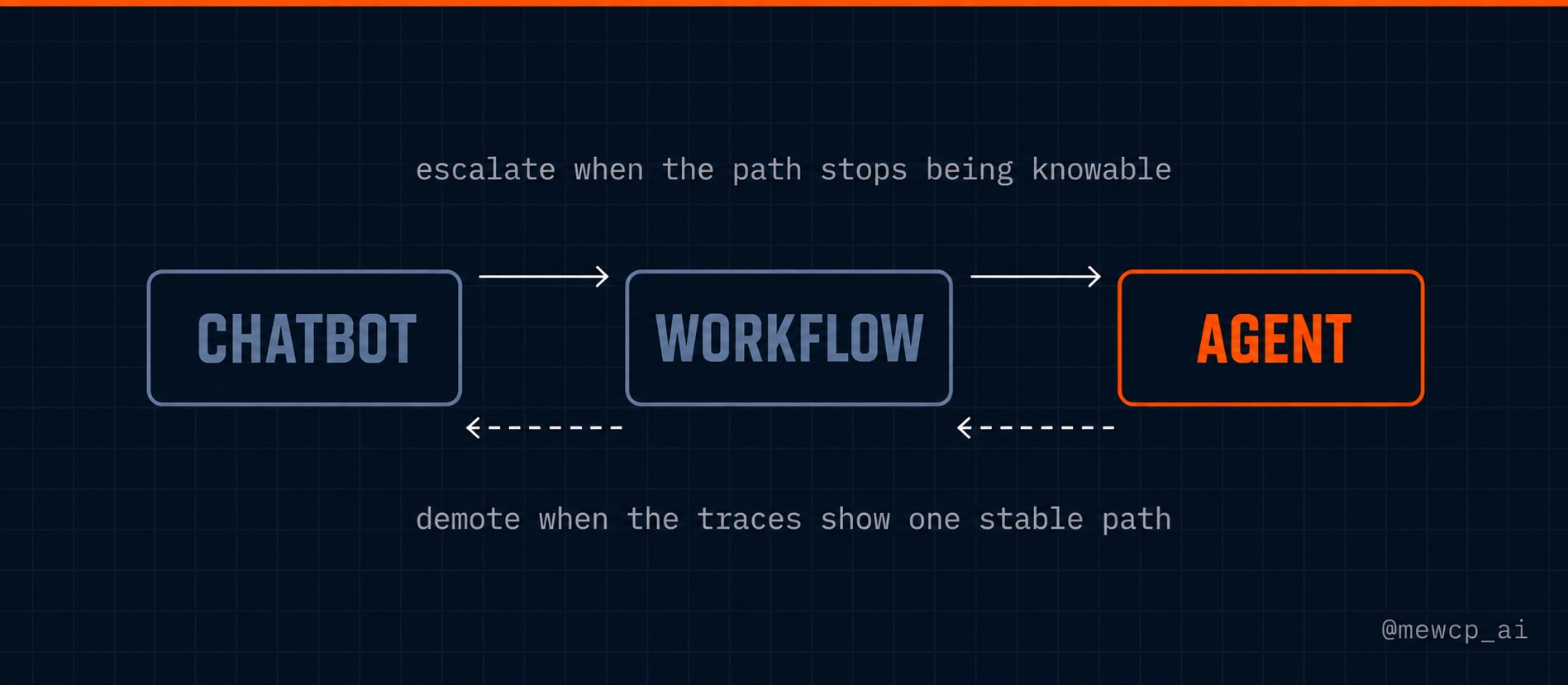
Systems evolve in one direction naturally and in the other direction reluctantly. Both moves are valid.
Chatbot to workflow. The signal is that users are performing the same manual action on every response. The move is to encode that action as a step, keeping the model on the language part. Stop here if the sequence is stable, which for most systems it is.
Workflow to agent. The signal is that your branch count is growing faster than your ability to enumerate cases, and that new branches are being discovered at run time rather than during planning. The move is to replace the fixed sequence with a goal, a tool set and a loop. Don't make this move because the workflow feels unsophisticated, because that isn't a signal.
Agent to workflow, the demotion. Once an agent has been running for a while, look at its traces. If the path is nearly always the same, that path is a workflow you now have evidence for, and you can have it for a fraction of the cost with deterministic behaviour and normal debugging.
This is the most under-used refactor in the space. Teams treat "we built an agent" as a one-way door, and it isn't. Letting an agent discover the right sequence and then hardcoding it is a legitimate and rather elegant strategy.
Worth saying explicitly: you may stop at any stage. Shipping a workflow when a workflow is correct is the win, not a compromise.
Section 9: Vocabulary
| Term | Definition |
|---|---|
| Chatbot | A single model call producing a response, with no side effects |
| Workflow | Fixed steps in a human-chosen order, with model calls inside them |
| Agent | The model chooses each next step from observations and decides when the goal is met |
| Tool | A function the system may call to affect or observe the outside world |
| Tool call | One structured invocation of a tool, with arguments |
| Observation | The result returned after a tool call, including errors |
| Trajectory | The full path one run took, which is the unit of evaluation for agents |
| Iteration | One pass of an agent loop: think, act, observe |
| Stop condition | The rule ending a loop: goal met, budget spent, no progress, escalation |
| Determinism | Whether the same input reliably produces the same path |
| Autonomy | How much of the loop closes without a human in it |
| Approval gate | A required human decision before a specified action executes |
The 30-Day Roadmap
You are here: Day 02.
Days 01 to 05 cover fundamentals: what an agent is, how it differs from a chatbot, the loop, tools, and prompting for reliability. Days 06 to 14 move into agent engineering, meaning planning, memory, retries, guardrails, evaluation, and observability. Days 15 to 22 cover protocols and integration, or how agents connect to the systems they act on. Days 23 to 30 are about production, and what changes once real users, real credentials, and real money are involved.
Day 03 goes deeper into the loop itself: why a single response can't finish a real task, and what actually accumulates across passes.
MewCP builds infrastructure for the production end of this journey. But if this post talked you out of building an agent today, it did its job.
Follow @mewcp_ai for the rest of the series.
Source: ReAct, reasoning and acting interleaved in language models, Yao et al., 2022 (arXiv:2210.03629), presented at ICLR 2023.