AI Agent Planning: How a Goal Becomes Executable Steps
by Rohit Gite, Co-Founder CTO @MewCP··8 min read
Your agent does not wander because the model is weak. It wanders because nobody turned the goal into steps. Here is what the planning layer really does, and how to build one.
You give the agent a goal. It calls a tool. Then another. Then it calls the first one again with slightly different arguments. Twenty steps later it produces a confident summary of work it never finished, and you go read the trace trying to figure out where it lost the thread.
The usual reaction is to blame the model or rewrite the system prompt. Usually the real gap is earlier: AI agent planning never happened. The agent received intent and was expected to produce action, with nothing in between that decided what the actual steps were.
This post is about that in-between layer. What it produces, how to build it, and when you genuinely do not need it.
A goal is not a task
Take the example everyone recognizes.
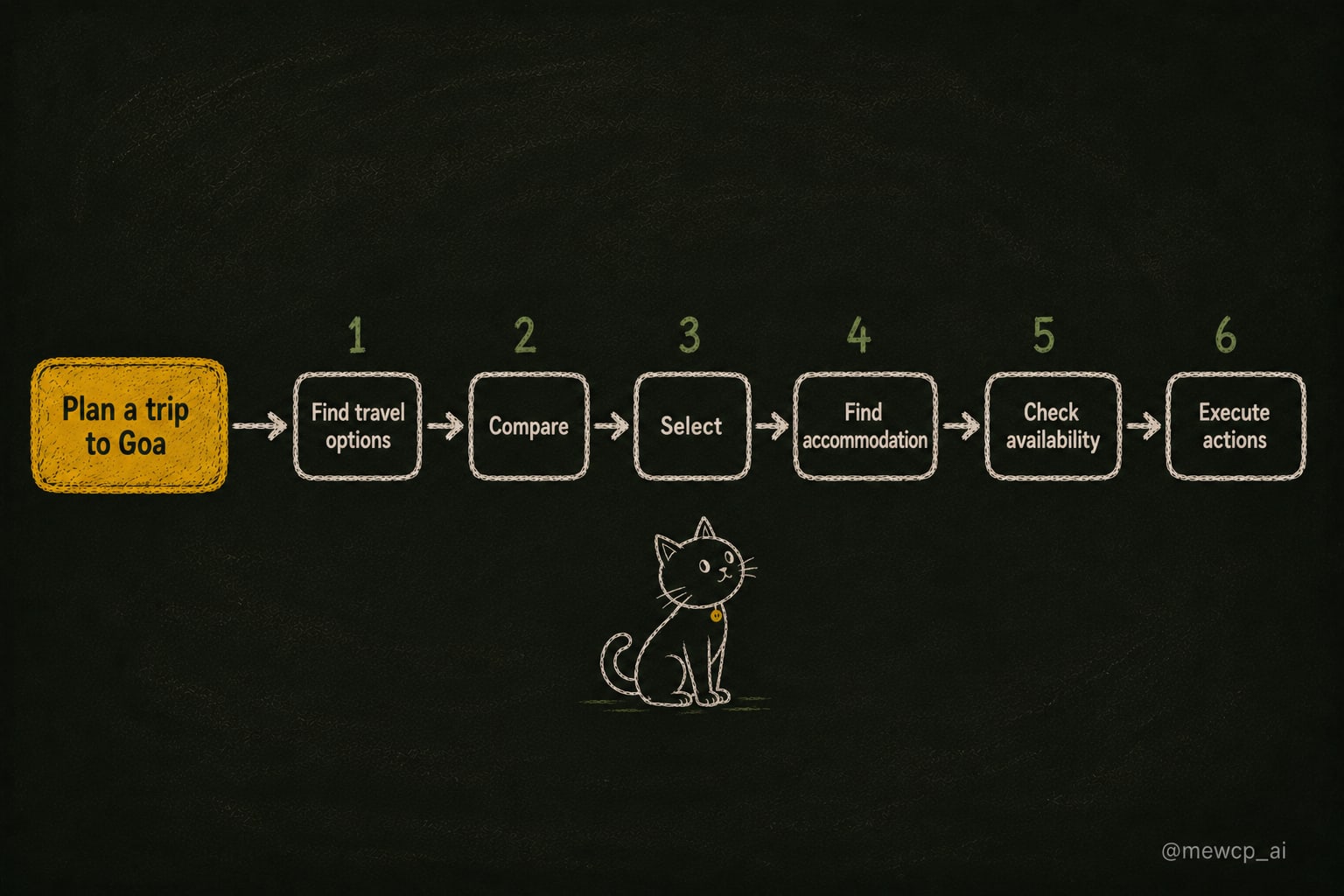
Plan a trip to Goa.
Read that sentence and try to name the first API call. You cannot, because there is nothing executable in it. It is a statement of desired outcome. An agent that receives it and immediately reaches for a tool is guessing.
Decomposed, it looks more like this:
Find travel options for the dates and origin
Compare them on price, duration and timing
Select one
Find accommodation near the chosen arrival point
Check availability for the matching dates
Execute the booking actions
Now every line maps to something. Step 1 is a search call. Step 3 is a decision that needs a criterion. Step 6 has side effects and probably needs a human. The goal became work.
That translation is the entire job of the planning layer.
What a plan actually contains
Most people who add planning to an agent add a list of strings. That is better than nothing and it falls apart quickly.
A plan worth having carries five things:
Subgoals. The units of work, each small enough to succeed or fail cleanly.
Order. What runs before what.
Dependencies. Which steps consume the output of which other steps. This is not the same as order.
Success checks. How you know a step actually worked, rather than returned 200.
A stop condition. What state means the goal is satisfied, plus a hard budget.
Drop the last two and you get the failure everyone has seen: an agent that keeps working after the goal is met, because nothing ever told it what "done" looks like.
As a schema:
{ "goal": "Plan a trip to Goa for 12-15 Nov from Bangalore, budget 30000 INR", "stop_condition": "Flight and hotel are both selected and confirmed to the user", "max_steps": 12, "steps": [ { "id": "s1", "intent": "Find flight options BLR to GOI for 12 Nov and 15 Nov return", "tool": "flights.search", "args": { "from": "BLR", "to": "GOI", "depart": "2026-11-12", "return": "2026-11-15" }, "depends_on": [], "success_check": "At least one flight option returned with a price" }, { "id": "s2", "intent": "Rank options by total cost and arrival time", "tool": null, "args": {}, "depends_on": ["s1"], "success_check": "A ranked list exists with a stated top choice" } ]}
Note "tool": null on step 2. Not every step is a tool call. Some steps are reasoning, and being explicit about that stops the planner from inventing a ranking.tool that does not exist.
Explicit planning and implicit planning
Here is where the internet argues, and where most posts pick a winner they should not pick.
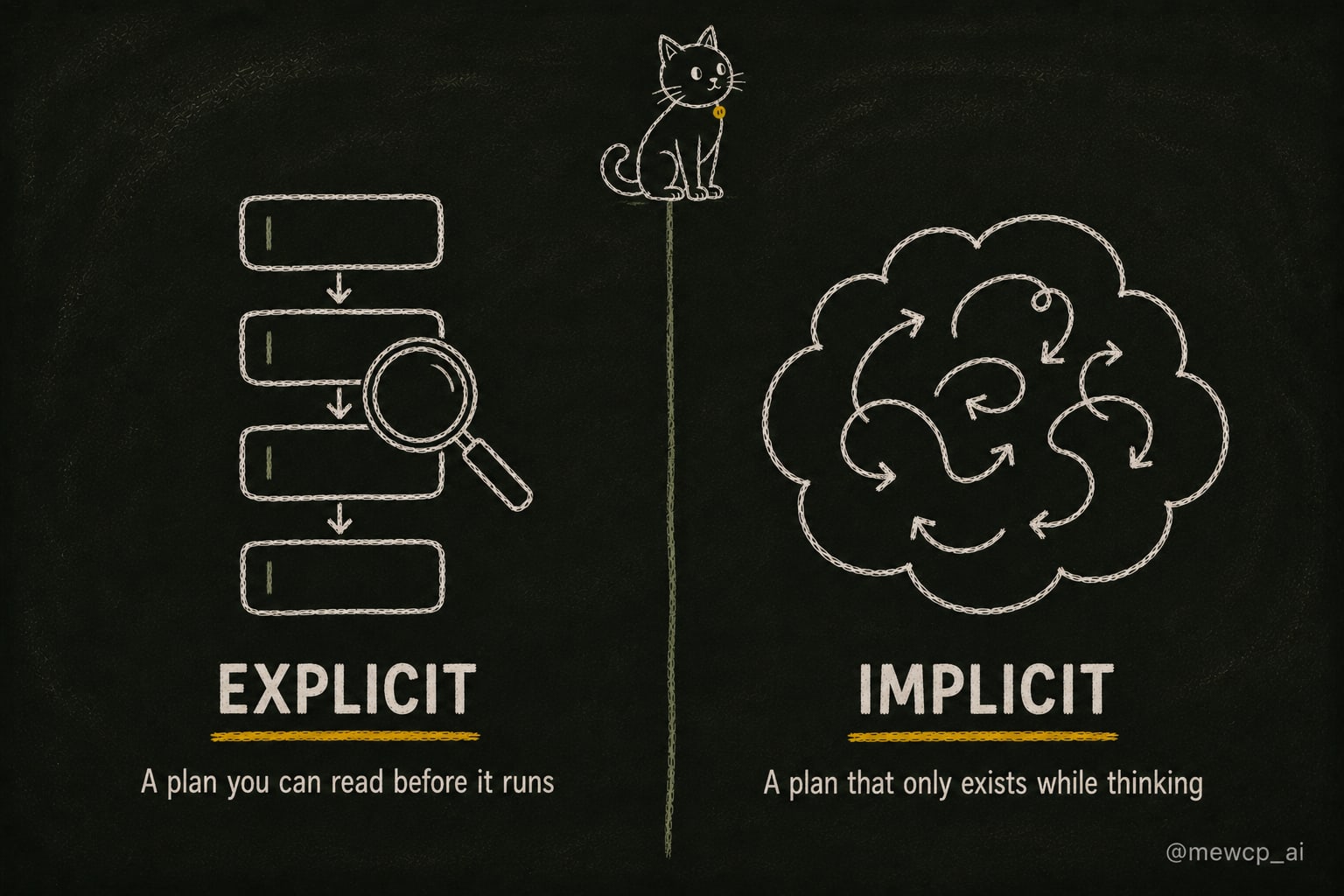
Explicit planning means the plan exists as a stored object before execution starts. You can print it, validate it, show it to a user, diff it against what actually happened.
Implicit planning means the plan only exists inside the model's reasoning as it goes. A ReAct-style loop is implicit planning. The model thinks, acts, observes, thinks again. There is no plan object anywhere.
Explicit
Implicit
Plan exists as data
Yes
No
Inspect before running
Yes
No
Human approval gate
Straightforward
Awkward
Adapts mid-run
Only by replanning
Naturally
Extra latency
One planning call up front
None
Debuggability
You can diff plan against trace
You reread the whole trace
Build cost
Higher
Low
Neither column is correct in general. A research agent that reads pages and follows leads is a bad fit for a rigid upfront plan, because the useful next step depends on what page three said. A deployment agent that touches production is a bad fit for implicit planning, because nobody wants to find out what it decided by reading logs afterward.
Most production systems I trust end up hybrid: an explicit plan at the coarse level, implicit reasoning inside each step.
Building an explicit planner
Structured output does the heavy lifting. Define the shape, make the model fill it, refuse anything that does not parse.
from pydantic import BaseModel, Fieldclass Step(BaseModel): id: str intent: str tool: str | None = None args: dict = Field(default_factory=dict) depends_on: list[str] = Field(default_factory=list) success_check: strclass Plan(BaseModel): goal: str stop_condition: str max_steps: int = 12 steps: list[Step]PLANNER_PROMPT = """You are the planning layer of an agent.Goal:{goal}Available tools:{tool_catalog}Rules:- Use only tools from the list above. If no tool fits a step, set tool to null.- Every step needs a success_check that can be evaluated from the step output.- depends_on lists step ids whose output this step consumes.- Stop at the smallest number of steps that satisfies the goal."""def make_plan(goal: str, tools: dict) -> Plan: catalog = "\n".join( f"- {name}({', '.join(t['args'])}): {t['description']}" for name, t in tools.items() ) prompt = PLANNER_PROMPT.format(goal=goal, tool_catalog=catalog) return call_model_structured(prompt, schema=Plan) # your provider's structured call
The tool_catalog line matters more than the prompt wording. A planner can only plan against tools it knows about. Build that string from your live tool registry at request time. The moment you hand-maintain it, someone ships a tool and the planner never learns it exists.
Then validate before you execute anything:
def validate(plan: Plan, tools: dict) -> list[str]:
    errors = []
    ids = {s.id for s in plan.steps}

    if len(ids) != len(plan.steps):
        errors.append("duplicate step ids")

    for s in plan.steps:
        if s.tool and s.tool not in tools:
            errors.append(f"{s.id}: unknown tool {s.tool}")
        if s.tool:
            allowed = set(tools[s.tool]["args"])
            unknown = set(s.args) - allowed
            if unknown:
                errors.append(f"{s.id}: unknown args {sorted(unknown)}")
        for dep in s.depends_on:
            if dep not in ids:
                errors.append(f"{s.id}: depends on missing step {dep}")

    # cycle detection by repeated resolution
    resolved, remaining = set(), list(plan.steps)
    while remaining:
        ready = [s for s in remaining if set(s.depends_on) <= resolved]
        if not ready:
            errors.append(f"cycle among {[s.id for s in remaining]}")
            break
        resolved |= {s.id for s in ready}
        remaining = [s for s in remaining if s not in ready]

    return errors
Cheap, deterministic, and it catches the two most common planner hallucinations before they cost you a tool call. If validate returns errors, send them back to the planner as a repair message rather than failing the run. One repair attempt fixes most of it.
Lists are a special case of graphs
A flat list forces sequential execution even when steps are independent. "Find flights" and "find hotels" do not need each other. Modelling depends_on turns the plan into a directed graph and lets you run independent branches together.
def ready(plan: Plan, done: set[str]) -> list[Step]:
    return [
        s for s in plan.steps
        if s.id not in done and set(s.depends_on) <= done
    ]
Two things fall out of this for free. You get parallelism where the graph allows it. And when a step fails, you know exactly which downstream steps are now invalid, because they are the ones transitively depending on it. With a flat list you either rerun everything after the failure or guess.
Skip the graph if your agent has three steps that are genuinely sequential. Adopt it the moment you have branches, because retrofitting dependencies later means rewriting the executor.
The loop: execute, check, replan
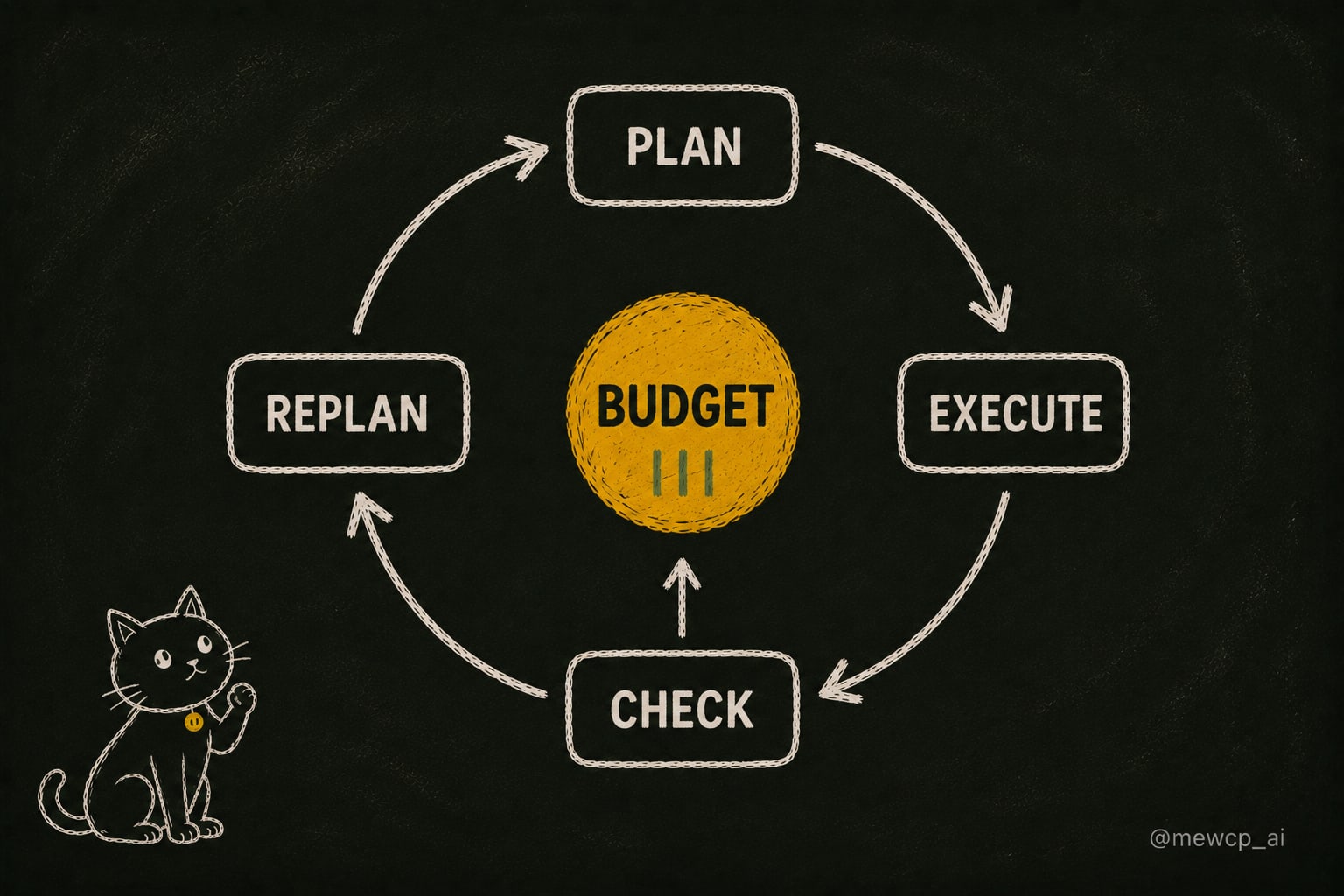
A plan made before execution is a hypothesis. Reality gets a vote.
def run(plan: Plan, tools: dict, state: dict) -> dict:
    done, results, budget = set(), {}, plan.max_steps

    while budget > 0:
        batch = ready(plan, done)
        if not batch:
            break

        step = batch[0]
        budget -= 1

        try:
            output = execute(step, tools, results) if step.tool else reason(step, results)
        except ToolError as e:
            plan = replan(plan, reason=f"{step.id} failed: {e}", results=results)
            continue

        if not check(step.success_check, output):
            plan = replan(plan, reason=f"{step.id} failed its check", results=results)
            continue

        results[step.id] = output
        done.add(step.id)

        if satisfied(plan.stop_condition, results):
            break

    return {"results": results, "completed": sorted(done), "budget_left": budget}
Four things should trigger a replan, and only these four:
A step failed. The tool errored or returned something unusable.
A success check failed. The call worked, the outcome did not.
New information invalidates the plan. Step 1 reveals there are no direct flights, so the accommodation step needs different dates.
The budget is nearly gone. Replan toward the smallest path that still satisfies the goal, or stop and report honestly.
Notice budget decrements on every attempt, including failed ones. That single line is what prevents the infinite replan loop where the agent keeps producing new plans for a step that will never work.
Six ways planning quietly breaks
Phantom tools. The planner invents calendar.book because it sounds plausible. Fix: validate tool names against the registry, and repair rather than fail.
Over-decomposition. Ask a strong model to plan and it will happily give you fourteen steps for a three step job. Every extra step is another chance to fail. Cap it in the prompt, cap it in the schema, and prefer the shortest plan that passes validation.
Plans without success criteria. A step "succeeds" because the HTTP call returned. Then the next step consumes an empty list. Force success_check to be a statement about the output, not about the call.
Stale plans. Long-running agents keep executing a plan written against facts that changed. Recheck preconditions on steps that were planned more than a few minutes before they run.
Hidden dependencies. Step 4 uses information produced by step 2 but does not declare it. Everything works until you parallelise, then it fails intermittently. If a step's prompt references another step's output, that dependency belongs in depends_on.
Planning against an unknown tool surface. The most common one, and the least discussed. If the catalog you inject is incomplete, stale, or differs per tenant, the planner produces plans your executor cannot run. This gets worse the moment you have real users with different connected accounts and different permissions.
A short checklist
Before you ship the planning layer:
The plan is a typed object, not a string
Every step has a success check that describes an outcome
There is a stop condition and a hard step budget
Tool names and arguments are validated against the live registry before execution
Dependency cycles are detected before execution
Failed validation triggers one repair attempt, not a crash
The budget decrements on failed attempts too
The plan and the actual trace are both logged, so you can diff them
Steps with real side effects are marked and can require approval
Where MewCP fits
The last failure mode is an infrastructure problem more than a prompt problem. Your planner is only as good as the tool catalog you hand it, and in a multi-tenant product that catalog is different for every user, changes when someone connects an account, and has to reflect current credentials and permissions.
That is the layer MewCP handles: hosted MCP servers and a gateway that expose a consistent, per-tenant tool surface with authentication and credential management already resolved. The planner asks what tools are available for this user right now and gets a real answer instead of a hardcoded list. That is worth mentioning here only because tool discovery and planning quality are the same problem viewed from two ends.
Build the planning layer whichever way suits your risk profile. Just make sure it exists, and make sure it knows what tools it actually has.